
Our Community is getting an upgrade! To get everything ready for the relaunch, we’ll be placing the site in read-only mode starting September 21st.
We really appreciate your understanding while we get things set up behind the scenes. Catch up on all the exciting details about the move here.
Need help or have questions? Drop us a line at [email protected]

Support Questions
 Hi, I'm CLEO! Something exciting is coming to the Community. Stay Tuned!
- Cloudera Community
- Support
- Support Questions
- Re: find last element of json in nifi
- Subscribe to RSS Feed
- Mark Question as New
- Mark Question as Read
- Float this Question for Current User
- Bookmark
- Subscribe
- Mute
- Printer Friendly Page
- Subscribe to RSS Feed
- Mark Question as New
- Mark Question as Read
- Float this Question for Current User
- Bookmark
- Subscribe
- Mute
- Printer Friendly Page
find last element of json in nifi
- Labels:
-
Apache NiFi


Created 08-17-2021 09:22 AM
- Mark as New
- Bookmark
- Subscribe
- Mute
- Subscribe to RSS Feed
- Permalink
- Report Inappropriate Content
One of the JSON values needs to find the string last element. how to get the particular value in attribute with the last element.
{
"TOT_NET_AMT" : "55.00",
"H_OBJECT" : "File",
"H_GROSS_AMNT" : "55.00,58.00",
"TOT_TAX_AMT" : "9.55"
}
expected value -
{
"TOT_NET_AMT" : "55.00",
"H_OBJECT" : "File",
"H_GROSS_AMNT" : "58.00",
"TOT_TAX_AMT" : "9.55"
}
Much appreciate it in advance.


Created 08-18-2021 02:20 PM
- Mark as New
- Bookmark
- Subscribe
- Mute
- Subscribe to RSS Feed
- Permalink
- Report Inappropriate Content
Hello ,
If your input json is coming below format
{
"TOT_NET_AMT" : "55.00",
"H_OBJECT" : "File",
"H_GROSS_AMNT" : ["55.00","58.00"],
"TOT_TAX_AMT" : "9.55"
}
If the value of H gross amount is in List of String ["55.00","58.00"] instead of String "55.00,58.00" , then you can use Jolt transformation JSON NiFi processor to define jolt spec to convert into the required output.
{
"TOT_NET_AMT" : "55.00",
"H_OBJECT" : "File",
"H_GROSS_AMNT" : "58.00",
"TOT_TAX_AMT" : "9.55"
}
Jolt transformation JSON configuration.
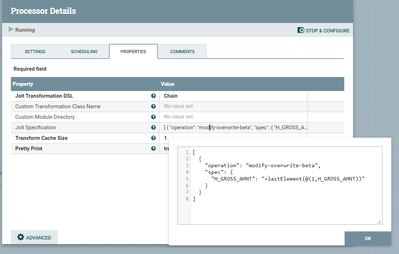
Jolt specification :
[
{
"operation": "modify-overwrite-beta",
"spec": {
"H_GROSS_AMNT": "=lastElement(@(1,H_GROSS_AMNT))"
}
}
]
If the input is not list of String for H Gross amount and only string with comma speparated, then please follow the below steps in order.
you will have to extract whole json into single attribute using extracttext processor and the attribute will hold entire json content , Next you can use EvaluateJsonPath which extracts each json element into each attributes , once you have all 4 attributes with value after EvaluateJsonPath , then you construct the json in Replace text processor ,H_GROSS_AMNT will still hold the string comma separated and u can use H_GROSS_AMNT:substringAfterLast(,) which extracts last element from the string value .
Examples of EvaluateJsonPath
https://nifi.apache.org/docs/nifi-docs/html/expression-language-guide.html#jsonpath
Created 08-18-2021 02:20 PM
- Mark as New
- Bookmark
- Subscribe
- Mute
- Subscribe to RSS Feed
- Permalink
- Report Inappropriate Content
Hello ,
If your input json is coming below format
{
"TOT_NET_AMT" : "55.00",
"H_OBJECT" : "File",
"H_GROSS_AMNT" : ["55.00","58.00"],
"TOT_TAX_AMT" : "9.55"
}
If the value of H gross amount is in List of String ["55.00","58.00"] instead of String "55.00,58.00" , then you can use Jolt transformation JSON NiFi processor to define jolt spec to convert into the required output.
{
"TOT_NET_AMT" : "55.00",
"H_OBJECT" : "File",
"H_GROSS_AMNT" : "58.00",
"TOT_TAX_AMT" : "9.55"
}
Jolt transformation JSON configuration.
Jolt specification :
[
{
"operation": "modify-overwrite-beta",
"spec": {
"H_GROSS_AMNT": "=lastElement(@(1,H_GROSS_AMNT))"
}
}
]
If the input is not list of String for H Gross amount and only string with comma speparated, then please follow the below steps in order.
you will have to extract whole json into single attribute using extracttext processor and the attribute will hold entire json content , Next you can use EvaluateJsonPath which extracts each json element into each attributes , once you have all 4 attributes with value after EvaluateJsonPath , then you construct the json in Replace text processor ,H_GROSS_AMNT will still hold the string comma separated and u can use H_GROSS_AMNT:substringAfterLast(,) which extracts last element from the string value .
Examples of EvaluateJsonPath
https://nifi.apache.org/docs/nifi-docs/html/expression-language-guide.html#jsonpath
Created on 08-18-2021 04:55 PM - edited 08-18-2021 05:02 PM
- Mark as New
- Bookmark
- Subscribe
- Mute
- Subscribe to RSS Feed
- Permalink
- Report Inappropriate Content
Thanks @adhishankarit for your help.
The value of H gross amount is in List ["55.00","58.00"] it's coming from flowfile attribute.
Will, it is possible to get the attribute value of H gross amount to use Jolt transformation JSON NiFi processor with the same as last element of H gross amount?
Thanks In advance.


