
Our Community is getting an upgrade! To get everything ready for the relaunch, we’ll be placing the site in read-only mode starting September 21st.
We really appreciate your understanding while we get things set up behind the scenes. Catch up on all the exciting details about the move here.
Need help or have questions? Drop us a line at [email protected]

Support Questions
 Hi, I'm CLEO! Something exciting is coming to the Community. Stay Tuned!
- Cloudera Community
- Support
- Support Questions
- hbase backup help
- Subscribe to RSS Feed
- Mark Question as New
- Mark Question as Read
- Float this Question for Current User
- Bookmark
- Subscribe
- Mute
- Printer Friendly Page
- Subscribe to RSS Feed
- Mark Question as New
- Mark Question as Read
- Float this Question for Current User
- Bookmark
- Subscribe
- Mute
- Printer Friendly Page
hbase backup help
- Labels:
-
Apache HBase


Created 06-05-2019 12:17 PM
- Mark as New
- Bookmark
- Subscribe
- Mute
- Subscribe to RSS Feed
- Permalink
- Report Inappropriate Content
Hi, I'm new in big DATA,
I'm working with HDP 2.6.5, Ambari 2.6.2, HBase 1.1.2
I would like to make a weekly full backups of all tables of HBase (all regionservers and my HBase master)
and daily incremental backups of same things
No one has made a backup, so that's reason I am trying to make one.
HBase is kerberised. so I did a kinit as hbase user
I tried those commands on my hbase master (in local on it) :
hbase backup create full hdfs://[FQDN server]:[port]/ -set /etc/hbase/hbase_backup_full/test -w 3
goal : backup all tables in the file called test (I've created it so I don't understand why it tells me that's empty, and I've made a chown hbase:hbase on it as well as on the directory hbase_backup_full)
issue : 634 ERROR [main] util.AbstractHBaseTool: Error running command-line tool
IOException: Backup set '/etc/hbase/hbase_backup_full/test' is either empty or does not exist
could anyone help me please ?
Do I need to modify some config files to do this ? if yes which ?
Thanks 🙂


Created on 06-05-2019 10:01 PM - edited 08-17-2019 03:07 PM
- Mark as New
- Bookmark
- Subscribe
- Mute
- Subscribe to RSS Feed
- Permalink
- Report Inappropriate Content
I have tried as much as possible to explain the process of doing a successful hbase backup. I think for sure is to enable hbase backup by adding some parameters documented below.
There are a couple of things to do like copying the core-site.xml to the hbase/conf directory etc. I hope this process helps you achieve your target. I have not included the incremental that documentation you can easily find
Check the directories in hdfs
[hbase@nanyuki ~]$ hdfs dfs -ls /
Found 12 items
drwxrwxrwx   - yarn   hadoop          0 2018-12-17 13:07 /app-logs
drwxr-xr-x   - hdfs   hdfs            0 2018-09-24 00:22 /apps
.......
drwxr-xr-x   - hdfs   hdfs            0 2019-01-29 06:06 /test
drwxrwxrwx   - hdfs   hdfs            0 2019-06-04 23:14 /tmp
drwxr-xr-x   - hdfs   hdfs            0 2018-12-17 13:04 /user
Created a backup directory in hdfs
[root@nanyuki ~]# su - hdfs
Last login: Wed Jun  5 20:47:02 CEST 2019
[hdfs@nanyuki ~]$ hdfs dfs -mkdir /backup
[hdfs@nanyuki ~]$ hdfs dfs -chown hbase  /backup
Validate the backup directory was created with correct permissions
[hdfs@nanyuki ~]$ hdfs dfs -ls /
Found 13 items
drwxrwxrwx   - yarn   hadoop          0 2018-12-17 13:07 /app-logs
drwxr-xr-x   - hdfs   hdfs            0 2018-09-24 00:22 /apps
drwxr-xr-x   - yarn   hadoop          0 2018-09-24 00:12 /ats
drwxr-xr-x   - hbase  hdfs            0 2019-06-05 21:11 /backup
.......
drwxr-xr-x   - hdfs   hdfs            0 2018-12-17 13:04 /user
Invoked the hbase shell to check the tables
[hbase@nanyuki ~]$ hbase shell
HBase Shell; enter 'help<RETURN>' for list of supported commands.
Type "exit<RETURN>" to leave the HBase Shell
Version 1.1.2.2.6.5.0-292, r897822d4dd5956ca186974c10382e9094683fa29, Fri May 11 08:00:59 UTC 2018
hbase(main):001:0> list_namespace
NAMESPACE
PDFTable
default
hbase
3 row(s) in 4.6610 seconds
Check the tables
hbase(main):002:0> list_namespace_tables 'hbase'
TABLE
acl
meta
namespace
3 row(s) in 0.1970 seconds
Hbase need a table called "backup" table in hbase namespace which was missing this table is created if hbase backup is enabled see below so I had to add the below parameters in Custom hbase-site at the same time enabling hbase backup
hbase.backup.enable=true
hbase.master.logcleaner.plugins=YOUR_PLUGINS,org.apache.hadoop.hbase.backup.master.BackupLogCleaner
hbase.procedure.master.classes=YOUR_CLASSES,org.apache.hadoop.hbase.backup.master.LogRollMasterProcedureManager
hbase.procedure.regionserver.classes=YOUR_CLASSES,org.apache.hadoop.hbase.backup.regionserver.LogRollRegionServerProcedureManager
hbase.coprocessor.region.classes=YOUR_CLASSES,org.apache.hadoop.hbase.backup.BackupObserver
After adding the above properties in Custom hbase-site and restarting hbase magically the backup table was created!
[hbase@nanyuki ~]$ hbase shell
HBase Shell; enter 'help<RETURN>' for list of supported commands.
Type "exit<RETURN>" to leave the HBase Shell
Version 1.1.2.2.6.5.0-292, r897822d4dd5956ca186974c10382e9094683fa29, Fri May 11 08:00:59 UTC 2018
hbase(main):001:0> list_namespace_tables 'hbase'
TABLE
acl
backup
meta
namespace
4 row(s) in 0.3230 seconds
Error with the backup command
[hbase@nanyuki ~]$ hbase backup create "full"  hdfs://nanyuki.kenya.ke:8020/backup  -set texas
2019-06-05 22:28:37,475 ERROR [main] util.AbstractHBaseTool: Error running command-line tool
java.io.IOException: Backup set 'texas' is either empty or does not exist
        at org.apache.hadoop.hbase.backup.impl.BackupCommands$CreateCommand.execute(BackupCommands.java:182)
        at org.apache.hadoop.hbase.backup.BackupDriver.parseAndRun(BackupDriver.java:111)
        at org.apache.hadoop.hbase.backup.BackupDriver.doWork(BackupDriver.java:126)
        at org.apache.hadoop.hbase.util.AbstractHBaseTool.run(AbstractHBaseTool.java:112)
        at org.apache.hadoop.util.ToolRunner.run(ToolRunner.java:76)
        at org.apache.hadoop.hbase.backup.BackupDriver.main(BackupDriver.java:131)
To resolve the error "Backup set 'texas' is either empty or does not exist" I pre-emptively create the directory
[hdfs@nanyuki ~]$ hdfs dfs -touchz /backup/texas
[hdfs@nanyuki ~]$ hdfs dfs -ls /backup
Found 1 items
-rw-r--r--   3 hdfs hdfs          0 2019-06-05 22:51 /backup/texas
Check the core-site.xml is in /.../hbase/conf directory if not like below I copied the core-site.xml over
[root@nanyuki ~] cp /etc/hadoop/2.6.5.0-292/0/core-site.xml /etc/hbase/conf/
validate the copy
[root@nanyuki conf]# ls -lrt /etc/hbase/conf/
total 60
-rw-r--r-- 1 root  root   4537 May 11  2018 hbase-env.cmd
-rw-r--r-- 1 hbase hadoop  367 Sep 23  2018 hbase-policy.xml
-rw-r--r-- 1 hbase hadoop 4235 Sep 23  2018 log4j.properties
-rw-r--r-- 1 hbase root     18 Oct  1  2018 regionservers
............
-rw-r--r-- 1 root  root   3946 Jun  5 22:38 core-site.xml
Relaunched the hbase backup, it was like frozen but at last, I got a "SUCCESS"
[hbase@nanyuki ~]$ hbase backup create "full"  hdfs://nanyuki.kenya.ke:8020/backup
2019-06-05 22:52:57,024 INFO  [main] util.BackupClientUtil: Using existing backup root dir: hdfs://nanyuki.kenya.ke:8020/backup
Backup session backup_1559767977522 finished. Status: SUCCESS
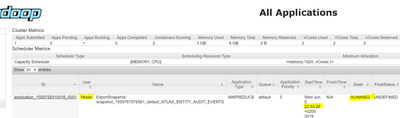
Checked the YARN UI some backup process was going on see screenshot below hbase_backup.PNG
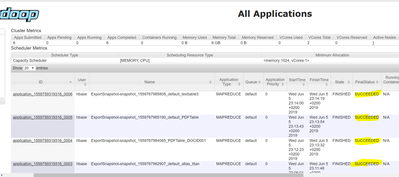
After successful backup see below screenshot hbase_backup2.PNG
Validate the backup was done this give some details like time, type "FULL" etc
[hbase@nanyuki hbase-client]$ bin/hbase backup show
Unsupported command for backup: show
[hbase@nanyuki hbase-client]$ hbase backup history
ID             : backup_1559767977522
Type           : FULL
Tables         : ATLAS_ENTITY_AUDIT_EVENTS,jina,atlas_titan,PDFTable:DOCID001,PDFTable,testtable3
State          : COMPLETE
Start time     : Wed Jun 05 22:52:57 CEST 2019
End time       : Wed Jun 05 23:14:20 CEST 2019
Progress       : 100
Backup in the backup directory in hdfs
[hdfs@nanyuki backup]$ hdfs dfs -ls /backup
Found 2 items
drwxr-xr-x   - hbase hdfs          0 2019-06-05 23:11 /backup/backup_1559767977522
Happy hadooping
Reference Hbase backup commands
Created on 06-05-2019 10:01 PM - edited 08-17-2019 03:07 PM
- Mark as New
- Bookmark
- Subscribe
- Mute
- Subscribe to RSS Feed
- Permalink
- Report Inappropriate Content
I have tried as much as possible to explain the process of doing a successful hbase backup. I think for sure is to enable hbase backup by adding some parameters documented below.
There are a couple of things to do like copying the core-site.xml to the hbase/conf directory etc. I hope this process helps you achieve your target. I have not included the incremental that documentation you can easily find
Check the directories in hdfs
[hbase@nanyuki ~]$ hdfs dfs -ls /
Found 12 items
drwxrwxrwx   - yarn   hadoop          0 2018-12-17 13:07 /app-logs
drwxr-xr-x   - hdfs   hdfs            0 2018-09-24 00:22 /apps
.......
drwxr-xr-x   - hdfs   hdfs            0 2019-01-29 06:06 /test
drwxrwxrwx   - hdfs   hdfs            0 2019-06-04 23:14 /tmp
drwxr-xr-x   - hdfs   hdfs            0 2018-12-17 13:04 /user
Created a backup directory in hdfs
[root@nanyuki ~]# su - hdfs
Last login: Wed Jun  5 20:47:02 CEST 2019
[hdfs@nanyuki ~]$ hdfs dfs -mkdir /backup
[hdfs@nanyuki ~]$ hdfs dfs -chown hbase  /backup
Validate the backup directory was created with correct permissions
[hdfs@nanyuki ~]$ hdfs dfs -ls /
Found 13 items
drwxrwxrwx   - yarn   hadoop          0 2018-12-17 13:07 /app-logs
drwxr-xr-x   - hdfs   hdfs            0 2018-09-24 00:22 /apps
drwxr-xr-x   - yarn   hadoop          0 2018-09-24 00:12 /ats
drwxr-xr-x   - hbase  hdfs            0 2019-06-05 21:11 /backup
.......
drwxr-xr-x   - hdfs   hdfs            0 2018-12-17 13:04 /user
Invoked the hbase shell to check the tables
[hbase@nanyuki ~]$ hbase shell
HBase Shell; enter 'help<RETURN>' for list of supported commands.
Type "exit<RETURN>" to leave the HBase Shell
Version 1.1.2.2.6.5.0-292, r897822d4dd5956ca186974c10382e9094683fa29, Fri May 11 08:00:59 UTC 2018
hbase(main):001:0> list_namespace
NAMESPACE
PDFTable
default
hbase
3 row(s) in 4.6610 seconds
Check the tables
hbase(main):002:0> list_namespace_tables 'hbase'
TABLE
acl
meta
namespace
3 row(s) in 0.1970 seconds
Hbase need a table called "backup" table in hbase namespace which was missing this table is created if hbase backup is enabled see below so I had to add the below parameters in Custom hbase-site at the same time enabling hbase backup
hbase.backup.enable=true
hbase.master.logcleaner.plugins=YOUR_PLUGINS,org.apache.hadoop.hbase.backup.master.BackupLogCleaner
hbase.procedure.master.classes=YOUR_CLASSES,org.apache.hadoop.hbase.backup.master.LogRollMasterProcedureManager
hbase.procedure.regionserver.classes=YOUR_CLASSES,org.apache.hadoop.hbase.backup.regionserver.LogRollRegionServerProcedureManager
hbase.coprocessor.region.classes=YOUR_CLASSES,org.apache.hadoop.hbase.backup.BackupObserver
After adding the above properties in Custom hbase-site and restarting hbase magically the backup table was created!
[hbase@nanyuki ~]$ hbase shell
HBase Shell; enter 'help<RETURN>' for list of supported commands.
Type "exit<RETURN>" to leave the HBase Shell
Version 1.1.2.2.6.5.0-292, r897822d4dd5956ca186974c10382e9094683fa29, Fri May 11 08:00:59 UTC 2018
hbase(main):001:0> list_namespace_tables 'hbase'
TABLE
acl
backup
meta
namespace
4 row(s) in 0.3230 seconds
Error with the backup command
[hbase@nanyuki ~]$ hbase backup create "full"  hdfs://nanyuki.kenya.ke:8020/backup  -set texas
2019-06-05 22:28:37,475 ERROR [main] util.AbstractHBaseTool: Error running command-line tool
java.io.IOException: Backup set 'texas' is either empty or does not exist
        at org.apache.hadoop.hbase.backup.impl.BackupCommands$CreateCommand.execute(BackupCommands.java:182)
        at org.apache.hadoop.hbase.backup.BackupDriver.parseAndRun(BackupDriver.java:111)
        at org.apache.hadoop.hbase.backup.BackupDriver.doWork(BackupDriver.java:126)
        at org.apache.hadoop.hbase.util.AbstractHBaseTool.run(AbstractHBaseTool.java:112)
        at org.apache.hadoop.util.ToolRunner.run(ToolRunner.java:76)
        at org.apache.hadoop.hbase.backup.BackupDriver.main(BackupDriver.java:131)
To resolve the error "Backup set 'texas' is either empty or does not exist" I pre-emptively create the directory
[hdfs@nanyuki ~]$ hdfs dfs -touchz /backup/texas
[hdfs@nanyuki ~]$ hdfs dfs -ls /backup
Found 1 items
-rw-r--r--   3 hdfs hdfs          0 2019-06-05 22:51 /backup/texas
Check the core-site.xml is in /.../hbase/conf directory if not like below I copied the core-site.xml over
[root@nanyuki ~] cp /etc/hadoop/2.6.5.0-292/0/core-site.xml /etc/hbase/conf/
validate the copy
[root@nanyuki conf]# ls -lrt /etc/hbase/conf/
total 60
-rw-r--r-- 1 root  root   4537 May 11  2018 hbase-env.cmd
-rw-r--r-- 1 hbase hadoop  367 Sep 23  2018 hbase-policy.xml
-rw-r--r-- 1 hbase hadoop 4235 Sep 23  2018 log4j.properties
-rw-r--r-- 1 hbase root     18 Oct  1  2018 regionservers
............
-rw-r--r-- 1 root  root   3946 Jun  5 22:38 core-site.xml
Relaunched the hbase backup, it was like frozen but at last, I got a "SUCCESS"
[hbase@nanyuki ~]$ hbase backup create "full"  hdfs://nanyuki.kenya.ke:8020/backup
2019-06-05 22:52:57,024 INFO  [main] util.BackupClientUtil: Using existing backup root dir: hdfs://nanyuki.kenya.ke:8020/backup
Backup session backup_1559767977522 finished. Status: SUCCESS
Checked the YARN UI some backup process was going on see screenshot below hbase_backup.PNG
After successful backup see below screenshot hbase_backup2.PNG
Validate the backup was done this give some details like time, type "FULL" etc
[hbase@nanyuki hbase-client]$ bin/hbase backup show
Unsupported command for backup: show
[hbase@nanyuki hbase-client]$ hbase backup history
ID             : backup_1559767977522
Type           : FULL
Tables         : ATLAS_ENTITY_AUDIT_EVENTS,jina,atlas_titan,PDFTable:DOCID001,PDFTable,testtable3
State          : COMPLETE
Start time     : Wed Jun 05 22:52:57 CEST 2019
End time       : Wed Jun 05 23:14:20 CEST 2019
Progress       : 100
Backup in the backup directory in hdfs
[hdfs@nanyuki backup]$ hdfs dfs -ls /backup
Found 2 items
drwxr-xr-x   - hbase hdfs          0 2019-06-05 23:11 /backup/backup_1559767977522
Happy hadooping
Reference Hbase backup commands
Created 06-06-2019 07:01 AM
- Mark as New
- Bookmark
- Subscribe
- Mute
- Subscribe to RSS Feed
- Permalink
- Report Inappropriate Content
Hi @Geoffrey Shelton Okot , thanks a lot for your answer, it's very usefull to me. Have a nice day 🙂
Created on 06-06-2019 09:59 AM - edited 08-17-2019 03:07 PM
- Mark as New
- Bookmark
- Subscribe
- Mute
- Subscribe to RSS Feed
- Permalink
- Report Inappropriate Content
Thanks again for your explications,
now I see a backup created (but failed)

I think the issue is due to a permission denied by Atlas
the backup directory created is empty
Created 06-06-2019 05:13 PM
- Mark as New
- Bookmark
- Subscribe
- Mute
- Subscribe to RSS Feed
- Permalink
- Report Inappropriate Content
Can you share the output of the successful backup! Try to display the contents first as hbase user
$ bin/hbase backup show
Then as hdfs user depending on the location of your backup directory in hdfs run
$ hdfs dfs -ls /$backup-dir
HTH


Created 12-01-2020 10:03 PM
- Mark as New
- Bookmark
- Subscribe
- Mute
- Subscribe to RSS Feed
- Permalink
- Report Inappropriate Content
Hi i got my backup table in list_namespace
list_namespace
NAMESPACE
backup
default
hbase
3 row(s)
list_namespace_tables 'hbase' in this i dont have backup table
list_namespace_tables 'hbase'
TABLE
meta
namespace
2 row(s)
is it ok or it will throw an error totake backup i am getting below error 2020-12-02 05:54:53,105 WARN [main] impl.BackupManager: Waiting to acquire backup exclusive lock for 3547s 2020-12-02 05:55:46,187 ERROR [main] impl.BackupAdminImpl: There is an active session already running Backup session finished. Status: FAILURE 2020-12-02 05:55:46,189 ERROR [main] backup.BackupDriver: Error running command-line tool java.io.IOException: Failed to acquire backup system table exclusive lock after 3600s at org.apache.hadoop.hbase.backup.impl.BackupManager.startBackupSession(BackupManager.java:415) at org.apache.hadoop.hbase.backup.impl.TableBackupClient.init(TableBackupClient.java:104) at org.apache.hadoop.hbase.backup.impl.TableBackupClient.(TableBackupClient.java:81) at org.apache.hadoop.hbase.backup.impl.FullTableBackupClient.(FullTableBackupClient.java:62) at org.apache.hadoop.hbase.backup.BackupClientFactory.create(BackupClientFactory.java:51) at org.apache.hadoop.hbase.backup.impl.BackupAdminImpl.backupTables(BackupAdminImpl.java:595) at org.apache.hadoop.hbase.backup.impl.BackupCommands$CreateCommand.execute(BackupCommands.java:347) at org.apache.hadoop.hbase.backup.BackupDriver.parseAndRun(BackupDriver.java:138) at org.apache.hadoop.hbase.backup.BackupDriver.doWork(BackupDriver.java:171) at org.apache.hadoop.hbase.backup.BackupDriver.run(BackupDriver.java:204) at org.apache.hadoop.util.ToolRunner.run(ToolRunner.java:76) at org.apache.hadoop.hbase.backup.BackupDriver.main(BackupDriver.java:179)
Created on 06-07-2019 07:04 AM - edited 08-17-2019 03:07 PM
- Mark as New
- Bookmark
- Subscribe
- Mute
- Subscribe to RSS Feed
- Permalink
- Report Inappropriate Content
Hello Geoffrey Shelton Okot ,
here are the returns of the commands you asked me to do
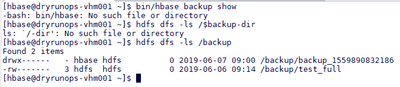
[hbase@xxxx ~]$ hbase backup history
ID : backup_1559901919878
Type : FULL
Tables : ATLAS_ENTITY_AUDIT_EVENTS,atlas_titan,newns:ATLAS_ENTITY_AUDIT_EVENTS,newns:atlas_titan
State : FAILED
Start time : Fri Jun 07 12:05:20 CEST 2019
Failed message : Failed of exporting snapshot snapshot_1559901920544_default_ATLAS_ENTITY_AUDIT_EVENTS to hdfs://xxxxx/backup/testesa/backup_1559901919878/default/ATLAS_ENTITY_AUDIT_EVENTS/ with reason code 1
Progress : 0
[hbase@xxxxx ~]$ bin/hbase backup show
-bash: bin/hbase: No such file or directory
[hbase@xxxxx ~]$ hdfs dfs -ls /$backup-dir
ls: `/-dir': No such file or directory
[hbase@xxxxx ~]$ hdfs dfs -ls /backup
Found 2 items
-rw------- 3 hdfs hdfs 0 2019-06-06 09:14 /backup/test_full
drwx------ - hbase hdfs 0 2019-06-07 12:05 /backup/testesa
[hbase@xxxxx ~]$
Created 06-07-2019 09:21 AM
- Mark as New
- Bookmark
- Subscribe
- Mute
- Subscribe to RSS Feed
- Permalink
- Report Inappropriate Content
@kailash salton
I am sorry but I don't see any attachment
Created 06-07-2019 12:51 PM
- Mark as New
- Bookmark
- Subscribe
- Mute
- Subscribe to RSS Feed
- Permalink
- Report Inappropriate Content
I've put issues by modifying last post
Created 06-07-2019 03:53 PM
- Mark as New
- Bookmark
- Subscribe
- Mute
- Subscribe to RSS Feed
- Permalink
- Report Inappropriate Content
Can you share the exact backup command? My interest is the backup dir !


