Our Community is getting an upgrade! To get everything ready for the relaunch, we’ll be placing the site in read-only mode starting September 21st.
We really appreciate your understanding while we get things set up behind the scenes. Catch up on all the exciting details about the move here.
Need help or have questions? Drop us a line at [email protected]

Support Questions

Find answers, ask questions, and share your expertise
Announcements
Share your experience with Cloudera on G2 and get a $25 Amazon Gift card.
Hi, I'm CLEO! Something exciting is coming to the Community. Stay Tuned!

hbase not showing ascii value for ROW key

avatar
Super Collaborator

I am loading a phoenix table but in hbase this table row key is shown as hex values. how can I correct this to see the ASCII values ? that is the integer value

sqlline version 1.1.8
0: jdbc:phoenix:localhost:2181:/hbase-unsecur> SELECT * FROM EXAMPLE;
+--------+-------------+------------+
| MY_PK  | FIRST_NAME  | LAST_NAME  |
+--------+-------------+------------+
| 12345  | John        | Doe        |
| 67890  | Mary        | Jane       |
+--------+-------------+------------+
2 rows selected (0.053 seconds)


Version 1.1.2.2.6.5.0-292, r897822d4dd5956ca186974c10382e9094683fa29, Fri May 11 08:01:42 UTC 2018
hbase(main):001:0> scan 'EXAMPLE'ROW                                              COLUMN+CELL \x80\x00\x00\x00\x00\x0009                      column=M:FIRST_NAME, timestamp=1551381906272, value=John \x80\x00\x00\x00\x00\x0009                      column=M:LAST_NAME, timestamp=1551381906272, value=Doe \x80\x00\x00\x00\x00\x0009                      column=M:_0, timestamp=1551381906272, value=x \x80\x00\x00\x00\x00\x01\x092                   column=M:FIRST_NAME, timestamp=1551381906272, value=Mary \x80\x00\x00\x00\x00\x01\x092                   column=M:LAST_NAME, timestamp=1551381906272, value=Jane \x80\x00\x00\x00\x00\x01\x092                   column=M:_0, timestamp=1551381906272, value=x2 row(s) in 0.2030 seconds


1 ACCEPTED SOLUTION

avatar

Welcome to Phoenix... where the cardinal rule is if you are going to use Phoenix, then for that table, don't look at it or use it directly from the HBase API. What you are seeing is pretty normal. I don't see your DDL, but I'll give you an example to compare against.

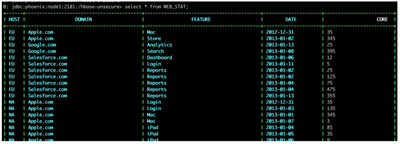
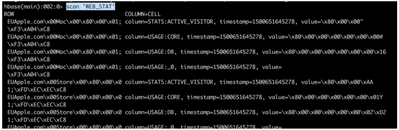
Check out the DDL at https://github.com/apache/phoenix/blob/master/examples/WEB_STAT.sql and focus on the CORE column which is a BIGINT and the ACTIVE_VISITOR column which is INTEGER. Here's the data that gets loaded into it; https://github.com/apache/phoenix/blob/master/examples/WEB_STAT.csv.

Here's what it looks like via Phoenix...

106942-queryviaphoenix.png

Here's what it looks like through HBase shell (using the API)...

106863-queryviahbase.png

Notice the CORE and ACTIVE_VISITOR values looking a lot like your example? Yep, welcome to Phoenix.

Remember, use Phoenix only for Phoenix tables and you'll be all right. 🙂 Good luck and happy Hadooping/HBasing!

View solution in original post

1 REPLY 1

avatar

Welcome to Phoenix... where the cardinal rule is if you are going to use Phoenix, then for that table, don't look at it or use it directly from the HBase API. What you are seeing is pretty normal. I don't see your DDL, but I'll give you an example to compare against.

Check out the DDL at https://github.com/apache/phoenix/blob/master/examples/WEB_STAT.sql and focus on the CORE column which is a BIGINT and the ACTIVE_VISITOR column which is INTEGER. Here's the data that gets loaded into it; https://github.com/apache/phoenix/blob/master/examples/WEB_STAT.csv.

Here's what it looks like via Phoenix...

106942-queryviaphoenix.png

Here's what it looks like through HBase shell (using the API)...

106863-queryviahbase.png

Notice the CORE and ACTIVE_VISITOR values looking a lot like your example? Yep, welcome to Phoenix.

Remember, use Phoenix only for Phoenix tables and you'll be all right. 🙂 Good luck and happy Hadooping/HBasing!