
Our Community is getting an upgrade! To get everything ready for the relaunch, we’ll be placing the site in read-only mode starting September 21st.
We really appreciate your understanding while we get things set up behind the scenes. Catch up on all the exciting details about the move here.
Need help or have questions? Drop us a line at [email protected]

Support Questions
 Hi, I'm CLEO! Something exciting is coming to the Community. Stay Tuned!
- Cloudera Community
- Support
- Support Questions
- how to verify by ambari api the active/standby res...
- Subscribe to RSS Feed
- Mark Question as New
- Mark Question as Read
- Float this Question for Current User
- Bookmark
- Subscribe
- Mute
- Printer Friendly Page
- Subscribe to RSS Feed
- Mark Question as New
- Mark Question as Read
- Float this Question for Current User
- Bookmark
- Subscribe
- Mute
- Printer Friendly Page
how to verify by ambari api the active/standby resource manager


Created on
04-26-2020
07:35 AM
- last edited on
04-27-2020
06:04 AM
by
 cjervis

- Mark as New
- Bookmark
- Subscribe
- Mute
- Subscribe to RSS Feed
- Permalink
- Report Inappropriate Content
hi all
we have two master machines
master01
master02
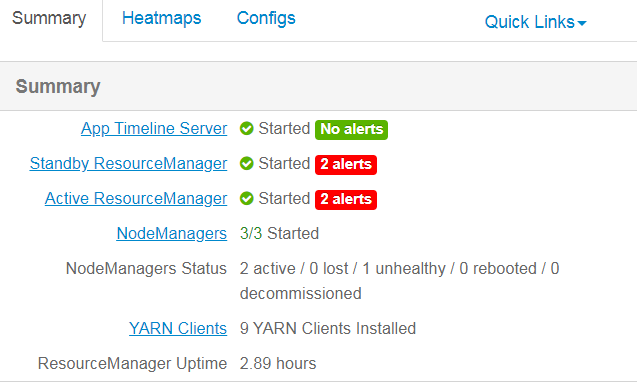
on both machines yarn resource manager is running as active/standby )
how to verify which machine is with active resource manager by ambari rest api ?



Created 04-26-2020 06:05 PM
- Mark as New
- Bookmark
- Subscribe
- Mute
- Subscribe to RSS Feed
- Permalink
- Report Inappropriate Content
If you want to get the HA Status (Active/Standby) for ResourceManager then you can make the following call:
# curl -s -u admin:admin -H "X-Requested-By: ambari" -X GET "h ttp://$AMBARI_FQDN:8080/api/v1/clusters/$CLUSTER_NAME/host_components?HostRoles/component_name=RESOURCEMANAGER&HostRoles/ha_state.in(ACTIVE,STANDBY)"
If you just want to know that which host the ResourceManager is in Active State then:
# curl -s -u admin:admin -H "X-Requested-By: ambari" -X GET "h ttp://$AMBARI_FQDN:8080/api/v1/clusters/$CLUSTER_NAME/host_components?HostRoles/component_name=RESOURCEMANAGER&HostRoles/ha_state=ACTIVE"
.
Created 04-26-2020 10:14 AM
- Mark as New
- Bookmark
- Subscribe
- Mute
- Subscribe to RSS Feed
- Permalink
- Report Inappropriate Content
example:
[root@master2 ~]# su yarn
[yarn@master2 root]$ yarn rmadmin -getServiceState rm1
standby
[yarn@master2 root]$ yarn rmadmin -getServiceState rm2
active
Created 04-26-2020 06:05 PM
- Mark as New
- Bookmark
- Subscribe
- Mute
- Subscribe to RSS Feed
- Permalink
- Report Inappropriate Content
If you want to get the HA Status (Active/Standby) for ResourceManager then you can make the following call:
# curl -s -u admin:admin -H "X-Requested-By: ambari" -X GET "h ttp://$AMBARI_FQDN:8080/api/v1/clusters/$CLUSTER_NAME/host_components?HostRoles/component_name=RESOURCEMANAGER&HostRoles/ha_state.in(ACTIVE,STANDBY)"
If you just want to know that which host the ResourceManager is in Active State then:
# curl -s -u admin:admin -H "X-Requested-By: ambari" -X GET "h ttp://$AMBARI_FQDN:8080/api/v1/clusters/$CLUSTER_NAME/host_components?HostRoles/component_name=RESOURCEMANAGER&HostRoles/ha_state=ACTIVE"
.
Created 04-26-2020 08:42 PM
- Mark as New
- Bookmark
- Subscribe
- Mute
- Subscribe to RSS Feed
- Permalink
- Report Inappropriate Content
Dear Jay - what you think about my previous answer ?
Created 04-27-2020 04:26 AM
- Mark as New
- Bookmark
- Subscribe
- Mute
- Subscribe to RSS Feed
- Permalink
- Report Inappropriate Content
Dear Jay - we try this API but no any status from API,


