Our Community is getting an upgrade! To get everything ready for the relaunch, we’ll be placing the site in read-only mode starting September 21st.
We really appreciate your understanding while we get things set up behind the scenes. Catch up on all the exciting details about the move here.
Need help or have questions? Drop us a line at [email protected]
Created 04-28-2020 12:18 AM
i have got the below details other than normal host url,
POST /j_security_check
Content-type: application/x-www-form-urlencoded
j_username=<userid>&j_password=<password>
Created on 04-28-2020 05:09 AM - edited 04-28-2020 05:11 AM
@san_re The configuration of Remote Url in InvokeHTTP should be as follows:
/j_security_check?j_username=${j_username}&j_password=${j_password}Notice the credential values are passed to the url with the ?. This is the only change in the processor config.
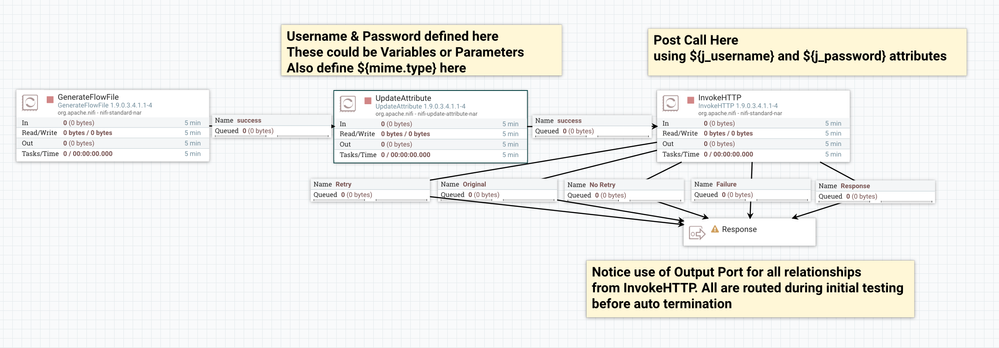
Here is a demo flow:
GenerateFlowFile - starts flow for testing
UpdateAttribute - sets user, pass,and mime type attributes needed in InvokeHttp
InvokeHttp - sends POST
You can find this template on my GitHub to inspect the entire flow:
https://github.com/steven-dfheinz/NiFi-Templates/blob/master/InvokeHttp_Demo.xml
Created on 04-28-2020 05:09 AM - edited 04-28-2020 05:11 AM
@san_re The configuration of Remote Url in InvokeHTTP should be as follows:
/j_security_check?j_username=${j_username}&j_password=${j_password}Notice the credential values are passed to the url with the ?. This is the only change in the processor config.
Here is a demo flow:
GenerateFlowFile - starts flow for testing
UpdateAttribute - sets user, pass,and mime type attributes needed in InvokeHttp
InvokeHttp - sends POST
You can find this template on my GitHub to inspect the entire flow:
https://github.com/steven-dfheinz/NiFi-Templates/blob/master/InvokeHttp_Demo.xml