
Our Community is getting an upgrade! To get everything ready for the relaunch, we’ll be placing the site in read-only mode starting September 21st.
We really appreciate your understanding while we get things set up behind the scenes. Catch up on all the exciting details about the move here.
Need help or have questions? Drop us a line at [email protected]

Support Questions
 Hi, I'm CLEO! Something exciting is coming to the Community. Stay Tuned!
- Cloudera Community
- Support
- Support Questions
- /opt/cloudera/cm/schema/scm_prepare_database.sh: N...
- Subscribe to RSS Feed
- Mark Question as New
- Mark Question as Read
- Float this Question for Current User
- Bookmark
- Subscribe
- Mute
- Printer Friendly Page
- Subscribe to RSS Feed
- Mark Question as New
- Mark Question as Read
- Float this Question for Current User
- Bookmark
- Subscribe
- Mute
- Printer Friendly Page
/opt/cloudera/cm/schema/scm_prepare_database.sh: No such file or directory
- Labels:
-
Cloudera Manager


- Mark as New
- Bookmark
- Subscribe
- Mute
- Subscribe to RSS Feed
- Permalink
- Report Inappropriate Content
I am installing Cloudera Enterprise 6.3.x and I am at step 5 (https://docs.cloudera.com/documentation/enterprise/6/6.3/topics/prepare_cm_database.html#scm_prepare...) .
I could not find /opt/cloudera/cm/schema/scm_prepare_database.sh file in my installation
Please help


Created 11-25-2019 12:35 PM
- Mark as New
- Bookmark
- Subscribe
- Mute
- Subscribe to RSS Feed
- Permalink
- Report Inappropriate Content
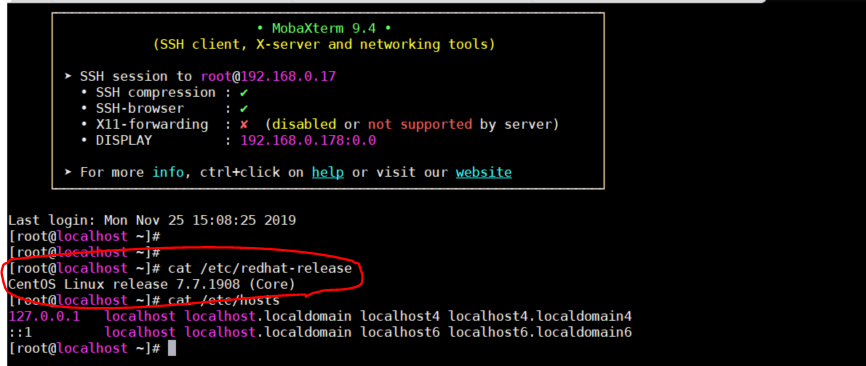
Bingooooooooo ! You are trying to install CDH on Operating System that is not certified no wonder all this headache I can now go to sleep.
We NEVER stress enough before embarking on deploying a software HDP or CDH you MUST read the vendor's release notes and most important the compatibility matrix. Not heeding to these pre-requisites always leads to a very bad first experience.
I downloaded and fired up your VM successfully, I then started form the basics Memory, CPU and networking then I saw a strange UI so checking the version confirmed my fears
Unsupported OS
Cloudera Compatability Matrix
Reference:
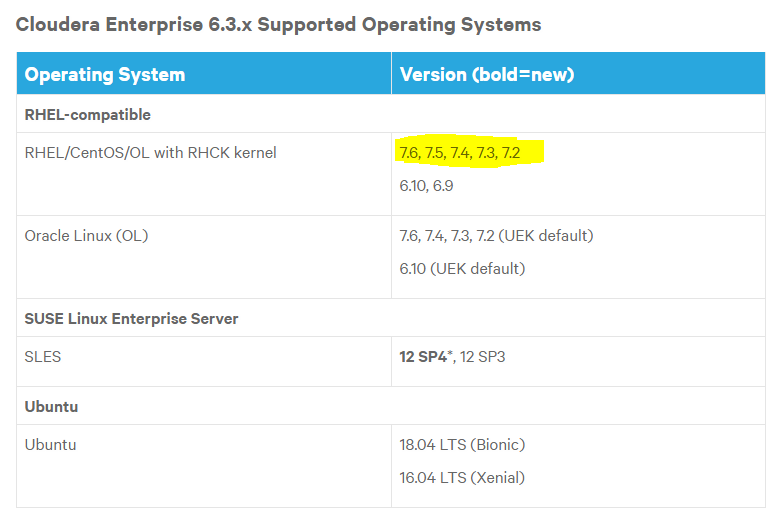
Currently, Centos/RHEL 7.6 is the latest compatible version so no need to proceed further with investigations
Happy hadooping
Created 11-24-2019 11:36 AM
- Mark as New
- Bookmark
- Subscribe
- Mute
- Subscribe to RSS Feed
- Permalink
- Report Inappropriate Content
The prepare database script is delivered by the previous steps
Step 1: Configure a Repository
Configure the Repository by running or chose appropriate CDH repos
$ sudo wget https://archive.cloudera.com/cm6/6.3.0/redhat7/yum/cloudera-manager.repo -P /etc/yum.repos.d/
Import the repository signing GPG key for Redhat 7
sudo rpm --import https://archive.cloudera.com/cm6/6.3.0/redhat7/yum/RPM-GPG-KEY-cloudera
Step 3: Install Cloudera Manager Server for RHEL7
or choose cm agent
$ sudo yum install cloudera-manager-daemons cloudera-manager-agent cloudera-manager-server
After the above steps, scm_prepare_database.sh should have been delivered you can check that
$ ll /opt/cloudera/cm/schema/
Hope that helps

Created 11-24-2019 08:08 PM
- Mark as New
- Bookmark
- Subscribe
- Mute
- Subscribe to RSS Feed
- Permalink
- Report Inappropriate Content
That did not help, I reinstalled but still no luck
[root@localhost ~]# ll /opt/cloudera/cm/
ls: cannot access /opt/cloudera/cm/: No such file or directory
Created 11-24-2019 08:09 PM
- Mark as New
- Bookmark
- Subscribe
- Mute
- Subscribe to RSS Feed
- Permalink
- Report Inappropriate Content
That didn't work, I reinstalled but still no luck...
[root@localhost ~]# ll /opt/cloudera/cm/
ls: cannot access /opt/cloudera/cm/: No such file or directory
Created 11-24-2019 09:51 PM
- Mark as New
- Bookmark
- Subscribe
- Mute
- Subscribe to RSS Feed
- Permalink
- Report Inappropriate Content
Thats weird.can you share the following information
- OS
- Contents of your repo file
- File System layout
- Steps followed or documents
- CM logs
Deployment shouldn't be that complicated I will setup a VM to try that out.
Created 11-25-2019 08:59 AM
- Mark as New
- Bookmark
- Subscribe
- Mute
- Subscribe to RSS Feed
- Permalink
- Report Inappropriate Content
Thank you for your reply, I have uploaded my VM image here (https://drive.google.com/file/d/1vYXSmYyRPr4ahnt0gCwJ3LYuV1j_t7FX/view?usp=sharing) . You may download and check it.
userId : root
Password : postal
Created 11-25-2019 12:35 PM
- Mark as New
- Bookmark
- Subscribe
- Mute
- Subscribe to RSS Feed
- Permalink
- Report Inappropriate Content
Bingooooooooo ! You are trying to install CDH on Operating System that is not certified no wonder all this headache I can now go to sleep.
We NEVER stress enough before embarking on deploying a software HDP or CDH you MUST read the vendor's release notes and most important the compatibility matrix. Not heeding to these pre-requisites always leads to a very bad first experience.
I downloaded and fired up your VM successfully, I then started form the basics Memory, CPU and networking then I saw a strange UI so checking the version confirmed my fears
Unsupported OS
Cloudera Compatability Matrix
Reference:
Currently, Centos/RHEL 7.6 is the latest compatible version so no need to proceed further with investigations
Happy hadooping


