
Our Community is getting an upgrade! To get everything ready for the relaunch, we’ll be placing the site in read-only mode starting September 21st.
We really appreciate your understanding while we get things set up behind the scenes. Catch up on all the exciting details about the move here.
Need help or have questions? Drop us a line at [email protected]

Support Questions
 Hi, I'm CLEO! Something exciting is coming to the Community. Stay Tuned!
- Cloudera Community
- Support
- Support Questions
- Re: unable to start service from hdp sandbox 2.6....
- Subscribe to RSS Feed
- Mark Question as New
- Mark Question as Read
- Float this Question for Current User
- Bookmark
- Subscribe
- Mute
- Printer Friendly Page
- Subscribe to RSS Feed
- Mark Question as New
- Mark Question as Read
- Float this Question for Current User
- Bookmark
- Subscribe
- Mute
- Printer Friendly Page
unable to start service from hdp sandbox 2.6.5


- Mark as New
- Bookmark
- Subscribe
- Mute
- Subscribe to RSS Feed
- Permalink
- Report Inappropriate Content
While trying to install HDP 2.6.5 sandbox on windows 10 with wmare, after starting the vm with 4cpu and 10g ram, i can login the ambari but all service can't be started
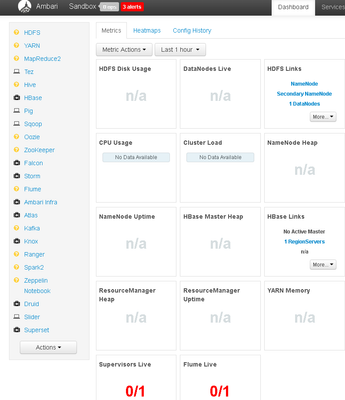
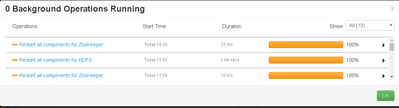
I have tried "restart all" service or restart zookeeper via the account: raj_ops, but no luck.



Created 06-06-2019 10:43 AM
- Mark as New
- Bookmark
- Subscribe
- Mute
- Subscribe to RSS Feed
- Permalink
- Report Inappropriate Content
It looks like your ambari agent might not be running.
1. Please try this:
# ambari-agent restart
2. Can you please check and share the ambari agent log ?
"/var/log/ambari-agent/ambari-agent.log"
3. Please check what all processes are already running on that Sandbox? It might be possible that few components might already be running but agent might not be able to show the proper status to Amabri Server due to some broker communication / OR agent down issue.
4. Please check the free memory available on the sandbox host:
# free -m
5. Also after restarting the ambari server do you see any error in the ambari-server.log?
.

Created 06-06-2019 10:37 AM
- Mark as New
- Bookmark
- Subscribe
- Mute
- Subscribe to RSS Feed
- Permalink
- Report Inappropriate Content
i also tried to use "ambari-admin-password-reset" to set admin password then login ambari with admin, then repeat the start service actions, but no luck to start hdp services..
Created 06-06-2019 10:43 AM
- Mark as New
- Bookmark
- Subscribe
- Mute
- Subscribe to RSS Feed
- Permalink
- Report Inappropriate Content
It looks like your ambari agent might not be running.
1. Please try this:
# ambari-agent restart
2. Can you please check and share the ambari agent log ?
"/var/log/ambari-agent/ambari-agent.log"
3. Please check what all processes are already running on that Sandbox? It might be possible that few components might already be running but agent might not be able to show the proper status to Amabri Server due to some broker communication / OR agent down issue.
4. Please check the free memory available on the sandbox host:
# free -m
5. Also after restarting the ambari server do you see any error in the ambari-server.log?
.


Created 09-17-2020 11:46 AM
- Mark as New
- Bookmark
- Subscribe
- Mute
- Subscribe to RSS Feed
- Permalink
- Report Inappropriate Content
How can I start the agent? I would need to SSH into the sandbox correct?
When I try to SSH using root, I get asked for a password, what should the password be?


Created 09-28-2020 05:58 PM
- Mark as New
- Bookmark
- Subscribe
- Mute
- Subscribe to RSS Feed
- Permalink
- Report Inappropriate Content
the password would be 'hadoop'
Created 06-06-2019 11:06 AM
- Mark as New
- Bookmark
- Subscribe
- Mute
- Subscribe to RSS Feed
- Permalink
- Report Inappropriate Content
after restart the ambari-agent service, i can start the zk , hdfs, mr, hive , spark2 now.
thanks @Jay Kumar SenSharma


