
Our Community is getting an upgrade! To get everything ready for the relaunch, we’ll be placing the site in read-only mode starting September 21st.
We really appreciate your understanding while we get things set up behind the scenes. Catch up on all the exciting details about the move here.
Need help or have questions? Drop us a line at [email protected]

Archives of Support Questions (Read Only)
- Cloudera Community
- Board Archive
- Archives of Support Questions (Read Only)
- Apache Ambari Cluster Name Error
- Subscribe to RSS Feed
- Mark Question as New
- Mark Question as Read
- Float this Question for Current User
- Bookmark
- Subscribe
- Mute
- Printer Friendly Page
- Subscribe to RSS Feed
- Mark Question as New
- Mark Question as Read
- Float this Question for Current User
- Bookmark
- Subscribe
- Mute
- Printer Friendly Page
Apache Ambari Cluster Name Error
- Labels:
-
Apache Ambari


Created on 09-24-2018 07:43 PM - edited 08-17-2019 10:21 PM
- Mark as New
- Bookmark
- Subscribe
- Mute
- Subscribe to RSS Feed
- Permalink
- Report Inappropriate Content
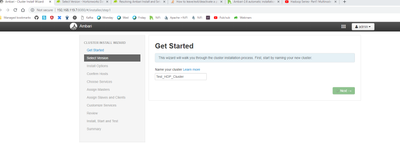
I got an Ambari Server to run, but when I try to create a cluster by its cluster name, it gets stuck on this step. Any help diagnosing the problem?


Created 09-25-2018 12:10 PM
- Mark as New
- Bookmark
- Subscribe
- Mute
- Subscribe to RSS Feed
- Permalink
- Report Inappropriate Content
Can you please check whether ambari server is running or not ? if server is running check the port is listenig or not *8080). Please try to restart the ambari-server and check again ?



Created 09-24-2018 07:46 PM
- Mark as New
- Bookmark
- Subscribe
- Mute
- Subscribe to RSS Feed
- Permalink
- Report Inappropriate Content
Can you refresh the page and try again? right click and see if there is any Javascript errors?
Created on 09-25-2018 11:44 AM - edited 08-17-2019 10:21 PM
- Mark as New
- Bookmark
- Subscribe
- Mute
- Subscribe to RSS Feed
- Permalink
- Report Inappropriate Content
Thank you for that; there are some Javascript errors:
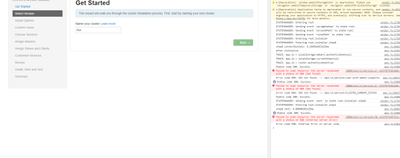
I'll look into getting these errors resolved; I've received one 404 error and a 500 one. Do you know the best place to get started in solving these issues?
Created 09-25-2018 12:10 PM
- Mark as New
- Bookmark
- Subscribe
- Mute
- Subscribe to RSS Feed
- Permalink
- Report Inappropriate Content
Can you please check whether ambari server is running or not ? if server is running check the port is listenig or not *8080). Please try to restart the ambari-server and check again ?
Created 09-25-2018 01:56 PM
- Mark as New
- Bookmark
- Subscribe
- Mute
- Subscribe to RSS Feed
- Permalink
- Report Inappropriate Content
Thanks everyone; I just did an uninstall/reinstall, and it's working great now

Created 09-26-2018 11:29 AM
- Mark as New
- Bookmark
- Subscribe
- Mute
- Subscribe to RSS Feed
- Permalink
- Report Inappropriate Content
I have the same problem. What do you mean by uninstall/reinstall? Did you just `apt remove/install` or yum or whatever, or did you rebuild the .deb/.rpm? Thank you @Adnan Chowdhury
Created 09-26-2018 01:18 PM
- Mark as New
- Bookmark
- Subscribe
- Mute
- Subscribe to RSS Feed
- Permalink
- Report Inappropriate Content
Hi Daniel; I did the first option. Since I'm on CentOS7, it was 'yum uninstall apache-server", and then just redid the setup steps.

Created 03-18-2019 09:08 PM
- Mark as New
- Bookmark
- Subscribe
- Mute
- Subscribe to RSS Feed
- Permalink
- Report Inappropriate Content
Hi. I have installed and configured Ambari using the guide here: https://cwiki.apache.org/confluence/display/AMBARI/Installation+Guide+for+Ambari+2.7.3. Unfortunately, I got the same error in this page. I already tried reinstalling twice but no success. I'm running Ubuntu on a Virtual Box running on Windows host. Any idea? Thanks.


