
Our Community is getting an upgrade! To get everything ready for the relaunch, we’ll be placing the site in read-only mode starting September 21st.
We really appreciate your understanding while we get things set up behind the scenes. Catch up on all the exciting details about the move here.
Need help or have questions? Drop us a line at [email protected]

Archives of Support Questions (Read Only)
- Cloudera Community
- Board Archive
- Archives of Support Questions (Read Only)
- Apache Nifi - Adding attributes as newlines FlowFi...
- Subscribe to RSS Feed
- Mark Question as New
- Mark Question as Read
- Float this Question for Current User
- Bookmark
- Subscribe
- Mute
- Printer Friendly Page
- Subscribe to RSS Feed
- Mark Question as New
- Mark Question as Read
- Float this Question for Current User
- Bookmark
- Subscribe
- Mute
- Printer Friendly Page
Apache Nifi - Adding attributes as newlines FlowFilw content
- Labels:
-
Apache NiFi


Created 08-02-2016 02:57 PM
- Mark as New
- Bookmark
- Subscribe
- Mute
- Subscribe to RSS Feed
- Permalink
- Report Inappropriate Content
Hi,
I have a scenario where My GetHTTP processor gets a JSON of system health metrics. I extract the attributes from the Json to essentially extract the desired metrics that I want to display on a Graph.
Input: Suppose following attributes I extracted from Json using EvaluateJSONPath processor:
metric1='<myconmapy>.<metric1> <value> <timestamp>'
metric2='<myconmapy>.<metric2> <value> <timestamp>'
metric3='<myconmapy>.<metric3> <value> <timestamp>'
Output: I want to convert all the above mentioned attributes/metrics as lines of FlowFile content, such that one FlowFile content will look like following (each line contains an attribute value):
<myconmapy>.<metric1> <value> <timestamp>
<myconmapy>.<metric2> <value> <timestamp>
<myconmapy>.<metric3> <value> <timestamp>
Is there a way to achieve the above mentioned Output using Nifi processors?
Thanks



Created 08-02-2016 03:05 PM
- Mark as New
- Bookmark
- Subscribe
- Mute
- Subscribe to RSS Feed
- Permalink
- Report Inappropriate Content
Yes, use a ReplaceText processor and NiFi's Expression Language syntax to reference your attributes and construct the content line. Tip: switch the evaluation mode for ReplaceText to 'Always Replace' as an optimization for your use case.
https://nifi.apache.org/docs/nifi-docs/html/expression-language-guide.html
Created 08-02-2016 03:05 PM
- Mark as New
- Bookmark
- Subscribe
- Mute
- Subscribe to RSS Feed
- Permalink
- Report Inappropriate Content
Yes, use a ReplaceText processor and NiFi's Expression Language syntax to reference your attributes and construct the content line. Tip: switch the evaluation mode for ReplaceText to 'Always Replace' as an optimization for your use case.
https://nifi.apache.org/docs/nifi-docs/html/expression-language-guide.html
Created 08-02-2016 03:13 PM
- Mark as New
- Bookmark
- Subscribe
- Mute
- Subscribe to RSS Feed
- Permalink
- Report Inappropriate Content
Awesome, I solved it by using the append('\n') for attribute:
${m1:append('\n')}${m2:append('\n')}${m3}
Thanks a lot,


Created 12-02-2016 12:06 PM
- Mark as New
- Bookmark
- Subscribe
- Mute
- Subscribe to RSS Feed
- Permalink
- Report Inappropriate Content
yeah thanks.. append works.. \\n (double backslash) doesnt.. I was doing this while writing count to file.. it now works.. The count is: ${executesql.row.count:append('\n')}

Created on 08-02-2016 03:28 PM - edited 08-18-2019 04:56 AM
- Mark as New
- Bookmark
- Subscribe
- Mute
- Subscribe to RSS Feed
- Permalink
- Report Inappropriate Content
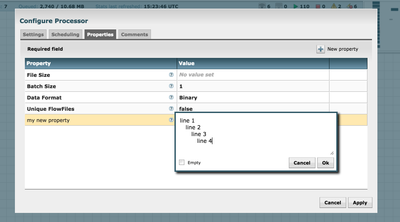
When entering text values into NiFi you should be able to hit "Shift-Enter" and it will give you true new lines. See attached screenshot


Created 11-18-2016 03:27 PM
- Mark as New
- Bookmark
- Subscribe
- Mute
- Subscribe to RSS Feed
- Permalink
- Report Inappropriate Content
Joe - What processor is being illustrated?


Created 08-02-2016 05:48 PM
- Mark as New
- Bookmark
- Subscribe
- Mute
- Subscribe to RSS Feed
- Permalink
- Report Inappropriate Content
Try using \\n (double backslash) or using 'Shift + enter" in the expression language editor box to create new lines in your replacement string as shown by Joe Witt above. Thanks,
Matt


