
Our Community is getting an upgrade! To get everything ready for the relaunch, we’ll be placing the site in read-only mode starting September 21st.
We really appreciate your understanding while we get things set up behind the scenes. Catch up on all the exciting details about the move here.
Need help or have questions? Drop us a line at [email protected]

Archives of Support Questions (Read Only)
- Cloudera Community
- Board Archive
- Archives of Support Questions (Read Only)
- Cant run hadoop commands on hortonwork sandbox
- Subscribe to RSS Feed
- Mark Question as New
- Mark Question as Read
- Float this Question for Current User
- Bookmark
- Subscribe
- Mute
- Printer Friendly Page
- Subscribe to RSS Feed
- Mark Question as New
- Mark Question as Read
- Float this Question for Current User
- Bookmark
- Subscribe
- Mute
- Printer Friendly Page
Cant run hadoop commands on hortonwork sandbox
- Labels:
-
Apache Hadoop


Created on 03-30-2017 10:21 PM - edited 09-16-2022 04:22 AM
- Mark as New
- Bookmark
- Subscribe
- Mute
- Subscribe to RSS Feed
- Permalink
- Report Inappropriate Content
Hi,
I have downlaoded and install sandbox on my windows 10 machine. I can connect it to it by SSH as root user. However, I acnt run hadoop commands on that. for example when I run "hadoop fs -ls"..it prompts bash hadoop command not found!


Created 03-30-2017 10:40 PM
- Mark as New
- Bookmark
- Subscribe
- Mute
- Subscribe to RSS Feed
- Permalink
- Report Inappropriate Content
Heya, can you verify that through putty you connected to port 2222? I suspect you may have connected to port 2122 or to something other than the sandbox container layer.
Created 03-30-2017 10:25 PM
- Mark as New
- Bookmark
- Subscribe
- Mute
- Subscribe to RSS Feed
- Permalink
- Report Inappropriate Content
Can you run the command `sandbox-version` to see which version of the sandbox you're on? I suspect your on the VM hosting the sandbox and not the sandbox itself. What was the SSH command you ran to connect?
Created 03-30-2017 10:31 PM
- Mark as New
- Bookmark
- Subscribe
- Mute
- Subscribe to RSS Feed
- Permalink
- Report Inappropriate Content
hi, i'm using putty to get ssh..user is root password is hadoop, when i run sandbox-version, it prompts /usr/bin/sandbox: Requires an SELinux enabled system
Created 03-30-2017 10:40 PM
- Mark as New
- Bookmark
- Subscribe
- Mute
- Subscribe to RSS Feed
- Permalink
- Report Inappropriate Content
Heya, can you verify that through putty you connected to port 2222? I suspect you may have connected to port 2122 or to something other than the sandbox container layer.
Created 03-30-2017 10:48 PM
- Mark as New
- Bookmark
- Subscribe
- Mute
- Subscribe to RSS Feed
- Permalink
- Report Inappropriate Content
hi, i'm doing ssh so can't connect to port 2222. i am connecting to port 22
Created on 03-30-2017 10:51 PM - edited 08-18-2019 01:57 AM
- Mark as New
- Bookmark
- Subscribe
- Mute
- Subscribe to RSS Feed
- Permalink
- Report Inappropriate Content
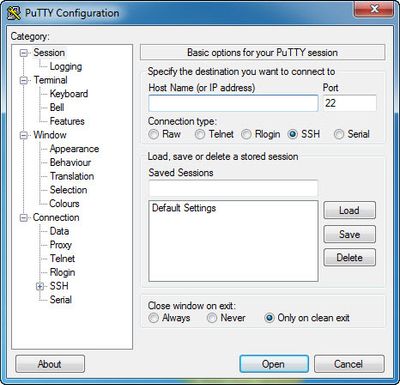
Through putty you can specify the port you want to connect to. This might be an outdated image, but see the top right of this image that makes available a "Port" field.
Created 03-30-2017 11:00 PM
- Mark as New
- Bookmark
- Subscribe
- Mute
- Subscribe to RSS Feed
- Permalink
- Report Inappropriate Content
yes, thanks it work now


