
Our Community is getting an upgrade! To get everything ready for the relaunch, we’ll be placing the site in read-only mode starting September 21st.
We really appreciate your understanding while we get things set up behind the scenes. Catch up on all the exciting details about the move here.
Need help or have questions? Drop us a line at [email protected]

Archives of Support Questions (Read Only)
- Cloudera Community
- Board Archive
- Archives of Support Questions (Read Only)
- Re: Error in using Sqoop
- Subscribe to RSS Feed
- Mark Question as New
- Mark Question as Read
- Float this Question for Current User
- Bookmark
- Subscribe
- Mute
- Printer Friendly Page
- Subscribe to RSS Feed
- Mark Question as New
- Mark Question as Read
- Float this Question for Current User
- Bookmark
- Subscribe
- Mute
- Printer Friendly Page
Error in using Sqoop
- Labels:
-
Apache Sqoop


Created 02-19-2016 01:09 PM
- Mark as New
- Bookmark
- Subscribe
- Mute
- Subscribe to RSS Feed
- Permalink
- Report Inappropriate Content
Hi,
HDP 2.3.4.0 cluster in 4 nodes has been set up and it is working fine. We are trying to evaluate Atlas using demo in below link:
https://github.com/shivajid/atlas/tree/master/tutorial
We are facing issue while using Sqoop during execution of above demo. Full description of issue is as below:
1) Sqoop and MySql databases are in different hosts.
2) MySql jar is in both the hosts and also in lib folder of sqoop home /usr/hdp/2.3.4.0-3485/sqoop/lib/
3) Have provided below privilege in MySql to avoid privilege issues:
grant all privileges on *.* to 'trucker1'@'%' identified by 'trucker';
flush privileges;
4) Now trying to import data using below command:
sqoop import --connect jdbc:mysql://3.209.124.206:3306/test --username trucker1 --password trucker --table DRIVERS -m 1 --target-dir demo$1 --hive-import --hive-table hortondrivers$1
5) Facing below error when executing above command.
16/02/19 18:20:45 WARN tool.BaseSqoopTool: Setting your password on the command-line is insecure. Consider using -P instead. 16/02/19 18:20:45 INFO manager.MySQLManager: Preparing to use a MySQL streaming resultset. 16/02/19 18:20:45 INFO tool.CodeGenTool: Beginning code generation 16/02/19 18:20:45 ERROR sqoop.Sqoop: Got exception running Sqoop: java.lang.RuntimeException: Could not load db driver class: com.mysql.jdbc.Driver java.lang.RuntimeException: Could not load db driver class: com.mysql.jdbc.Driver at org.apache.sqoop.manager.SqlManager.makeConnection(SqlManager.java:636) at org.apache.sqoop.manager.GenericJdbcManager.getConnection(GenericJdbcManager.java:52) at org.apache.sqoop.manager.SqlManager.execute(SqlManager.java:525) at org.apache.sqoop.manager.SqlManager.execute(SqlManager.java:548) at org.apache.sqoop.manager.SqlManager.getColumnTypesForRawQuery(SqlManager.java:191) at org.apache.sqoop.manager.SqlManager.getColumnTypes(SqlManager.java:175) at org.apache.sqoop.manager.ConnManager.getColumnTypes(ConnManager.java:262) at org.apache.sqoop.orm.ClassWriter.getColumnTypes(ClassWriter.java:1235) at org.apache.sqoop.orm.ClassWriter.generate(ClassWriter.java:1060) at org.apache.sqoop.tool.CodeGenTool.generateORM(CodeGenTool.java:82) at org.apache.sqoop.tool.ImportTool.importTable(ImportTool.java:390) at org.apache.sqoop.tool.ImportTool.run(ImportTool.java:476) at org.apache.sqoop.Sqoop.run(Sqoop.java:145) at org.apache.hadoop.util.ToolRunner.run(ToolRunner.java:70) at org.apache.sqoop.Sqoop.runSqoop(Sqoop.java:181) at org.apache.sqoop.Sqoop.runTool(Sqoop.java:220) at org.apache.sqoop.Sqoop.runTool(Sqoop.java:229) at org.apache.sqoop.Sqoop.main(Sqoop.java:238) at com.cloudera.sqoop.Sqoop.main(Sqoop.java:57)
Looking for your help as we need to understand how Atlas work for data governance.
Thanks!



Created 02-23-2016 03:39 AM
- Mark as New
- Bookmark
- Subscribe
- Mute
- Subscribe to RSS Feed
- Permalink
- Report Inappropriate Content
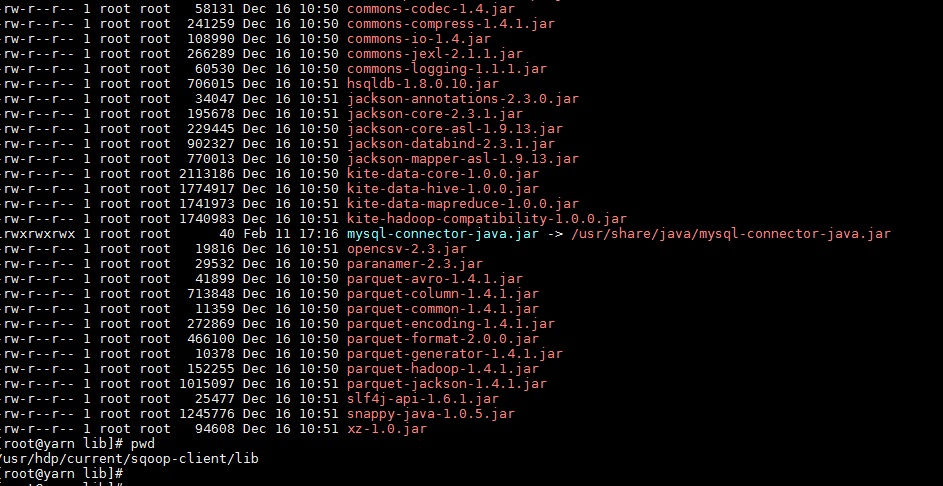
Hi @rajdip chaudhuri, mysql-connector-java.jar in /usr/hdp/sqoop-client/lib is a symlink to /usr/share/java/mysql-connector-java.jar which itself is a symlink to the real jar file with a version in its name. Make sure it points to the right file:
ls -l /usr/share/java/mysql-connector-java.jar
and ispect the destination file. Also, mysql-connecter that can be installed by yum is good for Mysql-5.1, but for 5.5 and 5.6 you need the latest version.


Created 02-19-2016 01:09 PM
- Mark as New
- Bookmark
- Subscribe
- Mute
- Subscribe to RSS Feed
- Permalink
- Report Inappropriate Content
place the mysql-connector-java.jar into /usr/hdp/sqoop-client/lib @rajdip chaudhuri review the docs https://docs.hortonworks.com/HDPDocuments/HDP2/HDP-2.3.2/bk_dataintegration/content/ch_using-sqoop.h...
Created 02-19-2016 01:21 PM
- Mark as New
- Bookmark
- Subscribe
- Mute
- Subscribe to RSS Feed
- Permalink
- Report Inappropriate Content
Jar is already at the mentioned path. Screenshot has been attached.
Created 02-19-2016 01:21 PM
- Mark as New
- Bookmark
- Subscribe
- Mute
- Subscribe to RSS Feed
- Permalink
- Report Inappropriate Content
give it right permissions, and you can also specify it explicitly
you can use Sqoop with any other JDBC-compliant database. First, download the appropriate JDBC driver for the type of database you want to import, and install the .jar file in the $SQOOP_HOME/lib directory on your client machine. (This will be /usr/lib/sqoop/lib if you installed from an RPM or Debian package.) Each driver .jar file also has a specific driver class which defines the entry-point to the driver. For example, MySQL’s Connector/J library has a driver class of com.mysql.jdbc.Driver. Refer to your database vendor-specific documentation to determine the main driver class. This class must be provided as an argument to Sqoop with --driver.
Created 02-19-2016 01:28 PM
- Mark as New
- Bookmark
- Subscribe
- Mute
- Subscribe to RSS Feed
- Permalink
- Report Inappropriate Content
@rajdip chaudhuri look at my response right above and see this https://community.hortonworks.com/questions/2879/bug-in-sandbox-232-hitting-sqoop-1400.html
Created 02-19-2016 01:33 PM
- Mark as New
- Bookmark
- Subscribe
- Mute
- Subscribe to RSS Feed
- Permalink
- Report Inappropriate Content
Created 02-19-2016 01:41 PM
- Mark as New
- Bookmark
- Subscribe
- Mute
- Subscribe to RSS Feed
- Permalink
- Report Inappropriate Content
Thanks @Artem Ervits. I can see the current version is mysql-connector-java-5.1.17-6.el6.noarch. Downloading the latest version from mysql site. Will let you know the results if the latest jar works or not.
Created 02-19-2016 01:43 PM
- Mark as New
- Bookmark
- Subscribe
- Mute
- Subscribe to RSS Feed
- Permalink
- Report Inappropriate Content
yes but see the note about using --driver and specifying class name. @rajdip chaudhuri
Created 02-19-2016 01:48 PM
- Mark as New
- Bookmark
- Subscribe
- Mute
- Subscribe to RSS Feed
- Permalink
- Report Inappropriate Content
Hi @Artem Ervits facing same issue after using --driver in the sqoop command. Currently downloading the latest jar file. Shall we go ahead and replace the old one with this new one?
Command used:
sqoop import --connect jdbc:mysql://3.209.124.206:3306/test --username trucker1 --password trucker --table DRIVERS -m 1 --driver com.mysql.jdbc.Driver --target-dir demo$1 --hive-import --hive-table hortondrivers$1
Created 02-19-2016 01:58 PM
- Mark as New
- Bookmark
- Subscribe
- Mute
- Subscribe to RSS Feed
- Permalink
- Report Inappropriate Content
@rajdip chaudhuri yes try the new jar


