
Our Community is getting an upgrade! To get everything ready for the relaunch, we’ll be placing the site in read-only mode starting September 21st.
We really appreciate your understanding while we get things set up behind the scenes. Catch up on all the exciting details about the move here.
Need help or have questions? Drop us a line at [email protected]

Archives of Support Questions (Read Only)
- Cloudera Community
- Board Archive
- Archives of Support Questions (Read Only)
- Re: Flume Authentication credentials are missing
- Subscribe to RSS Feed
- Mark Question as New
- Mark Question as Read
- Float this Question for Current User
- Bookmark
- Subscribe
- Mute
- Printer Friendly Page
- Subscribe to RSS Feed
- Mark Question as New
- Mark Question as Read
- Float this Question for Current User
- Bookmark
- Subscribe
- Mute
- Printer Friendly Page
Flume Authentication credentials are missing
- Labels:
-
Apache Flume


Created on 01-02-2017 10:06 PM - edited 09-16-2022 03:52 AM
- Mark as New
- Bookmark
- Subscribe
- Mute
- Subscribe to RSS Feed
- Permalink
- Report Inappropriate Content
I am trying to fetch twitter data into Hdfs and i have set all the required credentials and attached is the error log, which i am getting while running flume-agent and attached is the is my conf file.
Appreciate if someone could be help me.
ERROR lifecycle.LifecycleSupervisor: Unable to start EventDrivenSourceRunner: { source:com.cloudera.flume.source.TwitterSource{name:Twitter,state:IDLE} } - Exception follows.
java.lang.IllegalStateException: Authentication credentials are missing. See http://twitter4j.org/en/configuration.html for details
at twitter4j.TwitterBaseImpl.ensureAuthorizationEnabled(TwitterBaseImpl.java:215)
at twitter4j.TwitterStreamImpl.filter(TwitterStreamImpl.java:317)
at com.cloudera.flume.source.TwitterSource.start(TwitterSource.java:150)
at org.apache.flume.source.EventDrivenSourceRunner.start(EventDrivenSourceRunner.java:44)
at org.apache.flume.lifecycle.LifecycleSupervisor$MonitorRunnable.run(LifecycleSupervisor.java:251)
at java.util.concurrent.Executors$RunnableAdapter.call(Executors.java:471)
at java.util.concurrent.FutureTask.runAndReset(FutureTask.java:304)
at java.util.concurrent.ScheduledThreadPoolExecutor$ScheduledFutureTask.access$301(ScheduledThreadPoolExecutor.java:178)
at java.util.concurrent.ScheduledThreadPoolExecutor$ScheduledFutureTask.run(ScheduledThreadPoolExecutor.java:293)
at java.util.concurrent.ThreadPoolExecutor.runWorker(ThreadPoolExecutor.java:1145)
at java.util.concurrent.ThreadPoolExecutor$Worker.run(ThreadPoolExecutor.java:615)
at java.lang.Thread.run(Thread.java:745)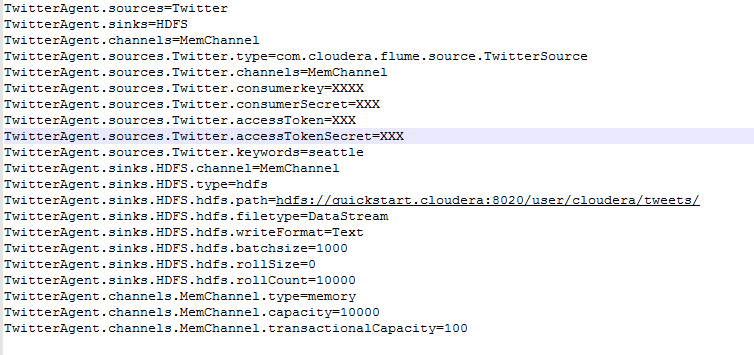
Created 01-02-2017 11:05 PM
- Mark as New
- Bookmark
- Subscribe
- Mute
- Subscribe to RSS Feed
- Permalink
- Report Inappropriate Content


Created 01-02-2017 10:31 PM
- Mark as New
- Bookmark
- Subscribe
- Mute
- Subscribe to RSS Feed
- Permalink
- Report Inappropriate Content
It thinks the credentials are missing. How did you set the OAuth consumer and token settings? Please mask the actual values but share the files and/or method they are provided to Flume.
Created 01-02-2017 10:41 PM
- Mark as New
- Bookmark
- Subscribe
- Mute
- Subscribe to RSS Feed
- Permalink
- Report Inappropriate Content
I have logged into the twitter app and registered my app and through that i got the Oauth keys and i have placed them in the config file.
below is the conf file and i have removed my keys and replaced it as 'XXX' (masking it).
TwitterAgent.sources = Twitter
TwitterAgent.sinks = HDFS
TwitterAgent.channels = MemChannel
TwitterAgent.sources.Twitter.type = com.cloudera.flume.source.TwitterSource
TwitterAgent.sources.Twitter.channels = MemChannel
TwitterAgent.sources.Twitter.consumerkey = XXX
TwitterAgent.sources.Twitter.consumerSecret = XXX
TwitterAgent.sources.Twitter.accessToken = XXX
TwitterAgent.sources.Twitter.accessTokenSecret = XXX
TwitterAgent.sources.Twitter.keywords = seattle
TwitterAgent.sinks.HDFS.channel = MemChannel
TwitterAgent.sinks.HDFS.type = hdfs
TwitterAgent.sinks.HDFS.hdfs.path = hdfs://localhost:8020/user/cloudera/tweets/
TwitterAgent.sinks.HDFS.hdfs.filetype = DataStream
TwitterAgent.sinks.HDFS.hdfs.writeFormat = Text
TwitterAgent.sinks.HDFS.hdfs.batchsize = 1000
TwitterAgent.sinks.HDFS.hdfs.rollSize = 0
TwitterAgent.sinks.HDFS.hdfs.rollCount = 10000
TwitterAgent.channels.MemChannel.type = memory
TwitterAgent.channels.MemChannel.capacity = 10000
TwitterAgent.channels.MemChannel.transactionalCapacity = 100
Created 01-02-2017 10:58 PM
- Mark as New
- Bookmark
- Subscribe
- Mute
- Subscribe to RSS Feed
- Permalink
- Report Inappropriate Content
should be
TwitterAgent.sources.Twitter.consumerKey = XXX
Created 01-02-2017 11:01 PM
- Mark as New
- Bookmark
- Subscribe
- Mute
- Subscribe to RSS Feed
- Permalink
- Report Inappropriate Content
Created 01-02-2017 11:03 PM
- Mark as New
- Bookmark
- Subscribe
- Mute
- Subscribe to RSS Feed
- Permalink
- Report Inappropriate Content
Created 01-02-2017 11:05 PM
- Mark as New
- Bookmark
- Subscribe
- Mute
- Subscribe to RSS Feed
- Permalink
- Report Inappropriate Content


Created 10-02-2017 06:58 PM
- Mark as New
- Bookmark
- Subscribe
- Mute
- Subscribe to RSS Feed
- Permalink
- Report Inappropriate Content
Hi Penta,
Did it work?
Actually Im facing the same issue and this is what I have used:
a1.sources.Twitter.consumerKey=XXX
a1.sources.Twitter.consumerSecret=XXX
a1.sources.Twitter.accessToken=XXX
a1.sources.Twitter.accessTokenSecret=XXX
I am trying to run the flume agent in cloudera VM.
Please advice if you or anyone know the solution.
Appreciate your suggestions/help!


