
Our Community is getting an upgrade! To get everything ready for the relaunch, we’ll be placing the site in read-only mode starting September 21st.
We really appreciate your understanding while we get things set up behind the scenes. Catch up on all the exciting details about the move here.
Need help or have questions? Drop us a line at [email protected]

Archives of Support Questions (Read Only)
- Cloudera Community
- Board Archive
- Archives of Support Questions (Read Only)
- Re: How to remove risk disks from Hadoop cluster ?
- Subscribe to RSS Feed
- Mark Question as New
- Mark Question as Read
- Float this Question for Current User
- Bookmark
- Subscribe
- Mute
- Printer Friendly Page
- Subscribe to RSS Feed
- Mark Question as New
- Mark Question as Read
- Float this Question for Current User
- Bookmark
- Subscribe
- Mute
- Printer Friendly Page
How to remove risk disks from Hadoop cluster ?
- Labels:
-
Apache Hadoop


Created on 02-22-2016 06:02 AM - edited 08-18-2019 05:51 AM
- Mark as New
- Bookmark
- Subscribe
- Mute
- Subscribe to RSS Feed
- Permalink
- Report Inappropriate Content
Some disks failed in my HDFS cluster. and nodemanager cannot start in these nodes.
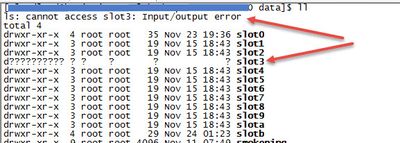
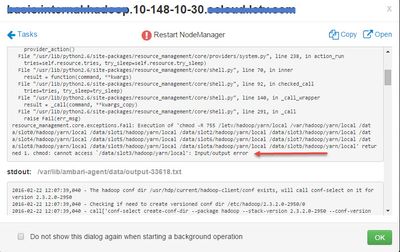
How to fix it ?


Created 02-22-2016 06:50 AM
- Mark as New
- Bookmark
- Subscribe
- Mute
- Subscribe to RSS Feed
- Permalink
- Report Inappropriate Content
In Namenode UI check and ensure that there are no missing and corrupt blocks. If this is true then you can successfully remove failed disk from DataNode.
Refer this for details


Created 02-22-2016 06:26 AM
- Mark as New
- Bookmark
- Subscribe
- Mute
- Subscribe to RSS Feed
- Permalink
- Report Inappropriate Content
Is multiple disks on the same node?
if yes, I think you can decommission the node from Ambari->hosts->data node -> you will find decommission from drop down.
Created 02-22-2016 07:11 AM
- Mark as New
- Bookmark
- Subscribe
- Mute
- Subscribe to RSS Feed
- Permalink
- Report Inappropriate Content
Thanks for quick reply.

Created 02-22-2016 06:41 AM
- Mark as New
- Bookmark
- Subscribe
- Mute
- Subscribe to RSS Feed
- Permalink
- Report Inappropriate Content
Take a look at this questions, maybe it is helpful => https://community.hortonworks.com/questions/3012/what-are-the-steps-an-operator-should-take-to-repl....
Created 02-22-2016 06:50 AM
- Mark as New
- Bookmark
- Subscribe
- Mute
- Subscribe to RSS Feed
- Permalink
- Report Inappropriate Content
In Namenode UI check and ensure that there are no missing and corrupt blocks. If this is true then you can successfully remove failed disk from DataNode.
Refer this for details
Created 02-22-2016 07:11 AM
- Mark as New
- Bookmark
- Subscribe
- Mute
- Subscribe to RSS Feed
- Permalink
- Report Inappropriate Content
Thanks for quick reply.


Created 02-22-2016 09:21 AM
- Mark as New
- Bookmark
- Subscribe
- Mute
- Subscribe to RSS Feed
- Permalink
- Report Inappropriate Content
Can you check the setting for
dfs.datanode.failed.volumes.tolerated
in your environment. Default is 0 which is a bit restrictive. Normally 1 or even 2 ( on datanodes with high disc density ) make more operational sense.
Then your datanode will start and you can take care of the discs.


Created 02-22-2016 12:33 PM
- Mark as New
- Bookmark
- Subscribe
- Mute
- Subscribe to RSS Feed
- Permalink
- Report Inappropriate Content
Iif you put this machine in a separate config group and remove referencw to the directories used you can keep the machine up. Removing disk and not replacing will mean your data will be writing to OS filesystem. Also do what Benjamin siggests and increase tolerance.


