
Our Community is getting an upgrade! To get everything ready for the relaunch, we’ll be placing the site in read-only mode starting September 21st.
We really appreciate your understanding while we get things set up behind the scenes. Catch up on all the exciting details about the move here.
Need help or have questions? Drop us a line at [email protected]

Archives of Support Questions (Read Only)
- Cloudera Community
- Board Archive
- Archives of Support Questions (Read Only)
- Re: I cant seem to get the api/v6/timeseries data ...
- Subscribe to RSS Feed
- Mark Question as New
- Mark Question as Read
- Float this Question for Current User
- Bookmark
- Subscribe
- Mute
- Printer Friendly Page
- Subscribe to RSS Feed
- Mark Question as New
- Mark Question as Read
- Float this Question for Current User
- Bookmark
- Subscribe
- Mute
- Printer Friendly Page
I cant seem to get the api/v6/timeseries data with curl. Can anyone post a snippet to get me going


Created 07-17-2014 07:56 AM
- Mark as New
- Bookmark
- Subscribe
- Mute
- Subscribe to RSS Feed
- Permalink
- Report Inappropriate Content
I cant seem to get the api/v6/timeseries data with curl. Can anyone post a snippet to get me going
I have been able to get other data from the api, but everytime I try and use timeseries, I just get Http 400 bad request



Created on 07-17-2014 08:22 AM - edited 07-17-2014 08:23 AM
- Mark as New
- Bookmark
- Subscribe
- Mute
- Subscribe to RSS Feed
- Permalink
- Report Inappropriate Content
Hi ranks,
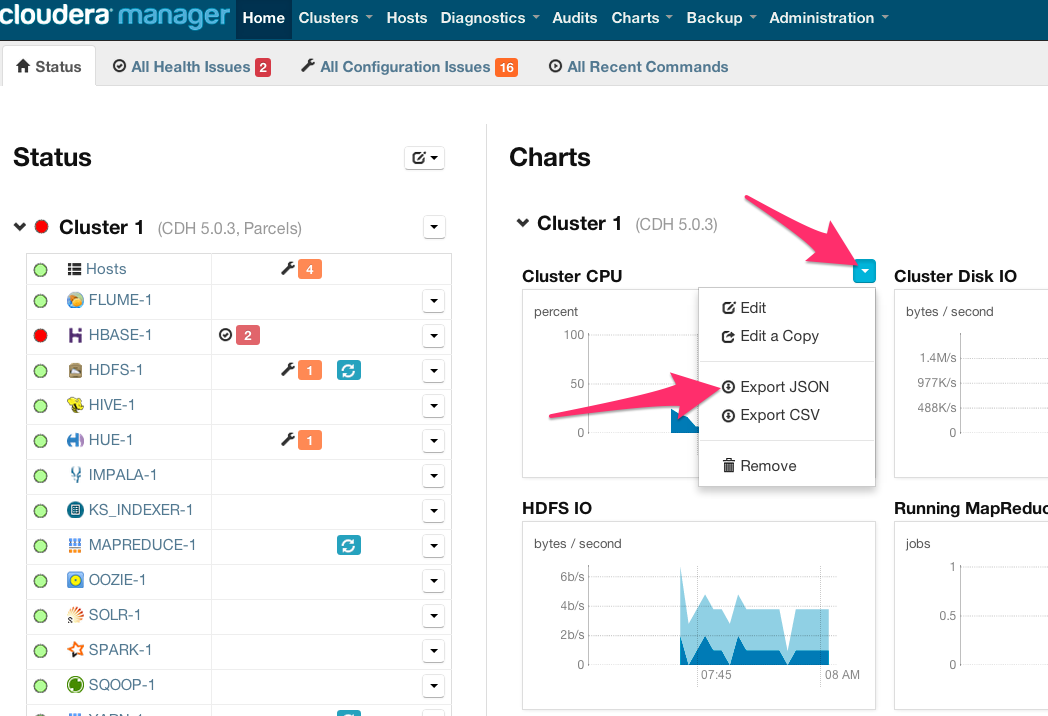
In Cloudera Manager 5 and higher, every chart you see in the web UI will provide you a direct /timeseries URL showing exactly how that chart itself retrieved metrics with the /timeseries endpoint! You can grab this same URL and use it with curl.
Find any chart and click on the blue arrow that will appear at the top-right. Choose "Export JSON". This will open a new window with the location bar already populated. This URL is a fully-formatted /timeseries API endpoint! Feel free to use any of them as a springboard for your curl testing. I tried to post one here but the forum doesn't like the URL and won't let me post. However it'd look like this:

I can use this now directly with my curl command ($curl -v -u $USER:$PASS '$URL') and I get json output as requested.
$ curl -v -u $USER:$PASS 'http://my.cluster.com:7180/api/v6/timeseries?query=select+cpu_percent_across_hosts+where+category+%3...
Hope this helps! Add -v and/or -i to your curl testing to get more information about the 400 error you're getting, as needed.
--
Mark S.
Created on 07-17-2014 08:22 AM - edited 07-17-2014 08:23 AM
- Mark as New
- Bookmark
- Subscribe
- Mute
- Subscribe to RSS Feed
- Permalink
- Report Inappropriate Content
Hi ranks,
In Cloudera Manager 5 and higher, every chart you see in the web UI will provide you a direct /timeseries URL showing exactly how that chart itself retrieved metrics with the /timeseries endpoint! You can grab this same URL and use it with curl.
Find any chart and click on the blue arrow that will appear at the top-right. Choose "Export JSON". This will open a new window with the location bar already populated. This URL is a fully-formatted /timeseries API endpoint! Feel free to use any of them as a springboard for your curl testing. I tried to post one here but the forum doesn't like the URL and won't let me post. However it'd look like this:
I can use this now directly with my curl command ($curl -v -u $USER:$PASS '$URL') and I get json output as requested.
$ curl -v -u $USER:$PASS 'http://my.cluster.com:7180/api/v6/timeseries?query=select+cpu_percent_across_hosts+where+category+%3...
Hope this helps! Add -v and/or -i to your curl testing to get more information about the 400 error you're getting, as needed.
--
Mark S.
Created 07-17-2014 10:12 AM
- Mark as New
- Bookmark
- Subscribe
- Mute
- Subscribe to RSS Feed
- Permalink
- Report Inappropriate Content
Thanks, I was missing replacing spaces with + signs in the select statement


