
Our Community is getting an upgrade! To get everything ready for the relaunch, we’ll be placing the site in read-only mode starting September 21st.
We really appreciate your understanding while we get things set up behind the scenes. Catch up on all the exciting details about the move here.
Need help or have questions? Drop us a line at [email protected]

Archives of Support Questions (Read Only)
- Cloudera Community
- Board Archive
- Archives of Support Questions (Read Only)
- Re: Impala Catalog Server supervisor permissions
- Subscribe to RSS Feed
- Mark Question as New
- Mark Question as Read
- Float this Question for Current User
- Bookmark
- Subscribe
- Mute
- Printer Friendly Page
- Subscribe to RSS Feed
- Mark Question as New
- Mark Question as Read
- Float this Question for Current User
- Bookmark
- Subscribe
- Mute
- Printer Friendly Page
Impala Catalog Server supervisor permissions
- Labels:
-
Apache Impala
-
Cloudera Manager


Created on 06-27-2017 02:13 PM - edited 09-16-2022 04:50 AM
- Mark as New
- Bookmark
- Subscribe
- Mute
- Subscribe to RSS Feed
- Permalink
- Report Inappropriate Content
I have a problem on a CDH 5.8.0 parcels testsystem starting the Impala Catalog Server.
The error message is the following:
Can't open /var/run/cloudera-scm-agent/process/148-impala-CATALOGSERVER/supervisor.conf: Permission denied.
The permissions for this file are:
-rw------- 1 root root 2970 Jun 27 23:01 supervisor.conf
All other files and directories in the /var/run/cloudera-scm-agent/process/148-impala-CATLOGSERVER folder having owner impala and group impala.
When I change the permissions it will be overwritten on the next start.
What is wrong here?
And what needs to be changed. I recently installed a different service and changed the visudo file, but I have not changed the Impala configuration.
Thanks for the advice.


Created 06-29-2017 05:33 AM
- Mark as New
- Bookmark
- Subscribe
- Mute
- Subscribe to RSS Feed
- Permalink
- Report Inappropriate Content
since i see you logs says that you are downlading the parcels from /opt/cloudera/parcels/CDH-5.11.1-1.cdh5.11.1.p0.4/lib/impala/../..
it says ( in your log file ) go to
/var/log/impalad/impalad.ERROR
it may direct to mini-dump logs (/var/log/impala-minidumps/impalad / )
if you open the file and if you come across the JRE runtime error plus if it complains about the core dump .
Then it is the bug that is related to Linux kernel , impala's JRE error .
the fix is to increase the Stack thread . do the below steps
the error should look like this
A fatal error has been detected by the Java Runtime Environment:
#
#  SIGBUS (0x7) at pc=0x00007fa6b9f80c18, pid=3819, tid=0x00007fa6cfdb4900
#
# JRE version:  (8.0_131-b11) (build )
# Java VM: Java HotSpot(TM) 64-Bit Server VM (25.131-b11 mixed mode linux-amd64 compressed oops)
# Problematic frame:
# j  java.lang.Object.<clinit>()V+0
#
# Failed to write core dump. Core dumps have been disabled. To enable core dumping, try "ulimit -c unlimited" before starting Java again
#
# If you would like to submit a bug report, please visit:
#   http://bugreport.java.com/bugreport/crash.jsp
#
The fix is
In Cloduera manager UI -> Cluster -> Go to Impala - Configuration tab .
Search
Step 1 :
Impala Daemon properties:
Impala Daemon Environment Advanced Configuration Snippet (Safety Valve)
apply the JAVA_TOOL_OPTIONS=-Xss2m
Steo 2 :
Apply the same for Impala Catalog -
"Impala Catalog Server Environment Advanced Configuration Snippet (Safety Valve)"
before you restart the catalog daemon.
JAVA_TOOL_OPTIONS=-Xss2m
Reason - The crash was caused by a change to the linux kernel that modified the memory layout around JAVAthread stacks.
JIRA - - https://issues.apache.org/jira/browse/DAEMON-363
Please let me know if that works
Created 07-06-2017 01:13 AM
- Mark as New
- Bookmark
- Subscribe
- Mute
- Subscribe to RSS Feed
- Permalink
- Report Inappropriate Content
could u share the logs .
what is the status of other impala dameons ?
what version of jdk are you using ?


Created 07-06-2017 05:58 AM
- Mark as New
- Bookmark
- Subscribe
- Mute
- Subscribe to RSS Feed
- Permalink
- Report Inappropriate Content
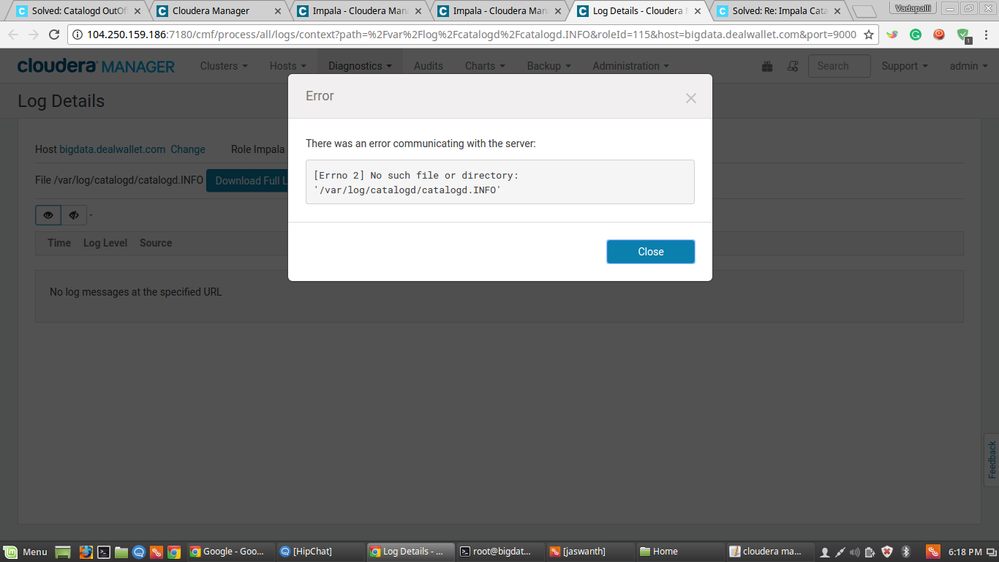
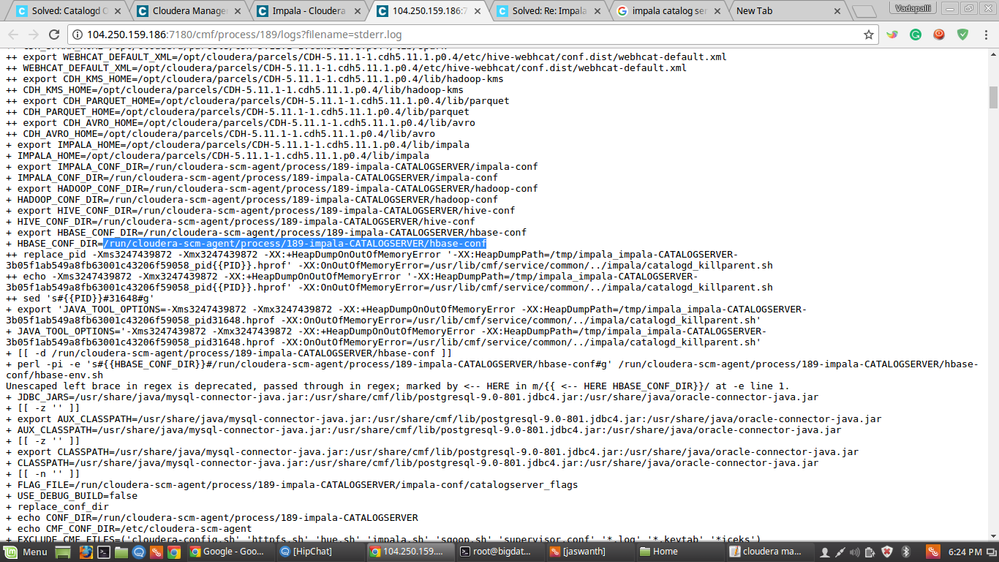
yes my impala daemon is working after adding the java_tool_options=-Xss2m but as same to catalog server i add java_tool_options=-Xss2m its not starting
and my java version is
java version "1.8.0_131"
Java(TM) SE Runtime Environment (build 1.8.0_131-b11)
Java HotSpot(TM) 64-Bit Server VM (build 25.131-b11, mixed mode)


Created 07-12-2017 09:34 AM
- Mark as New
- Bookmark
- Subscribe
- Mute
- Subscribe to RSS Feed
- Permalink
- Report Inappropriate Content
Thank you for sharing the solution.
Created 07-12-2017 10:19 PM
- Mark as New
- Bookmark
- Subscribe
- Mute
- Subscribe to RSS Feed
- Permalink
- Report Inappropriate Content
@rroyYou Welcome 🙂

Created 07-14-2017 02:13 AM
- Mark as New
- Bookmark
- Subscribe
- Mute
- Subscribe to RSS Feed
- Permalink
- Report Inappropriate Content
Great it helped me too.

- « Previous
-
- 1
- 2
- Next »

