
Our Community is getting an upgrade! To get everything ready for the relaunch, we’ll be placing the site in read-only mode starting September 21st.
We really appreciate your understanding while we get things set up behind the scenes. Catch up on all the exciting details about the move here.
Need help or have questions? Drop us a line at [email protected]

Archives of Support Questions (Read Only)
- Cloudera Community
- Board Archive
- Archives of Support Questions (Read Only)
- Re: Importtsv tool - Specify a YARN Queue?
- Subscribe to RSS Feed
- Mark Question as New
- Mark Question as Read
- Float this Question for Current User
- Bookmark
- Subscribe
- Mute
- Printer Friendly Page
- Subscribe to RSS Feed
- Mark Question as New
- Mark Question as Read
- Float this Question for Current User
- Bookmark
- Subscribe
- Mute
- Printer Friendly Page
Importtsv tool - Specify a YARN Queue?
- Labels:
-
Apache HBase
-
Apache YARN


Created 11-23-2015 04:22 PM
- Mark as New
- Bookmark
- Subscribe
- Mute
- Subscribe to RSS Feed
- Permalink
- Report Inappropriate Content
When using the importtsv tool is there a way to specify a YARN queue? Despite attempting to set a YARN queue it always goes to the 'default' queue.


Created 11-23-2015 09:35 PM
- Mark as New
- Bookmark
- Subscribe
- Mute
- Subscribe to RSS Feed
- Permalink
- Report Inappropriate Content
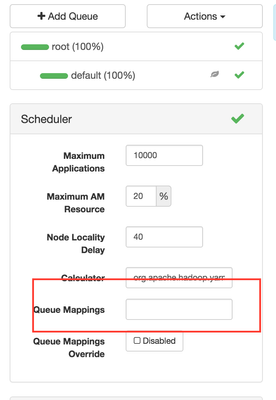
@Brad Bukacek Jr You could assign a default query to the user that is executing the importtsv statement.
What Scheduler are you using? Capacity or Fair Scheduler?
Here is the configuration for the capacity scheduler:
yarn.scheduler.capacity.queue-mappings
This configuration specifies the mapping of user or group to aspecific queue. You can map a single user or a list of users to queues. Syntax: [u or g]:[name]:[queue_name][,next_mapping]*. Here, u or g indicates whether the mapping is for a user or group. The value is u for user and g for group. name indicates the user name or group name. To specify the user who has submitted the application, %user can be used. queue_name indicates the queue name for which the application has to be mapped. To specify queue name same as user name, %user can be used. To specify queue name same as the name of the primary group for which the user belongs to, %primary_group can be used.
Example:
<property>
   <name>yarn.scheduler.capacity.queue-mappings</name>
   <value>u:user1:queue1,g:group1:queue2,u:%user:%user,u:user2:%primary_group</value>
   <description>
     Here, <user1> is mapped to <queue1>, <group1> is mapped to <queue2>,
     maps users to queues with the same name as user, <user2> is mapped
     to queue name same as <primary group> respectively. The mappings will be
     evaluated from left to right, and the first valid mapping will be used.
   </description>
 </property>


Created 11-23-2015 04:30 PM
- Mark as New
- Bookmark
- Subscribe
- Mute
- Subscribe to RSS Feed
- Permalink
- Report Inappropriate Content
You need to use -Dmapreduce.job.queuename=anotherqueue
just confirmed the following works
hbase org.apache.hadoop.hbase.mapreduce.RowCounter -Dmapreduce.job.queuename=hive1 TestTable
Created 11-23-2015 09:35 PM
- Mark as New
- Bookmark
- Subscribe
- Mute
- Subscribe to RSS Feed
- Permalink
- Report Inappropriate Content
@Brad Bukacek Jr You could assign a default query to the user that is executing the importtsv statement.
What Scheduler are you using? Capacity or Fair Scheduler?
Here is the configuration for the capacity scheduler:
yarn.scheduler.capacity.queue-mappings
This configuration specifies the mapping of user or group to aspecific queue. You can map a single user or a list of users to queues. Syntax: [u or g]:[name]:[queue_name][,next_mapping]*. Here, u or g indicates whether the mapping is for a user or group. The value is u for user and g for group. name indicates the user name or group name. To specify the user who has submitted the application, %user can be used. queue_name indicates the queue name for which the application has to be mapped. To specify queue name same as user name, %user can be used. To specify queue name same as the name of the primary group for which the user belongs to, %primary_group can be used.
Example:
<property>
   <name>yarn.scheduler.capacity.queue-mappings</name>
   <value>u:user1:queue1,g:group1:queue2,u:%user:%user,u:user2:%primary_group</value>
   <description>
     Here, <user1> is mapped to <queue1>, <group1> is mapped to <queue2>,
     maps users to queues with the same name as user, <user2> is mapped
     to queue name same as <primary group> respectively. The mappings will be
     evaluated from left to right, and the first valid mapping will be used.
   </description>
 </property>

Created on 11-23-2015 09:40 PM - edited 08-19-2019 05:46 AM
- Mark as New
- Bookmark
- Subscribe
- Mute
- Subscribe to RSS Feed
- Permalink
- Report Inappropriate Content
Blog : https://www.linkedin.com/pulse/yarn-queues-hadoop-neeraj-sabharwal
Capacity sheduler view has an option for user mapping
format



