
Our Community is getting an upgrade! To get everything ready for the relaunch, we’ll be placing the site in read-only mode starting September 21st.
We really appreciate your understanding while we get things set up behind the scenes. Catch up on all the exciting details about the move here.
Need help or have questions? Drop us a line at [email protected]

Archives of Support Questions (Read Only)
- Cloudera Community
- Board Archive
- Archives of Support Questions (Read Only)
- Re: Kafka Producer on Apache Atlas via command lin...
- Subscribe to RSS Feed
- Mark Question as New
- Mark Question as Read
- Float this Question for Current User
- Bookmark
- Subscribe
- Mute
- Printer Friendly Page
- Subscribe to RSS Feed
- Mark Question as New
- Mark Question as Read
- Float this Question for Current User
- Bookmark
- Subscribe
- Mute
- Printer Friendly Page
Kafka Producer on Apache Atlas via command line
- Labels:
-
Apache Atlas
-
Apache Kafka


Created 06-23-2017 12:37 PM
- Mark as New
- Bookmark
- Subscribe
- Mute
- Subscribe to RSS Feed
- Permalink
- Report Inappropriate Content
Hi,
I tried to use this command line :
> $KAFKA_BORKER_HOME/bin/kafka-topics.sh --create --zookeeper localhost:2181 --replication-factor 1 --partitions 1 --topic test

> $KAFKA_BORKER_HOME/bin/kafka-console-producer.sh --broker-list localhost:9092 --topic test
When I typed a test message like:
test message 1
I had this error message :
[2017-06-23 10:17:43,467] ERROR Error when sending message to topic test with key: null, value: 14 bytes with error: (org.apache.kafka.clients.producer.internals.ErrorLoggingCallback)
org.apache.kafka.common.errors.TimeoutException: Failed to update metadata after 60000 ms.
Do you have a suggestion ?
A this time, I am investigated around Ranger configuration.
Thanks for your help.



Created 06-23-2017 02:27 PM
- Mark as New
- Bookmark
- Subscribe
- Mute
- Subscribe to RSS Feed
- Permalink
- Report Inappropriate Content
Can you please check if the port 9092 is correct in the broker list and the broker is up and running ?
Also , is your cluster kerberized ?
Please note that :
The issue has nothing to do with Atlas or Ranger . When Atlas starts up , it creates 2 kafka topics ATLAS_HOOK and ATLAS_ENTITIES . The user doesn't have to create any topic.
Created 06-23-2017 02:27 PM
- Mark as New
- Bookmark
- Subscribe
- Mute
- Subscribe to RSS Feed
- Permalink
- Report Inappropriate Content
Can you please check if the port 9092 is correct in the broker list and the broker is up and running ?
Also , is your cluster kerberized ?
Please note that :
The issue has nothing to do with Atlas or Ranger . When Atlas starts up , it creates 2 kafka topics ATLAS_HOOK and ATLAS_ENTITIES . The user doesn't have to create any topic.
Created 06-23-2017 03:07 PM
- Mark as New
- Bookmark
- Subscribe
- Mute
- Subscribe to RSS Feed
- Permalink
- Report Inappropriate Content
Thanks for your comment @Sharmadha Sainath
I use HDP SandBox, so I use the default configuration.
Mu cluster is not kerberized.
First, I tried to use kafka-console-producer.sh to create an entity on ATLAS_HOOK. I had the same error message.
Command :
lsof -i -P -n | grep kafka
Result :
java       x      kafka  x  IPv6 x      0t0  TCP *:60141 (LISTEN)
java       x      kafka  x  IPv6 x      0t0  TCP 192.x.x.x:49648->192.x.x.x:2181 (ESTABLISHED)
java       x      kafka  x  IPv6 x      0t0  TCP 192.x.x.x:6667 (LISTEN)
java       x      kafka  x  IPv6 x      0t0  TCP 1192.x.x.x:6667->192.x.x.x:32837 (ESTABLISHED)
java       x      kafka  x  IPv6 x      0t0  TCP 192.x.x.x:47712->192.x.x.x:6667 (CLOSE_WAIT)
java       x      kafka  x  IPv6 x      0t0  TCP 192.x.x.x:45976->192.x.x.x:6188 (ESTABLISHED)
java       x      kafka  x  IPv6 x      0t0  TCP 192.x.x.x:6667->192.x.x.x:47717 (ESTABLISHED)
Command :
$KAFKA_BROKER_HOME/bin/kafka-topics.sh --describe --topic ATLAS_HOOK --zookeeper localhost:2181
Result :
Topic:ATLAS_HOOK        PartitionCount:1        ReplicationFactor:1     Configs:
        Topic: ATLAS_HOOK       Partition: 0    Leader: 1001    Replicas: 1001  Isr: 1001
Created on 06-23-2017 04:00 PM - edited 08-17-2019 08:19 PM
- Mark as New
- Bookmark
- Subscribe
- Mute
- Subscribe to RSS Feed
- Permalink
- Report Inappropriate Content
Can you please try with "--broker-list localhost:6667" ?
broker seems to be running on port 6667.
To verify the port number on which kafka broker is running , get into zookeeper client shell
using $ZOOKEEPER_HOME/bin/zkCli.sh and get the broker port.
The following image is taken after running zookeeper client shell and note that get /brokers/ids/0 lists the port.
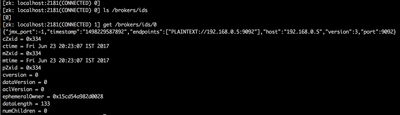
Best way to check the processes running on a port is using lsof -i:6667.
In your case , "kakfa" in the 3rd column of output lsof -i -P -n | grep kafka is the kafka user and not the process itself.
Also , best practice is to use the hostname itself instead of "localhost".
Created 06-26-2017 07:40 AM
- Mark as New
- Bookmark
- Subscribe
- Mute
- Subscribe to RSS Feed
- Permalink
- Report Inappropriate Content
Thank you su much @Sharmadha Sainath!
Your comment is very useful !!!
I tested these commands :
$KAFKA_HOME/bin/kafka-console-producer.sh --broker-list MY_HOSTNAME:6667 --topic ATLAS_HOOK
Then in Kafka Procuder console:
{"version": {"version": "1.0.0"}, "message": {"entities": [{"jsonClass": "org.apache.atlas.typesystem.json.InstanceSerialization$_Reference", "id": {"jsonClass": "org.apache.atlas.typesystem.json.InstanceSerialization$_Id", "id": "-1467290565135246000", "version": 0, "typeName": "hdfs_path", "state": "ACTIVE"}, "typeName": "hdfs_path", "values": {"qualifiedName": "TestKafka", "owner": "admin", "description": "Test kafka", "path":"/user/data/testkafka.csv", posixPermissions": null, "createTime": "1970-01-01T00:00:00.000Z", "isSymlink": false, "extendedAttributes": null, "numberOfReplicas": 0, "name": "DataKFK"}, "traitNames": [], "traits": {} }], "type": "ENTITY_CREATE", "user": "admin"} }
So, Atlas notifies into ATLAS_ENTITIES topic this new entity. I could see it on Atlas UI !
Have a good day !


