
Our Community is getting an upgrade! To get everything ready for the relaunch, we’ll be placing the site in read-only mode starting September 21st.
We really appreciate your understanding while we get things set up behind the scenes. Catch up on all the exciting details about the move here.
Need help or have questions? Drop us a line at [email protected]

Archives of Support Questions (Read Only)
- Cloudera Community
- Board Archive
- Archives of Support Questions (Read Only)
- NiFi - How to use JOLT to add json key:value dyna...
- Subscribe to RSS Feed
- Mark Question as New
- Mark Question as Read
- Float this Question for Current User
- Bookmark
- Subscribe
- Mute
- Printer Friendly Page
- Subscribe to RSS Feed
- Mark Question as New
- Mark Question as Read
- Float this Question for Current User
- Bookmark
- Subscribe
- Mute
- Printer Friendly Page
NiFi - How to use JOLT to add json key:value dynamically to the Flowfile content?
- Labels:
-
Apache NiFi


Created 12-11-2017 07:25 AM
- Mark as New
- Bookmark
- Subscribe
- Mute
- Subscribe to RSS Feed
- Permalink
- Report Inappropriate Content
Input JSON content -
{
"exampledata": {
"name": "Test",
"age": null,
"ver": null,
"payloadType": "Text",
"payloadData": "adsadsdsdsdsdsdsdsdsds",
"sequenceNum": null,
"timeStamp": "2017-09-22T12:07:29.968Z"
}
}
Output expected -
{ "exampledata": { "name": "Test", "age": null, "ver": null, "payloadType": "Text", "payloadData": "adsadsdsdsdsdsdsdsdsds", "sequenceNum": null, "timeStamp": "2017-09-22T12:07:29.968Z" "company" : "CompanyName" } }
company will be retrieved from Flowfile attribute and should be added to JSON Content.
Any help with JOLT Chain spec is much appreciated.


Created on 12-11-2017 03:00 PM - edited 08-17-2019 07:09 PM
- Mark as New
- Bookmark
- Subscribe
- Mute
- Subscribe to RSS Feed
- Permalink
- Report Inappropriate Content
According to jira https://issues.apache.org/jira/browse/NIFI-3010
if you are using NiFi 1.2+ then we can use Attributes from the flowfile and add them to json.
I'm having Company attributes associated with the flowfile and value is also Company.
Input:-
{
"exampledata": {
"name": "Test",
"age": null,
"ver": null,
"payloadType": "Text",
"payloadData": "adsadsdsdsdsdsdsdsdsds",
"sequenceNum": null,
"timeStamp": "2017-09-22T12:07:29.968Z"
}
}Jolt-spec:-
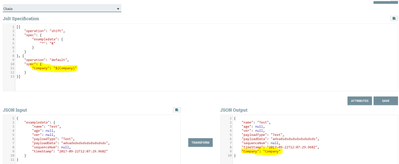
[{
 "operation": "shift",
 "spec": {
  "*": "&"
 }
}, {
 "operation": "default",
 "spec": {
  "Company": "${Company}"
 }
}]
Output:-
{
"exampledata": {
"name": "Test",
"age": null,
"ver": null,
"payloadType": "Text",
"payloadData": "adsadsdsdsdsdsdsdsdsds",
"sequenceNum": null,
"timeStamp": "2017-09-22T12:07:29.968Z"
},
"Company": "Company"
}
but this spec won't give the expected output as per your question, as we cannot add the attribute into main exampledata list.
Example1:-
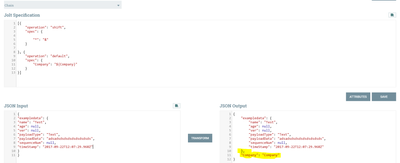
by flattening out exampledata then we can add company attribute to the json message as follow.
Jolt-spec:-
[{
"operation": "shift",
"spec": {
"exampledata": {
"*": "&"
}
}
}, {
"operation": "default",
"spec": {
"Company": "${Company}"
}
}]
Output:-
{
"name": "Test",
"age": null,
"ver": null,
"payloadType": "Text",
"payloadData": "adsadsdsdsdsdsdsdsdsds",
"sequenceNum": null,
"timeStamp": "2017-09-22T12:07:29.968Z",
"Company": "Company"
}
Example2:-
If you are using prior version than NiFi 1.2, Then you need to use Replace text Processor with Below Properties.
Search Value
}\s+}
Replacement Value
,"company" : "${CompanyName}" } }
Replacement Strategy
Regex Replace
Evaluation Mode
Entire text
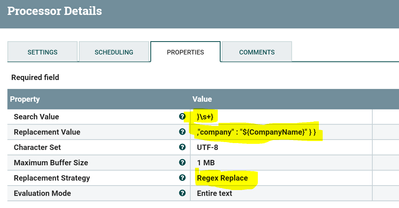
By using this method also we can add the attribute dynamically based on the flowfile attributes to the json message.
Created on 12-11-2017 03:00 PM - edited 08-17-2019 07:09 PM
- Mark as New
- Bookmark
- Subscribe
- Mute
- Subscribe to RSS Feed
- Permalink
- Report Inappropriate Content
According to jira https://issues.apache.org/jira/browse/NIFI-3010
if you are using NiFi 1.2+ then we can use Attributes from the flowfile and add them to json.
I'm having Company attributes associated with the flowfile and value is also Company.
Input:-
{
"exampledata": {
"name": "Test",
"age": null,
"ver": null,
"payloadType": "Text",
"payloadData": "adsadsdsdsdsdsdsdsdsds",
"sequenceNum": null,
"timeStamp": "2017-09-22T12:07:29.968Z"
}
}
Jolt-spec:-
[{
 "operation": "shift",
 "spec": {
  "*": "&"
 }
}, {
 "operation": "default",
 "spec": {
  "Company": "${Company}"
 }
}]
Output:-
{
"exampledata": {
"name": "Test",
"age": null,
"ver": null,
"payloadType": "Text",
"payloadData": "adsadsdsdsdsdsdsdsdsds",
"sequenceNum": null,
"timeStamp": "2017-09-22T12:07:29.968Z"
},
"Company": "Company"
}
but this spec won't give the expected output as per your question, as we cannot add the attribute into main exampledata list.
Example1:-
by flattening out exampledata then we can add company attribute to the json message as follow.
Jolt-spec:-
[{
"operation": "shift",
"spec": {
"exampledata": {
"*": "&"
}
}
}, {
"operation": "default",
"spec": {
"Company": "${Company}"
}
}]
Output:-
{
"name": "Test",
"age": null,
"ver": null,
"payloadType": "Text",
"payloadData": "adsadsdsdsdsdsdsdsdsds",
"sequenceNum": null,
"timeStamp": "2017-09-22T12:07:29.968Z",
"Company": "Company"
}
Example2:-
If you are using prior version than NiFi 1.2, Then you need to use Replace text Processor with Below Properties.
Search Value
}\s+}
Replacement Value
,"company" : "${CompanyName}" } }
Replacement Strategy
Regex Replace
Evaluation Mode
Entire text
By using this method also we can add the attribute dynamically based on the flowfile attributes to the json message.
Created 12-12-2017 09:14 AM
- Mark as New
- Bookmark
- Subscribe
- Mute
- Subscribe to RSS Feed
- Permalink
- Report Inappropriate Content
@Shu - Thanks a lot, it is really helpful.


