
Our Community is getting an upgrade! To get everything ready for the relaunch, we’ll be placing the site in read-only mode starting September 21st.
We really appreciate your understanding while we get things set up behind the scenes. Catch up on all the exciting details about the move here.
Need help or have questions? Drop us a line at [email protected]

Archives of Support Questions (Read Only)
- Cloudera Community
- Board Archive
- Archives of Support Questions (Read Only)
- Oozie-Error: E0501: User: oozie is not allowed to ...
- Subscribe to RSS Feed
- Mark Question as New
- Mark Question as Read
- Float this Question for Current User
- Bookmark
- Subscribe
- Mute
- Printer Friendly Page
- Subscribe to RSS Feed
- Mark Question as New
- Mark Question as Read
- Float this Question for Current User
- Bookmark
- Subscribe
- Mute
- Printer Friendly Page
Oozie-Error: E0501: User: oozie is not allowed to impersonate root


Created on 12-25-2013 01:30 PM - edited 09-16-2022 01:51 AM
- Mark as New
- Bookmark
- Subscribe
- Mute
- Subscribe to RSS Feed
- Permalink
- Report Inappropriate Content
I manually installed a single-node cluster according to the cloudera instructions and this oozie example worked fine. But now I am manually installing a three-node cluster, and running the Oozie example (http://archive.cloudera.com/cdh4/cdh/4/oozie/DG_Examples.html) does not work.
I did everything according to the instructions:
Create the Oozie DB:
CREATE DATABASE oozie;
GRANT ALL PRIVILEGES ON  oozie.* TO 'oozie'@'localhost' IDENTIFIED BY 'oozie';
GRANT ALL PRIVILEGES ON oozie.* TO 'oozie'@'%' IDENTIFIED BY 'oozie';
exit;
Edit the oozie-site.xml file:
    <property>
        <name>oozie.service.JPAService.jdbc.driver</name>
        <value>com.mysql.jdbc.Driver</value>
    </property>
    <property>
        <name>oozie.service.JPAService.jdbc.url</name>
        <value>jdbc:mysql://MY-VM-ALIAS:3306/oozie</value>
    </property>
    <property>
        <name>oozie.service.JPAService.jdbc.username</name>
        <value>oozie</value>
    </property>
    <property>
        <name>oozie.service.JPAService.jdbc.password</name>
        <value>oozie</value>
    </property>
(where MY-VM-ALIAS is in the /etc/hosts file as usual)
Put the MySQL Connector in /var/lib/oozie
Run the DB Creation tool successfully:
sudo -u oozie /usr/lib/oozie/bin/ooziedb.sh create -run
Install the ShareLib via:
sudo -u hdfs hadoop fs -mkdir  /user/oozie
sudo -u hdfs hadoop fs -chown oozie:oozie /user/oozie
mkdir /tmp/ooziesharelib
cd /tmp/ooziesharelib
tar xzf /usr/lib/oozie/oozie-sharelib.tar.gz
sudo -u oozie hadoop fs -put share /user/oozie/share
Start the oozie server
Download and unzip the tar file on the Master Node with the Oozie server.
Verify that JobTracker is on port 8021 (by mapred-site.xml) and that NameNode is on port 8020 (by core-site.xml) as listed in the examples/apps/map-reduce/job.properties file:
nameNode=hdfs://MY-VM-ALIAS:8020
jobTracker=MY-VM-ALIAS:8021
queueName=default
examplesRoot=examples

oozie.wf.application.path=${nameNode}/user/${user.name}/${examplesRoot}/apps/map-reduce
outputDir=map-reduce
Put the examples directory into HDFS.
Export OOZIE_URL
Issue this command to run the example:
oozie job -config examples/apps/map-reduce/job.properties -run
The first time I received the following error:
Error: E0501 : E0501: Could not perform authorization operation, Call From MY-VM-ALIAS/xxx.xx.xx.xxx to localhost:8020 failed on connection exception: java.net.ConnectException: Connection refused; For more details see: http://wiki.apache.org/hadoop/ConnectionRefused
I did a telnet localhost 8020 and a telnet localhost 8021 and both failed. However, a telnet MY-VM-ALIAS 8020 and a MY-VM-ALIAS 8021 worked fine.
So I edited the examples/apps/map-reduce/job.properties file and replaced localhost with MY-VM-ALIAS:
nameNode=hdfs://MY-VM-ALIAS:8020
jobTracker=MY-VM-ALIAS:8021
queueName=default
examplesRoot=examples

oozie.wf.application.path=${nameNode}/user/${user.name}/${examplesRoot}/apps/map-reduce
outputDir=map-reduce
And issuing the command to run the example:
oozie job -config examples/apps/map-reduce/job.properties -run
produces the following error:
Error: E0501 : E0501: Could not perform authorization operation, User: oozie is not allowed to impersonate root
If I issue:
sudo -u oozie oozie job -config examples/apps/map-reduce/job.properties -oozie "http://MY-VM-ALIAS:11000/oozie" -run
I receive the following error:
Error: E0501 : E0501: Could not perform authorization operation, User: oozie is not allowed to impersonate oozie
Google suggested I add this to my core-site.xml file:
<property
      <name>hadoop.proxyuser.oozie.hosts</name>
      <value>*</value>
 </property>

 <property>
      <name>hadoop.proxyuser.oozie.groups</name>
      <value>*</value>
 </property>
Which didn't accomplish anything.
Created on 12-25-2013 01:33 PM - edited 12-25-2013 02:01 PM
- Mark as New
- Bookmark
- Subscribe
- Mute
- Subscribe to RSS Feed
- Permalink
- Report Inappropriate Content
Ok, well after I restarted HDFS via:
for x in `cd /etc/init.d ; ls hadoop-hdfs-*` ; do sudo service $x restart ; done
The proxy settings that I added to core-site.xml appeared to have kicked in and I could then run the example.
However, when I go to MY-VM-ALIAS:11000/oozie, the job's status is KILLED immediately.
If I double click on the job, and then double click on the action item with the name of fail, I can see that the error message is:
Map/Reduce failed, error message[rRuntimeException: Error in configuing object]
Clicking on the Job Log tab, I saw this:
Caused by: java.lang.IllegalArgumentException: Compression codec com.hadoop.compression.lzo.LzoCodec not found.
	at org.apache.hadoop.io.compress.CompressionCodecFactory.getCodecClasses(CompressionCodecFactory.java:134)
	at org.apache.hadoop.io.compress.CompressionCodecFactory.<init>(CompressionCodecFactory.java:174)
	at org.apache.hadoop.mapred.TextInputFormat.configure(TextInputFormat.java:38)
	... 29 more
Caused by: java.lang.ClassNotFoundException: Class com.hadoop.compression.lzo.LzoCodec not found
	at org.apache.hadoop.conf.Configuration.getClassByName(Configuration.java:1680)
	at org.apache.hadoop.io.compress.CompressionCodecFactory.getCodecClasses(CompressionCodecFactory.java:127)
	... 31 more
Google suggested that I put the "hadoop-lzo.jar in /var/lib/oozie/ and [restart] Oozie."
So I issued (on my master node with the Oozie server):
find / -name hadoop-lzo.jar
cp /usr/lib/hadoop/lib/hadoop-lzo.jar /var/lib/oozie/
sudo service oozie restart
and my job ran and succeeded!



Created 12-25-2013 09:31 PM
- Mark as New
- Bookmark
- Subscribe
- Mute
- Subscribe to RSS Feed
- Permalink
- Report Inappropriate Content
error, but you'll need to ensure you've made the change on the
NameNode and JobTracker's core-site.xml and that you've restarted them
after the change. Has this been done as well?
P.s. If you use Cloudera Manager controlled cluster, this property is
pre-added for the out of box experience.


Created 01-13-2014 06:34 AM
- Mark as New
- Bookmark
- Subscribe
- Mute
- Subscribe to RSS Feed
- Permalink
- Report Inappropriate Content
When you added the hadoop.proxyuser.oozie.* values, did you restart MapReduce and HBase? They have to be restarted to notice that change. Also, are you using CM? It doesn't look like it, but I wanted to confirm because that would change things.
Thanks
Chris
Created on 12-25-2013 01:33 PM - edited 12-25-2013 02:01 PM
- Mark as New
- Bookmark
- Subscribe
- Mute
- Subscribe to RSS Feed
- Permalink
- Report Inappropriate Content
Ok, well after I restarted HDFS via:
for x in `cd /etc/init.d ; ls hadoop-hdfs-*` ; do sudo service $x restart ; done
The proxy settings that I added to core-site.xml appeared to have kicked in and I could then run the example.
However, when I go to MY-VM-ALIAS:11000/oozie, the job's status is KILLED immediately.
If I double click on the job, and then double click on the action item with the name of fail, I can see that the error message is:
Map/Reduce failed, error message[rRuntimeException: Error in configuing object]
Clicking on the Job Log tab, I saw this:
Caused by: java.lang.IllegalArgumentException: Compression codec com.hadoop.compression.lzo.LzoCodec not found.
	at org.apache.hadoop.io.compress.CompressionCodecFactory.getCodecClasses(CompressionCodecFactory.java:134)
	at org.apache.hadoop.io.compress.CompressionCodecFactory.<init>(CompressionCodecFactory.java:174)
	at org.apache.hadoop.mapred.TextInputFormat.configure(TextInputFormat.java:38)
	... 29 more
Caused by: java.lang.ClassNotFoundException: Class com.hadoop.compression.lzo.LzoCodec not found
	at org.apache.hadoop.conf.Configuration.getClassByName(Configuration.java:1680)
	at org.apache.hadoop.io.compress.CompressionCodecFactory.getCodecClasses(CompressionCodecFactory.java:127)
	... 31 more
Google suggested that I put the "hadoop-lzo.jar in /var/lib/oozie/ and [restart] Oozie."
So I issued (on my master node with the Oozie server):
find / -name hadoop-lzo.jar
cp /usr/lib/hadoop/lib/hadoop-lzo.jar /var/lib/oozie/
sudo service oozie restart
and my job ran and succeeded!
Created 12-25-2013 09:31 PM
- Mark as New
- Bookmark
- Subscribe
- Mute
- Subscribe to RSS Feed
- Permalink
- Report Inappropriate Content
error, but you'll need to ensure you've made the change on the
NameNode and JobTracker's core-site.xml and that you've restarted them
after the change. Has this been done as well?
P.s. If you use Cloudera Manager controlled cluster, this property is
pre-added for the out of box experience.
Created on 12-28-2013 05:57 PM - edited 12-28-2013 05:58 PM
- Mark as New
- Bookmark
- Subscribe
- Mute
- Subscribe to RSS Feed
- Permalink
- Report Inappropriate Content
I currently only have a three node cluster, so I have the JobTracker and NameNode on a single node (which I call "The Master Node"). Thank you for that fact, however, as I plan on attempting to manually install a larger cluster.
Would it be necessary to add to my core-site.xml's on my Slave Nodes as well?
I am practicing manual installations just to understand the inner workings, but when my company decides to move into production with our POCs I will definitely use Cloudera Manager.
Would you happen to know if there is a list of properties configured out of the box in Cloudera Manager that one has to look out for when doing manual installations?
Thank you Harsh J.
Created 12-28-2013 09:04 PM
- Mark as New
- Bookmark
- Subscribe
- Mute
- Subscribe to RSS Feed
- Permalink
- Report Inappropriate Content
Created on 01-10-2014 01:49 PM - edited 01-10-2014 02:01 PM
- Mark as New
- Bookmark
- Subscribe
- Mute
- Subscribe to RSS Feed
- Permalink
- Report Inappropriate Content
I have now installed a 5 node cluster with the following configuration:
Master 1: NameNode
Master 2: Secondary NameNode, JobTracker, HMaster, Hive MetaStore,
Slave 1: TaskTracker, DataNode, HRegionServer
Slave 2: TaskTracker, DataNode, HRegionServer
Slave 3: TaskTracker, DataNode, HRegionServer
I installed Ooize on my Master 2, along with a MySQL database, and ran the same steps.
For Master 1 (NameNode) and Master 2 (JobTracker), I added the following properties to the core-site.xml as before:
<property
      <name>hadoop.proxyuser.oozie.hosts</name>
      <value>*</value>
 </property>

 <property>
      <name>hadoop.proxyuser.oozie.groups</name>
      <value>*</value>
 </property>
And restarted HDFS on both of the nodes.
Now, I can issue the oozie job ... command and from my bash it executes successfully with no errors. However, when I log into the Oozie Web Console, I am told that the job cannot successfully because "JA009: User: oozie is not allowed to impersonate root".
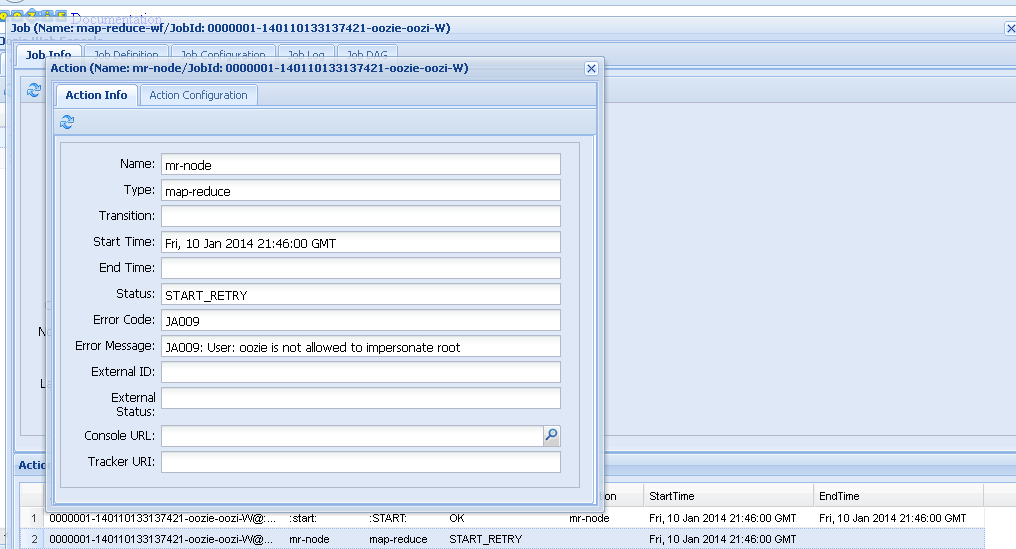
Here are the logs:
2014-01-10 13:58:05,677 INFO ActionStartXCommand:539 - USER[root] GROUP[-] TOKEN[] APP[map-reduce-wf] JOB[0000003-140110133137421-oozie-oozi-W] ACTION[0000003-140110133137421-oozie-oozi-W@:start:] Start action [0000003-140110133137421-oozie-oozi-W@:start:] with user-retry state : userRetryCount [0], userRetryMax [0], userRetryInterval [10]
2014-01-10 13:58:05,678 WARN ActionStartXCommand:542 - USER[root] GROUP[-] TOKEN[] APP[map-reduce-wf] JOB[0000003-140110133137421-oozie-oozi-W] ACTION[0000003-140110133137421-oozie-oozi-W@:start:] [***0000003-140110133137421-oozie-oozi-W@:start:***]Action status=DONE
2014-01-10 13:58:05,678 WARN ActionStartXCommand:542 - USER[root] GROUP[-] TOKEN[] APP[map-reduce-wf] JOB[0000003-140110133137421-oozie-oozi-W] ACTION[0000003-140110133137421-oozie-oozi-W@:start:] [***0000003-140110133137421-oozie-oozi-W@:start:***]Action updated in DB!
2014-01-10 13:58:05,791 INFO ActionStartXCommand:539 - USER[root] GROUP[-] TOKEN[] APP[map-reduce-wf] JOB[0000003-140110133137421-oozie-oozi-W] ACTION[0000003-140110133137421-oozie-oozi-W@mr-node] Start action [0000003-140110133137421-oozie-oozi-W@mr-node] with user-retry state : userRetryCount [0], userRetryMax [0], userRetryInterval [10]
2014-01-10 13:58:06,083 WARN MapReduceActionExecutor:542 - USER[root] GROUP[-] TOKEN[] APP[map-reduce-wf] JOB[0000003-140110133137421-oozie-oozi-W] ACTION[0000003-140110133137421-oozie-oozi-W@mr-node] credentials is null for the action
2014-01-10 13:58:06,500 WARN ActionStartXCommand:542 - USER[root] GROUP[-] TOKEN[] APP[map-reduce-wf] JOB[0000003-140110133137421-oozie-oozi-W] ACTION[0000003-140110133137421-oozie-oozi-W@mr-node] Error starting action [mr-node]. ErrorType [TRANSIENT], ErrorCode [JA009], Message [JA009: User: oozie is not allowed to impersonate root]
org.apache.oozie.action.ActionExecutorException: JA009: User: oozie is not allowed to impersonate root
at org.apache.oozie.action.ActionExecutor.convertExceptionHelper(ActionExecutor.java:418)
at org.apache.oozie.action.ActionExecutor.convertException(ActionExecutor.java:392)
at org.apache.oozie.action.hadoop.JavaActionExecutor.submitLauncher(JavaActionExecutor.java:773)
at org.apache.oozie.action.hadoop.JavaActionExecutor.start(JavaActionExecutor.java:927)
at org.apache.oozie.command.wf.ActionStartXCommand.execute(ActionStartXCommand.java:211)
at org.apache.oozie.command.wf.ActionStartXCommand.execute(ActionStartXCommand.java:59)
at org.apache.oozie.command.XCommand.call(XCommand.java:277)
at org.apache.oozie.service.CallableQueueService$CompositeCallable.call(CallableQueueService.java:326)
at org.apache.oozie.service.CallableQueueService$CompositeCallable.call(CallableQueueService.java:255)
at org.apache.oozie.service.CallableQueueService$CallableWrapper.run(CallableQueueService.java:175)
at java.util.concurrent.ThreadPoolExecutor$Worker.runTask(ThreadPoolExecutor.java:895)
at java.util.concurrent.ThreadPoolExecutor$Worker.run(ThreadPoolExecutor.java:918)
at java.lang.Thread.run(Thread.java:662)
Caused by: org.apache.hadoop.ipc.RemoteException(org.apache.hadoop.security.authorize.AuthorizationException): User: oozie is not allowed to impersonate root
at org.apache.hadoop.ipc.Client.call(Client.java:1238)
at org.apache.hadoop.ipc.WritableRpcEngine$Invoker.invoke(WritableRpcEngine.java:225)
at org.apache.hadoop.mapred.$Proxy30.getDelegationToken(Unknown Source)
at org.apache.hadoop.mapred.JobClient.getDelegationToken(JobClient.java:2125)
at org.apache.oozie.service.HadoopAccessorService.createJobClient(HadoopAccessorService.java:372)
at org.apache.oozie.action.hadoop.JavaActionExecutor.createJobClient(JavaActionExecutor.java:970)
at org.apache.oozie.action.hadoop.JavaActionExecutor.submitLauncher(JavaActionExecutor.java:723)
... 10 more
2014-01-10 13:58:06,501 INFO ActionStartXCommand:539 - USER[root] GROUP[-] TOKEN[] APP[map-reduce-wf] JOB[0000003-140110133137421-oozie-oozi-W] ACTION[0000003-140110133137421-oozie-oozi-W@mr-node] Next Retry, Attempt Number [1] in [60,000] milliseconds
2014-01-10 13:59:06,556 INFO ActionStartXCommand:539 - USER[root] GROUP[-] TOKEN[] APP[map-reduce-wf] JOB[0000003-140110133137421-oozie-oozi-W] ACTION[0000003-140110133137421-oozie-oozi-W@mr-node] Start action [0000003-140110133137421-oozie-oozi-W@mr-node] with user-retry state : userRetryCount [0], userRetryMax [0], userRetryInterval [10]
2014-01-10 13:59:06,692 WARN MapReduceActionExecutor:542 - USER[root] GROUP[-] TOKEN[] APP[map-reduce-wf] JOB[0000003-140110133137421-oozie-oozi-W] ACTION[0000003-140110133137421-oozie-oozi-W@mr-node] credentials is null for the action
2014-01-10 13:59:07,028 WARN ActionStartXCommand:542 - USER[root] GROUP[-] TOKEN[] APP[map-reduce-wf] JOB[0000003-140110133137421-oozie-oozi-W] ACTION[0000003-140110133137421-oozie-oozi-W@mr-node] Error starting action [mr-node]. ErrorType [TRANSIENT], ErrorCode [JA009], Message [JA009: User: oozie is not allowed to impersonate root]
org.apache.oozie.action.ActionExecutorException: JA009: User: oozie is not allowed to impersonate root
at org.apache.oozie.action.ActionExecutor.convertExceptionHelper(ActionExecutor.java:418)
at org.apache.oozie.action.ActionExecutor.convertException(ActionExecutor.java:392)
at org.apache.oozie.action.hadoop.JavaActionExecutor.submitLauncher(JavaActionExecutor.java:773)
at org.apache.oozie.action.hadoop.JavaActionExecutor.start(JavaActionExecutor.java:927)
at org.apache.oozie.command.wf.ActionStartXCommand.execute(ActionStartXCommand.java:211)
at org.apache.oozie.command.wf.ActionStartXCommand.execute(ActionStartXCommand.java:59)
at org.apache.oozie.command.XCommand.call(XCommand.java:277)
at org.apache.oozie.service.CallableQueueService$CallableWrapper.run(CallableQueueService.java:175)
at java.util.concurrent.ThreadPoolExecutor$Worker.runTask(ThreadPoolExecutor.java:895)
at java.util.concurrent.ThreadPoolExecutor$Worker.run(ThreadPoolExecutor.java:918)
at java.lang.Thread.run(Thread.java:662)
Caused by: org.apache.hadoop.ipc.RemoteException(org.apache.hadoop.security.authorize.AuthorizationException): User: oozie is not allowed to impersonate root
at org.apache.hadoop.ipc.Client.call(Client.java:1238)
at org.apache.hadoop.ipc.WritableRpcEngine$Invoker.invoke(WritableRpcEngine.java:225)
at org.apache.hadoop.mapred.$Proxy30.getDelegationToken(Unknown Source)
at org.apache.hadoop.mapred.JobClient.getDelegationToken(JobClient.java:2125)
at org.apache.oozie.service.HadoopAccessorService.createJobClient(HadoopAccessorService.java:372)
at org.apache.oozie.action.hadoop.JavaActionExecutor.createJobClient(JavaActionExecutor.java:970)
at org.apache.oozie.action.hadoop.JavaActionExecutor.submitLauncher(JavaActionExecutor.java:723)
... 8 more
2014-01-10 13:59:07,029 INFO ActionStartXCommand:539 - USER[root] GROUP[-] TOKEN[] APP[map-reduce-wf] JOB[0000003-140110133137421-oozie-oozi-W] ACTION[0000003-140110133137421-oozie-oozi-W@mr-node] Next Retry, Attempt Number [2] in [60,000] milliseconds
Any ideas?
Thank you.
Created 01-13-2014 06:34 AM
- Mark as New
- Bookmark
- Subscribe
- Mute
- Subscribe to RSS Feed
- Permalink
- Report Inappropriate Content
When you added the hadoop.proxyuser.oozie.* values, did you restart MapReduce and HBase? They have to be restarted to notice that change. Also, are you using CM? It doesn't look like it, but I wanted to confirm because that would change things.
Thanks
Chris
Created 01-13-2014 01:25 PM
- Mark as New
- Bookmark
- Subscribe
- Mute
- Subscribe to RSS Feed
- Permalink
- Report Inappropriate Content
Ok great. I restarted all MapReduce and Hbase daemons in addition to the HDFS daemons and it is working properly now. Thank you!
Previously I had only restarted HDFS.


