
Our Community is getting an upgrade! To get everything ready for the relaunch, we’ll be placing the site in read-only mode starting September 21st.
We really appreciate your understanding while we get things set up behind the scenes. Catch up on all the exciting details about the move here.
Need help or have questions? Drop us a line at [email protected]

Archives of Support Questions (Read Only)
- Cloudera Community
- Board Archive
- Archives of Support Questions (Read Only)
- Re: [SOLVED]Java Hdfs Program Fails With Connectio...
- Subscribe to RSS Feed
- Mark Question as New
- Mark Question as Read
- Float this Question for Current User
- Bookmark
- Subscribe
- Mute
- Printer Friendly Page
- Subscribe to RSS Feed
- Mark Question as New
- Mark Question as Read
- Float this Question for Current User
- Bookmark
- Subscribe
- Mute
- Printer Friendly Page
[SOLVED]Java Hdfs Program Fails With Connection Refused
- Labels:
-
Apache Hadoop


Created on 05-17-2017 12:15 AM - edited 08-18-2019 03:03 AM
- Mark as New
- Bookmark
- Subscribe
- Mute
- Subscribe to RSS Feed
- Permalink
- Report Inappropriate Content
Hopefully someone can help me figure out what is going on.
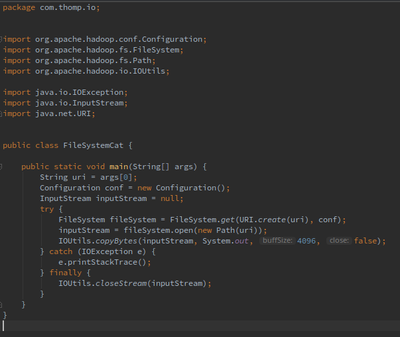
I downloaded Hdp 2.6 for virtualbox and followed the instructions to install and set up. I am running it on Linux Mint 18. I am following along in the 'Hadoop the Definitive Guide' book and I am trying to run one of the examples. Here is the code I wrote from the book:
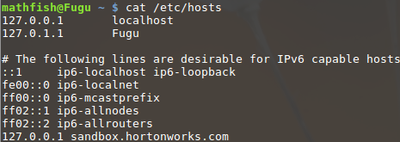
I set up my /etc/hosts like this, just following the instructions in the 'Learning the Ropes' tutorial.
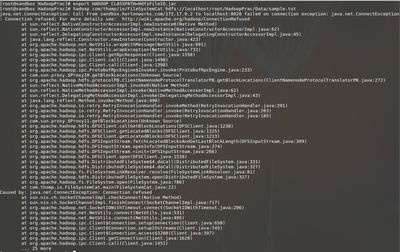
Following the book I do the following but I am getting a connection refused error. Is something not setup correctly?
Any and all help would be GREATLY appreciated. I was up super late last night trying to figure this out with no luck.


Created 05-17-2017 03:42 AM
- Mark as New
- Bookmark
- Subscribe
- Mute
- Subscribe to RSS Feed
- Permalink
- Report Inappropriate Content
dfs.namenode.datanode.registration.ip-hostname-check
If true (the default), then the namenode requires that a connecting datanode's address must be resolved to a hostname. If necessary, a reverse DNS lookup is performed. All attempts to register a datanode from an unresolvable address are rejected. It is recommended that this setting be left on to prevent accidental registration of datanodes listed by hostname in the excludes file during a DNS outage. Only set this to false in environments where there is no infrastructure to support reverse DNS lookup.
Created on 05-17-2017 02:34 AM - edited 08-18-2019 03:03 AM
- Mark as New
- Bookmark
- Subscribe
- Mute
- Subscribe to RSS Feed
- Permalink
- Report Inappropriate Content
So the above works if I do:
hadoop com/thomp/io/FileSystemCat hdfs://sandbox.hortonworks.com:8020/HadoopPrac/Data/sample.txt
or if I do
hadoop com/thomp/io/FileSystemCat hdfs://172.17.0.2:8020/HadoopPrac/Data/sample.txt
Why is that? I set up hdp 2.6 sandbox on my mac and it works when I just do localhost. Why wouldn't it be the same thing since it is the same install?
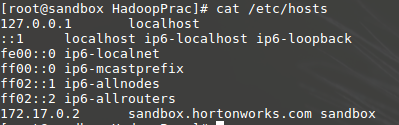
Here is a screen shot of the /etc/hosts file on the vm:
Created 05-17-2017 03:24 AM
- Mark as New
- Bookmark
- Subscribe
- Mute
- Subscribe to RSS Feed
- Permalink
- Report Inappropriate Content
You can execute the following tests bellow, usually the sanbox hdfs is not set to listen to localhost, but to sandbox.hortonworks.com;
hdfs$ hdfs dfs -ls hdfs://sandbox.hortonworks.com/tmp
You can try with localhost and should fail with the same Error:
hdfs$ hdfs dfs -ls hdfs://localhost/tmp
To check, just go to ambari:services:hdfs:configs:Advance and filter for port number 8020;
Created 05-17-2017 03:42 AM
- Mark as New
- Bookmark
- Subscribe
- Mute
- Subscribe to RSS Feed
- Permalink
- Report Inappropriate Content
dfs.namenode.datanode.registration.ip-hostname-check
If true (the default), then the namenode requires that a connecting datanode's address must be resolved to a hostname. If necessary, a reverse DNS lookup is performed. All attempts to register a datanode from an unresolvable address are rejected. It is recommended that this setting be left on to prevent accidental registration of datanodes listed by hostname in the excludes file during a DNS outage. Only set this to false in environments where there is no infrastructure to support reverse DNS lookup.
Created 05-17-2017 04:17 PM
- Mark as New
- Bookmark
- Subscribe
- Mute
- Subscribe to RSS Feed
- Permalink
- Report Inappropriate Content
Okay, that makes sense.
And I just checked and on my mac I was actually doing the command:
hadoop com/thomp/io/FileSystemCat /HadoopPrac/Data/sample.txt
which also worked.
Thanks again!


