
Our Community is getting an upgrade! To get everything ready for the relaunch, we’ll be placing the site in read-only mode starting September 21st.
We really appreciate your understanding while we get things set up behind the scenes. Catch up on all the exciting details about the move here.
Need help or have questions? Drop us a line at [email protected]

Archives of Support Questions (Read Only)
- Cloudera Community
- Board Archive
- Archives of Support Questions (Read Only)
- Service 'webhcat' check failed: RA080 Can't determ...
- Subscribe to RSS Feed
- Mark Question as New
- Mark Question as Read
- Float this Question for Current User
- Bookmark
- Subscribe
- Mute
- Printer Friendly Page
- Subscribe to RSS Feed
- Mark Question as New
- Mark Question as Read
- Float this Question for Current User
- Bookmark
- Subscribe
- Mute
- Printer Friendly Page
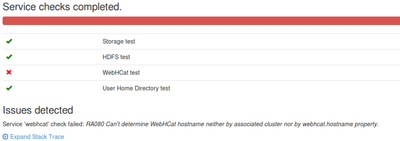
Service 'webhcat' check failed: RA080 Can't determine WebHCat hostname neither by associated cluster nor by webhcat.hostname property
- Labels:
-
Apache Ambari
-
Apache Hive


Created on 11-12-2017 11:07 PM - edited 08-18-2019 01:13 AM
- Mark as New
- Bookmark
- Subscribe
- Mute
- Subscribe to RSS Feed
- Permalink
- Report Inappropriate Content
I have created a PIG view in Ambari Server and cannot access it due to error "Service 'webhcat' check failed: RA080 Can't determine WebHCat hostname neither by associated cluster nor by webhcat.hostname property"
I used also the below configuration:
- a.Go to Services > HDFS > Configs
- b.Under the Advanced tab, navigate to the Custom core-site section
- c.Click Add Property with the following inputs:
| hadoop.proxyuser.hcat.groups=*
hadoop.proxyuser.hcat.hosts=* webhcat.proxyuser.root.groups=* webhcat.proxyuser.root.hosts=* |
But, I have still problem. How can I resolve it?



Created 11-13-2017 12:30 AM
- Mark as New
- Bookmark
- Subscribe
- Mute
- Subscribe to RSS Feed
- Permalink
- Report Inappropriate Content
Created 11-13-2017 12:14 AM
- Mark as New
- Bookmark
- Subscribe
- Mute
- Subscribe to RSS Feed
- Permalink
- Report Inappropriate Content
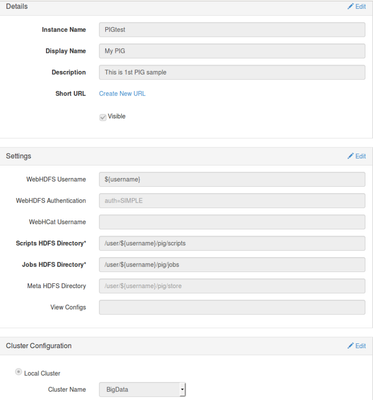
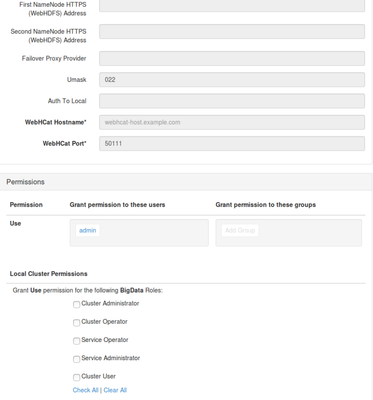
Can you share your Pig View configurations and HDP version ?
Created on 11-13-2017 12:31 AM - edited 08-18-2019 01:13 AM
- Mark as New
- Bookmark
- Subscribe
- Mute
- Subscribe to RSS Feed
- Permalink
- Report Inappropriate Content
Dear Dinesh,
HDP version is 2.6. Pig View Configuration is in the below figures:
Created 11-13-2017 12:30 AM
- Mark as New
- Bookmark
- Subscribe
- Mute
- Subscribe to RSS Feed
- Permalink
- Report Inappropriate Content
Created 11-13-2017 12:47 AM
- Mark as New
- Bookmark
- Subscribe
- Mute
- Subscribe to RSS Feed
- Permalink
- Report Inappropriate Content
Thanks for link. One step is about Hive configuration, but I do not want it. Or is it mandatory for Pig View? this link: https://docs.hortonworks.com/HDPDocuments/Ambari-2.6.0.0/bk_ambari-views/content/setup_WebHCat_proxy...
Created 11-13-2017 06:14 AM
- Mark as New
- Bookmark
- Subscribe
- Mute
- Subscribe to RSS Feed
- Permalink
- Report Inappropriate Content
You need to do that step. That is the one which configures the proxy for your ambari principal.


