
Our Community is getting an upgrade! To get everything ready for the relaunch, we’ll be placing the site in read-only mode starting September 21st.
We really appreciate your understanding while we get things set up behind the scenes. Catch up on all the exciting details about the move here.
Need help or have questions? Drop us a line at [email protected]

Archives of Support Questions (Read Only)
- Cloudera Community
- Board Archive
- Archives of Support Questions (Read Only)
- Somebody can help me? I get this message when the ...
- Subscribe to RSS Feed
- Mark Question as New
- Mark Question as Read
- Float this Question for Current User
- Bookmark
- Subscribe
- Mute
- Printer Friendly Page
- Subscribe to RSS Feed
- Mark Question as New
- Mark Question as Read
- Float this Question for Current User
- Bookmark
- Subscribe
- Mute
- Printer Friendly Page
Somebody can help me? I get this message when the accumulo tracer is starting:
- Labels:
-
Apache Accumulo


Created 08-22-2018 07:34 PM
- Mark as New
- Bookmark
- Subscribe
- Mute
- Subscribe to RSS Feed
- Permalink
- Report Inappropriate Content
failed; error='Cannot allocate memory' (errno=12)
#
# There is insufficient memory for the Java Runtime Environment to continue.
# Native memory allocation (mmap) failed to map 724828160 bytes for committing reserved memory.
# An error report file with more information is saved as:
# /home/accumulo/hs_err_pid4961.log



Created 08-22-2018 07:46 PM
- Mark as New
- Bookmark
- Subscribe
- Mute
- Subscribe to RSS Feed
- Permalink
- Report Inappropriate Content
Do you have available memory in the host? it looks like JVM unable to get the 724828160 bytes from OS.
Please run "free -m" and see how much it returns. or you can also check with "cat /proc/meminfo"
Created 08-22-2018 07:46 PM
- Mark as New
- Bookmark
- Subscribe
- Mute
- Subscribe to RSS Feed
- Permalink
- Report Inappropriate Content
Do you have available memory in the host? it looks like JVM unable to get the 724828160 bytes from OS.
Please run "free -m" and see how much it returns. or you can also check with "cat /proc/meminfo"
Created on 08-23-2018 01:46 PM - edited 08-17-2019 05:47 PM
- Mark as New
- Bookmark
- Subscribe
- Mute
- Subscribe to RSS Feed
- Permalink
- Report Inappropriate Content
hi, @Akhil S Naik
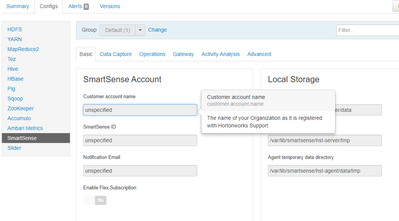
is correct, my memory was on the limit, do you know why i can't change the configuration of the different services on ambari? i have to add an SmartSense ID to start it


