
Our Community is getting an upgrade! To get everything ready for the relaunch, we’ll be placing the site in read-only mode starting September 21st.
We really appreciate your understanding while we get things set up behind the scenes. Catch up on all the exciting details about the move here.
Need help or have questions? Drop us a line at [email protected]

Archives of Support Questions (Read Only)
- Cloudera Community
- Board Archive
- Archives of Support Questions (Read Only)
- Re: Sqoop 1 Client not started
- Subscribe to RSS Feed
- Mark Question as New
- Mark Question as Read
- Float this Question for Current User
- Bookmark
- Subscribe
- Mute
- Printer Friendly Page
- Subscribe to RSS Feed
- Mark Question as New
- Mark Question as Read
- Float this Question for Current User
- Bookmark
- Subscribe
- Mute
- Printer Friendly Page
Sqoop 1 Client not started
- Labels:
-
Apache Sqoop
-
Apache YARN
-
Cloudera Manager


Created on 05-23-2016 10:37 AM - edited 09-16-2022 03:21 AM
- Mark as New
- Bookmark
- Subscribe
- Mute
- Subscribe to RSS Feed
- Permalink
- Report Inappropriate Content
I have a 2 Node YARN cluster using Cloudera manager 5.4.2 and by default sqoop 2 is installed. I wanted to use Sqoop 1 and I have installed Sqoop 1 client by following the cloudera documenatation as per below link:
http://www.cloudera.com/documentation/enterprise/5-4-x/topics/cm_mc_sqoop1_client.html
http://www.cloudera.com/documentation/enterprise/5-4-x/topics/cm_mc_add_service.html
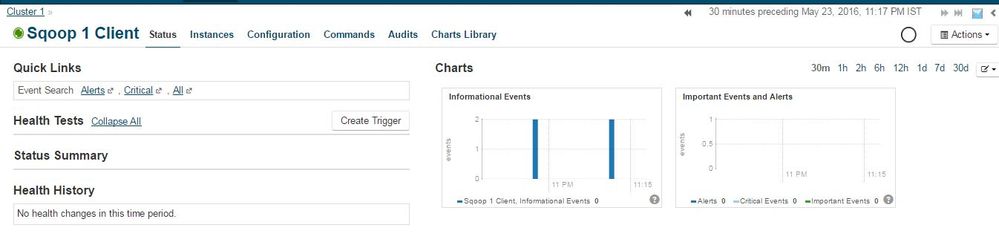
Once the Sqoop 1 client is installed and I have deployed client configuration, restarted all services and also infact restarted entire cluster but still I see Sqoop 1 client is always in "None" state. Kindly Help
For reference, I have the screen capture from Cloudera Manager console for Sqoop 1:



Created 05-30-2016 07:11 PM
- Mark as New
- Bookmark
- Subscribe
- Mute
- Subscribe to RSS Feed
- Permalink
- Report Inappropriate Content
Its usage is described in depth at its guide: http://archive.cloudera.com/cdh5/cdh/5/sqoop/SqoopUserGuide.html
Sqoop 2.x is a different architecture that's under heavy development and is not recommended for wide use yet. Its client has a prompt style connection to the Sqoop Service that's part of its new architecture. Its usage is separately documented at http://archive.cloudera.com/cdh5/cdh/5/sqoop2/CommandLineClient.html
Unless you are aware of Sqoop2's features and are looking for it specifically, you will likely need Sqoop 1.x (Simple 'sqoop' command) for your Sqoop needs. You can run a test command following the former user guide link posted above to ensure Sqoop 1.x command works (and it should, cause it has no dependencies or services to rely on).


Created on 05-24-2016 08:15 AM - edited 05-24-2016 10:17 AM
- Mark as New
- Bookmark
- Subscribe
- Mute
- Subscribe to RSS Feed
- Permalink
- Report Inappropriate Content
As the service name suggest 'Sqoop 1 Client', and not a service deamon with ability to report its state weather it's started or stopped. Are you seeing any issues with using sqoop command?
Created 05-27-2016 03:55 AM
- Mark as New
- Bookmark
- Subscribe
- Mute
- Subscribe to RSS Feed
- Permalink
- Report Inappropriate Content
Thanks Michalis, am quite new to sqoop usage. I have installed Sqoop1 Client and Sqoop2 using Cloudera Manager. Am able to use "Sqoop2" command and it goes into sqoop prompt like below:
[hduser@node1 ~]$ sqoop2
Sqoop home directory: /opt/cloudera/parcels/CDH-5.4.1-1.cdh5.4.1.p0.6/lib/sqoop2
Sqoop Shell: Type 'help' or '\h' for help.

sqoop:000>
But When I use, "Sqoop command", am getting the following message and doesn't enter into sqoop prompt:
[hduser@node1 ~]$ sqoop
Warning: /opt/cloudera/parcels/CDH-5.4.1-1.cdh5.4.1.p0.6/bin/../lib/sqoop/../accumulo does not exist! Accumulo imports will fail.
Please set $ACCUMULO_HOME to the root of your Accumulo installation.
Try 'sqoop help' for usage.
[hduser@node1 ~]$
Checked the sqoop version and it says 1.4.5 :
[hduser@node1 ~]$ sqoop version
Warning: /opt/cloudera/parcels/CDH-5.4.1-1.cdh5.4.1.p0.6/bin/../lib/sqoop/../accumulo does not exist! Accumulo imports will fail.
Please set $ACCUMULO_HOME to the root of your Accumulo installation.
16/05/27 16:20:13 INFO sqoop.Sqoop: Running Sqoop version: 1.4.5-cdh5.4.1
Sqoop 1.4.5-cdh5.4.1
git commit id
Compiled by jenkins on Thu May  7 22:45:52 PDT 2015
[hduser@node1 ~]$
And I wanted to use Sqoop1 to import data from Oracle to HDFS/Hive. The reason I heard is Sqoop2 is not production ready and was advised to configure Sqoop1 as per architects.
Here am little confused, like which version of Sqoop am I using? Does Sqoop2 command also refers to sqoop1? How do I use Sqoop1 specifically?
Created 05-30-2016 02:53 AM
- Mark as New
- Bookmark
- Subscribe
- Mute
- Subscribe to RSS Feed
- Permalink
- Report Inappropriate Content
@michalis : Can you please check on it. Many thanks
Created 05-30-2016 07:11 PM
- Mark as New
- Bookmark
- Subscribe
- Mute
- Subscribe to RSS Feed
- Permalink
- Report Inappropriate Content
Its usage is described in depth at its guide: http://archive.cloudera.com/cdh5/cdh/5/sqoop/SqoopUserGuide.html
Sqoop 2.x is a different architecture that's under heavy development and is not recommended for wide use yet. Its client has a prompt style connection to the Sqoop Service that's part of its new architecture. Its usage is separately documented at http://archive.cloudera.com/cdh5/cdh/5/sqoop2/CommandLineClient.html
Unless you are aware of Sqoop2's features and are looking for it specifically, you will likely need Sqoop 1.x (Simple 'sqoop' command) for your Sqoop needs. You can run a test command following the former user guide link posted above to ensure Sqoop 1.x command works (and it should, cause it has no dependencies or services to rely on).
Created on 06-01-2016 04:41 AM - edited 06-01-2016 04:42 AM
- Mark as New
- Bookmark
- Subscribe
- Mute
- Subscribe to RSS Feed
- Permalink
- Report Inappropriate Content
Thanks @Harsh J, Appreciate your help. Just as a feedback on part of Cloudera Documentation should also include an example with Sqoop1 and Sqoop2 and that would have been very helpful too for all the users who deploy Sqoop.


