
Our Community is getting an upgrade! To get everything ready for the relaunch, we’ll be placing the site in read-only mode starting September 21st.
We really appreciate your understanding while we get things set up behind the scenes. Catch up on all the exciting details about the move here.
Need help or have questions? Drop us a line at [email protected]

Archives of Support Questions (Read Only)
- Cloudera Community
- Board Archive
- Archives of Support Questions (Read Only)
- Use cURL to make an API call to change base URL re...
- Subscribe to RSS Feed
- Mark Question as New
- Mark Question as Read
- Float this Question for Current User
- Bookmark
- Subscribe
- Mute
- Printer Friendly Page
- Subscribe to RSS Feed
- Mark Question as New
- Mark Question as Read
- Float this Question for Current User
- Bookmark
- Subscribe
- Mute
- Printer Friendly Page
Use cURL to make an API call to change base URL repository for Ambari Blueprints deployment?


Created on 11-11-2015 12:12 AM - edited 09-16-2022 02:48 AM
- Mark as New
- Bookmark
- Subscribe
- Mute
- Subscribe to RSS Feed
- Permalink
- Report Inappropriate Content
I have successfully uploaded a blueprint to an Ambari server. I am trying now to configure default repositories for HDP installation in our classroom lab environment, as per instructions here:
I have created the a file, named HDPRepo.test, per the instructions.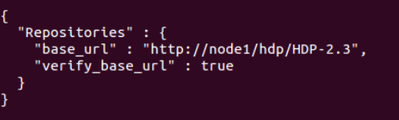
curl -u admin:admin -i -H
"X-Requested-By: jedentest1" -X POST -d @HDPRepo.test
http://node1:8080/api/v1/stacks/HDP/versions/2.3/operating_systems/redhat6/repositories/HDP-2.3/
I can't find this demo'd anywhere on the web, so I'm flying a bit blind. The error being returned is: { "status" : 500, "message" : "Cannot create repositories."} My suspicion is that the documentation is missing some minor piece (possibly a cURL add-on, or perhaps the API URI isn't quite right) that makes this update of the base_url value work. Has anyone actually done this that can point out what I need to modify in my command? Thanks!


Created 11-11-2015 06:20 AM
- Mark as New
- Bookmark
- Subscribe
- Mute
- Subscribe to RSS Feed
- Permalink
- Report Inappropriate Content
You are using a POST-request, I think that is the reason why its not working, try PUT. I usually follow these steps when I install my cluster with blueprints
1.Upload blueprint
2.Update repositories
3.Create cluster (upload host mapping)
To update the repositories you can use the following commands.
HDP Utils:
curl -H "X-Requested-By: ambari" -X PUT -u admin:<PASSWORD> http://c6601.ambari.apache.org:8080/api/v1/stacks/HDP/versions/2.2/operating_systems/redhat6/reposit... -d @repo_payload
Payload
{
	"Repositories": {
		"base_url": "http://c6601.ambari.apache.org/HDP-UTILS-1.1.0.20/repos/centos6",
		"verify_base_url": true
	}
}
HDP:
curl -H "X-Requested-By: ambari" -X PUT -u admin:<PASSWORD> http://c6601.ambari.apache.org:8080/api/v1/stacks/HDP/versions/2.2/operating_systems/redhat6/reposit... -d @repo_payload
Payload
{
	"Repositories": {
		"base_url": "http://c6601.ambari.apache.org/HDP/centos6/2.x/updates/2.2.4.2",
		"verify_base_url": true
	}
}
Created 11-11-2015 05:01 AM
- Mark as New
- Bookmark
- Subscribe
- Mute
- Subscribe to RSS Feed
- Permalink
- Report Inappropriate Content
UPDATE: I finally ran across this issue, which at least explains why the process is not working:
https://issues.apache.org/jira/browse/AMBARI-12811
The question now, then, becomes "How do I update the repo_version table prior to a blueprint-based installation?"
Created 11-11-2015 05:04 AM
- Mark as New
- Bookmark
- Subscribe
- Mute
- Subscribe to RSS Feed
- Permalink
- Report Inappropriate Content
And remember, I am writing a publicly available training course, so please, no answers that require hacking that you would not suggest the average administrator to attempt. 🙂
Created 11-11-2015 06:20 AM
- Mark as New
- Bookmark
- Subscribe
- Mute
- Subscribe to RSS Feed
- Permalink
- Report Inappropriate Content
You are using a POST-request, I think that is the reason why its not working, try PUT. I usually follow these steps when I install my cluster with blueprints
1.Upload blueprint
2.Update repositories
3.Create cluster (upload host mapping)
To update the repositories you can use the following commands.
HDP Utils:
curl -H "X-Requested-By: ambari" -X PUT -u admin:<PASSWORD> http://c6601.ambari.apache.org:8080/api/v1/stacks/HDP/versions/2.2/operating_systems/redhat6/reposit... -d @repo_payload
Payload
{
	"Repositories": {
		"base_url": "http://c6601.ambari.apache.org/HDP-UTILS-1.1.0.20/repos/centos6",
		"verify_base_url": true
	}
}
HDP:
curl -H "X-Requested-By: ambari" -X PUT -u admin:<PASSWORD> http://c6601.ambari.apache.org:8080/api/v1/stacks/HDP/versions/2.2/operating_systems/redhat6/reposit... -d @repo_payload
Payload
{
	"Repositories": {
		"base_url": "http://c6601.ambari.apache.org/HDP/centos6/2.x/updates/2.2.4.2",
		"verify_base_url": true
	}
}
Created 11-11-2015 02:12 PM
- Mark as New
- Bookmark
- Subscribe
- Mute
- Subscribe to RSS Feed
- Permalink
- Report Inappropriate Content
That was it! Thanks Jonas!


