
Archives of Support Questions (Read Only)
- Cloudera Community
- Board Archive
- Archives of Support Questions (Read Only)
- Re: telnet connection refused
- Subscribe to RSS Feed
- Mark Question as New
- Mark Question as Read
- Float this Question for Current User
- Bookmark
- Subscribe
- Mute
- Printer Friendly Page
- Subscribe to RSS Feed
- Mark Question as New
- Mark Question as Read
- Float this Question for Current User
- Bookmark
- Subscribe
- Mute
- Printer Friendly Page
telnet connection refused
- Labels:
-
Apache Flume


Created on 07-09-2017 05:50 PM - edited 09-16-2022 04:54 AM
- Mark as New
- Bookmark
- Subscribe
- Mute
- Subscribe to RSS Feed
- Permalink
- Report Inappropriate Content
I was learning flume agent. my flume agent was listening to localhost and port 2222. I was able to telnet successfully and see the logs captured by flume agent.
Suddently I noticed, some messages (jobs stopped. Reset Adapter). After that I am not able to telnet to localhost port 2222. I tried from scratch, removing sandbox and import it again. I still have the same problem. Now I am stuck with telnet issue and doesnt know how to troubleshoot or fix the issue. I tried all the possibilities, import the sandbox, again, check network settings, cable connected, port forwarding. no luck. can some one help me get rid of this.
I



Created 07-09-2017 06:02 PM
- Mark as New
- Bookmark
- Subscribe
- Mute
- Subscribe to RSS Feed
- Permalink
- Report Inappropriate Content
Hello @Ramkumar Rajaman ,
Could you please provide us the output of below command
# netstat -tnlp | grep 2222
Also if possible please check Link as it might be helpful to you.
Created on 07-09-2017 05:57 PM - edited 08-17-2019 05:21 PM
- Mark as New
- Bookmark
- Subscribe
- Mute
- Subscribe to RSS Feed
- Permalink
- Report Inappropriate Content
telnet: connect to address ::1: Cannot assign requested address
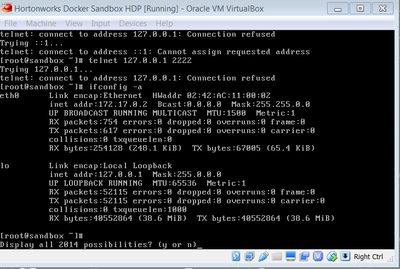
Created 07-09-2017 06:02 PM
- Mark as New
- Bookmark
- Subscribe
- Mute
- Subscribe to RSS Feed
- Permalink
- Report Inappropriate Content
Hello @Ramkumar Rajaman ,
Could you please provide us the output of below command
# netstat -tnlp | grep 2222
Also if possible please check Link as it might be helpful to you.
Created 07-09-2017 08:56 PM
- Mark as New
- Bookmark
- Subscribe
- Mute
- Subscribe to RSS Feed
- Permalink
- Report Inappropriate Content
Hello Bansal, Thanks for your reply.
the statement returned nothing.
I think i figured out what the issue is. no agent listening to that port. when flume listens, telnet works.
When I start the Flume agent and when the agent is running/listening to the port 2222 in localhost, my telnet works without any issues. as soon as i kill my flume agent , telnet stops working. looks like I got some understanding on how flume agent works. will continue my learning ..
Thanks,
Ram


