Our Community is getting an upgrade! To get everything ready for the relaunch, we’ll be placing the site in read-only mode starting September 21st.
We really appreciate your understanding while we get things set up behind the scenes. Catch up on all the exciting details about the move here.
Need help or have questions? Drop us a line at [email protected]

Community Articles

Find and share helpful community-sourced technical articles.
Announcements
Share your experience with Cloudera on G2 and get a $25 Amazon Gift card.
Hi, I'm CLEO! Something exciting is coming to the Community. Stay Tuned!

Labels (1)
avatar
Master Guru

Building schemas is tedious work and fraught with errors. The InferAvroSchema processor can get you started. It generates a compliant schema for use. There is one caveat, you have to make sure you are using Apache Avro safe field names. I have a custom processor that will clean your attributes if you need them Avro-safe. See processor listed below.

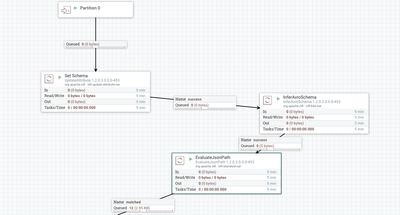
Example Flow Utilizing InferAvroSchema

45381-avro.png

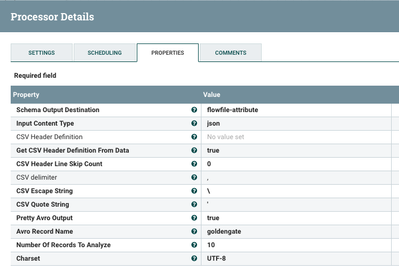
InferAvroSchema Details

45382-inferavroschema.png

Step 0: Use Apache NiFi to Convert Data to JSON or CSV

Step 1: Send JSON or CSV Data to InferAvroSchema

I recommend setting output destination to flowfile-attribute, input content type to json, pretty avro output to true.

Step 2: The New schema is now in attribute: inferred.avro.schema.

inferred.avro.schema
{ "type" : "record", "name" : "schema1", "fields" : [ { "name" : "table", "type" : "string", "doc" : "Type inferred from '\"schema1.tableName\"'" } ] } 

This schema can then be used for conversions directly or stored in Hortonworks Schema Registry or Apache NiFi Built-in Avro Registry.

Now you can use it for ConvertRecord, QueryRecord and other Record processing.

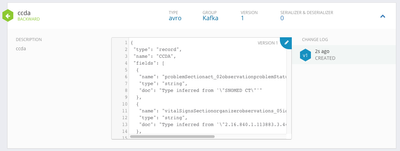
Example Generated Schema in Avro-JSON Format Stored in Hortonworks Schema Registry:

45383-ccda-schemareg.png

Source: https://github.com/tspannhw/nifi-attributecleaner-processor

5,031 Views