Our Community is getting an upgrade! To get everything ready for the relaunch, we’ll be placing the site in read-only mode starting September 21st.
We really appreciate your understanding while we get things set up behind the scenes. Catch up on all the exciting details about the move here.
Need help or have questions? Drop us a line at [email protected]

Community Articles

Find and share helpful community-sourced technical articles.
Announcements
Share your experience with Cloudera on G2 and get a $25 Amazon Gift card.
Hi, I'm CLEO! Something exciting is coming to the Community. Stay Tuned!

Labels (1)
avatar

PROBLEM

I have a non kerberized cluster. I did apply https://community.hortonworks.com/articles/81910/how-to-enable-user-impersonation-for-jdbc-interpre.... however the jdbc intepreter is still not impersonated.

NOTE: From HDP 2.6.2 (Zeppelin 0.7.2) JDBC interpreter on non-kerberised cluster is impersonated by having the following property added into Zeppelin UI -> Interpreter -> JDBC config:

hive.proxy.user.property=hive.server2.proxy.user

SOLUTION

1. Go to Zeppelin UI -> Interpreter

The configuration for JDBC hive interpreter should look like
20497-screen1.png

2. Edit JDBC interpreter

Remove properties hive.user and hive.password and save the changes. So, now the configuration looks like
20498-screen2.png

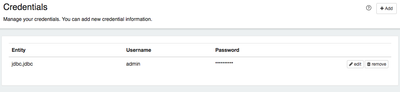
3. Go to Zeppelin UI -> Credential

Add the credentials for the user like
Entity: jdbc.jdbc 
Username: <username> 
Password: <password>
20499-screen3.png

4. Run the query

Go to your notebook and run the jdbc query for hive. In RM UI this query is now running by YOU
20500-screen4.png
7,151 Views
Comments

I followed the above process but i got the following error

Running on HDP 2.7.3.2.6.0.3-8,Zeppelin 0.7 with Kerberos disabled

java.net.ConnectException: Connection refused (Connection refused) at java.net.PlainSocketImpl.socketConnect(Native Method) at java.net.AbstractPlainSocketImpl.doConnect(AbstractPlainSocketImpl.java:350) at java.net.AbstractPlainSocketImpl.connectToAddress(AbstractPlainSocketImpl.java:206) at java.net.AbstractPlainSocketImpl.connect(AbstractPlainSocketImpl.java:188) at java.net.SocksSocketImpl.connect(SocksSocketImpl.java:392) at java.net.Socket.connect(Socket.java:589) at org.apache.thrift.transport.TSocket.open(TSocket.java:182) at org.apache.zeppelin.interpreter.remote.ClientFactory.create(ClientFactory.java:51) at org.apache.zeppelin.interpreter.remote.ClientFactory.create(ClientFactory.java:37) at org.apache.commons.pool2.BasePooledObjectFactory.makeObject(BasePooledObjectFactory.java:60) at org.apache.commons.pool2.impl.GenericObjectPool.create(GenericObjectPool.java:861) at org.apache.commons.pool2.impl.GenericObjectPool.borrowObject(GenericObjectPool.java:435) at org.apache.commons.pool2.impl.GenericObjectPool.borrowObject(GenericObjectPool.java:363) at org.apache.zeppelin.interpreter.remote.RemoteInterpreterProcess.getClient(RemoteInterpreterProcess.java:90) at org.apache.zeppelin.interpreter.remote.RemoteInterpreter.init(RemoteInterpreter.java:211) at org.apache.zeppelin.interpreter.remote.RemoteInterpreter.getFormType(RemoteInterpreter.java:377) at org.apache.zeppelin.interpreter.LazyOpenInterpreter.getFormType(LazyOpenInterpreter.java:105) at org.apache.zeppelin.notebook.Paragraph.jobRun(Paragraph.java:387) at org.apache.zeppelin.scheduler.Job.run(Job.java:175) at org.apache.zeppelin.scheduler.RemoteScheduler$JobRunner.run(RemoteScheduler.java:329) at java.util.concurrent.Executors$RunnableAdapter.call(Executors.java:511) at java.util.concurrent.FutureTask.run(FutureTask.java:266) at java.util.concurrent.ScheduledThreadPoolExecutor$ScheduledFutureTask.access$201(ScheduledThreadPoolExecutor.java:180) at java.util.concurrent.ScheduledThreadPoolExecutor$ScheduledFutureTask.run(ScheduledThreadPoolExecutor.java:293) at java.util.concurrent.ThreadPoolExecutor.runWorker(ThreadPoolExecutor.java:1142) at java.util.concurrent.ThreadPoolExecutor$Worker.run(ThreadPoolExecutor.java:617) at java.lang.Thread.run(Thread.java:745)

@Vijay Kiran

Do not raise issues within the Article. Just create a separate HCC providing details of your JDBC interpreter as well as Credentials.

NOTE: The above was tested on HDP 2.6.1 only. And you are on 2.6.0.3 if I am right.

Everyone following this article.

Make sure value is set for property zeppelin.jdbc.auth.type in jdbc interpreter either as SIMPLE or KERBEROS.

In my case, impersonation did not happen properly when the property has null value, and I changed the value to SIMPLE.

Version history
Last update:
‎08-17-2019 11:57 AM
Updated by:
Contributors