Our Community is getting an upgrade! To get everything ready for the relaunch, we’ll be placing the site in read-only mode starting September 21st.
We really appreciate your understanding while we get things set up behind the scenes. Catch up on all the exciting details about the move here.
Need help or have questions? Drop us a line at [email protected]

Community Articles

Find and share helpful community-sourced technical articles.
Announcements
Share your experience with Cloudera on G2 and get a $25 Amazon Gift card.
Hi, I'm CLEO! Something exciting is coming to the Community. Stay Tuned!

Labels (1)
avatar
Master Guru

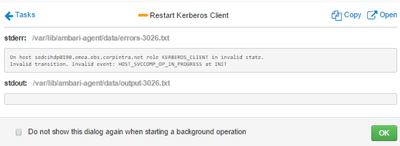
If you are getting below error while refreshing client configs via Ambari UI then here are the steps to fix it!

3564-daimler-kerb-client-error.png

1. Remove KERBEROS_CLIENT for problematic hosts using below curl call

curl -H "X-Requested-By:ambari"-u admin:admin -X DELETE "http://<AMBARI-SERVER>:8080/api/v1/clusters/<cluster-name>/hosts/<host-name>/host_components/KERBEROS_CLIENT"

2. Ensure from Ambari UI that KERBEROS_CLIENT got removed.

3. From Ambari UI --> goto the problematic host --> click on Add button --> select Kerberos Client

3560-screen-shot-2016-04-20-at-83213-pm.png

4. Installation should complete without any issue.

6,349 Views
Comments

@Kuldeep Kulkarni I encountered similar issue with HDFS_CLIENT, I've successfully deleted the client using curl call as mentioned in your post. But, Installation of HDFS_CLIENT stuck at:

2017-01-24 08:44:43,873 - Package['unzip'] {}

And installation failed with following error message: stderr: /var/lib/ambari-agent/data/errors-2631.txt

Python script has been killed due to timeout after waiting 1800 secs

Could you please suggest me some pointers?

@Kuldeep Mishra

It looks like problem with "yum" utility while installing package - unzip.

Can you please login to the said node and try installing 'unzip' from backend using below commands?

#Command 1
yum clean all
#Command 2
yum install unzip

Once above command succeeds, please retry an operation from Ambari.

@Kuldeep Kulkarni,

Yes it was a problem with my rpm command, that's why yum hung. I rebuild rpmdb and everything working fine now.

thanks a ton. 🙂

Version history
Last update:
‎08-17-2019 12:42 PM
Updated by:
Contributors