Our Community is getting an upgrade! To get everything ready for the relaunch, we’ll be placing the site in read-only mode starting September 21st.
We really appreciate your understanding while we get things set up behind the scenes. Catch up on all the exciting details about the move here.
Need help or have questions? Drop us a line at [email protected]

Community Articles

Find and share helpful community-sourced technical articles.
Announcements
Share your experience with Cloudera on G2 and get a $25 Amazon Gift card.
Hi, I'm CLEO! Something exciting is coming to the Community. Stay Tuned!

Labels (1)
avatar
Super Guru

1.Configure sample ambari alert using Ambari UI.

.

2.Login to ambari webui using [admin/admin]

.

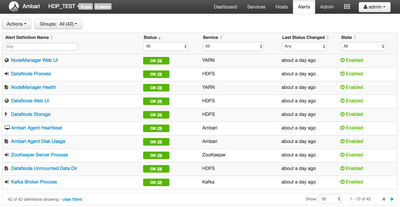
3.Click on "Alerts"

.

5088-s1.png

.

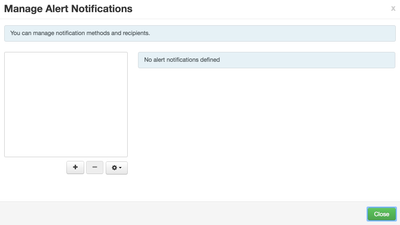
4.Click "Action"-> "Manage Notification"

.

5090-s2.png

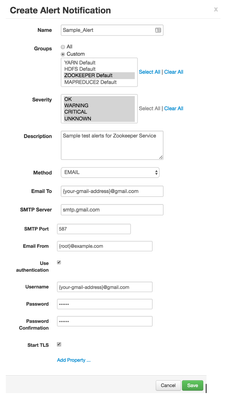
5.Add sample alert for service

5091-s3.png

5092-s4.png

.

6. In above example you can use Gmail username and password to test connection.

.

7. After adding sample alert close the screen.

.

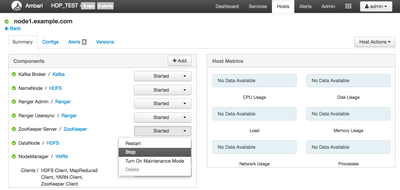
8.From the ambari ui now stop one of the zookeeper service

.

5093-s5.png

5094-s6.png

.

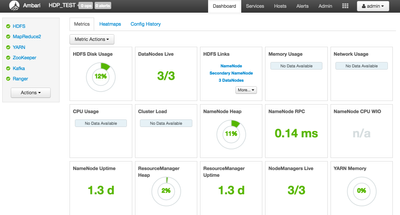
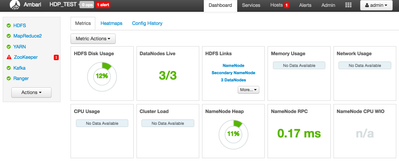
9.You should be able to see alert indication in ambari ui for the zookeeper service stopped

.

5095-s7.png

.

10. Same time if you tail for ambari-alerts.log you will be able to see "Connection Failed" log messages for zookeeper service.

.

2016-05-27 14:57:31,541 [CRITICAL] [ZOOKEEPER] [zookeeper_server_process] (ZooKeeper Server Process) Connection failed: [Errno 111] Connection refused to node1.example.com:2181

.

11. Check your email and make sure you receive the alert.

.

12. If you don’t see alerts the enable debugging for Alerts in ambari log4j.properties as shown below.

.

13. Login to ambari server cli using superuser credentials [eg. root]

.

vi /etc/ambari-server/conf/log4j.properties 

Modify
- log4j.logger.alerts=INFO,alerts to log4j.logger.alerts=DEBUG,alerts

Add below line to Alerts section -

log4j.logger.org.apache.ambari.server.notifications.dispatchers=DEBUG,alerts

.

14. Save the file and restart ambari server service.

.

15. Try to stop zookeeper on any one of the node and check for the ambari-server.log and amabri-alerts.log.

.

16. You should be able to see the alert logs sent on email via smtp settings you did.

.

17. If there are any smtp errors you will see those in "/var/log/ambari-server/ambari-server.log"

11,551 Views
Comments
avatar
Master Guru

Good stuff @Sagar Shimpi 🙂

avatar

i did same thing on HDP2.5 but still showing below error

534-5.7.14 IvciS8yws8APKDFHijkrFoJ92wCiJPAO_hwu5n84JrRGIqSyumJ05MoXUq94ogjYKFwfS5 534-5.7.14 iP5EQUiY-JheLLz82D33Qp2yF8wuQkoQ6BAwjeCpThA9GoTte7WBFbZnRByREw7MnpQ3Am 534-5.7.14 qRMD4_bLAgQqiJIzCgxU1ppqCt9qc> Please log in via your web browser and 534-5.7.14 then try again. 534-5.7.14 Learn more at 534 5.7.14 https://support.google.com/mail/answer/78754 e8sm22695829pga.72 - gsmtp at com.sun.mail.smtp.SMTPTransport$Authenticator.authenticate(SMTPTransport.java:892) at com.sun.mail.smtp.SMTPTransport.authenticate(SMTPTransport.java:814) at com.sun.mail.smtp.SMTPTransport.protocolConnect(SMTPTransport.java:728) at javax.mail.Service.connect(Service.java:386) at javax.mail.Service.connect(Service.java:245) at javax.mail.Service.connect(Service.java:194) at javax.mail.Transport.send0(Transport.java:253) at javax.mail.Transport.send(Transport.java:124) at org.apache.ambari.server.notifications.dispatchers.EmailDispatcher.dispatch(EmailDispatcher.java:160) at org.apache.ambari.server.notifications.DispatchRunnable.run(DispatchRunnable.java:58) at java.util.concurrent.ThreadPoolExecutor.runWorker(ThreadPoolExecutor.java:1142) at java.util.concurrent.ThreadPoolExecutor$Worker.run(ThreadPoolExecutor.java:617) at java.lang.Thread.run(Thread.java:745)

Version history
Last update:
‎08-17-2019 11:58 AM
Updated by:
Contributors