


Our Community is getting an upgrade! To get everything ready for the relaunch, we’ll be placing the site in read-only mode starting September 21st.
We really appreciate your understanding while we get things set up behind the scenes. Catch up on all the exciting details about the move here.
Need help or have questions? Drop us a line at [email protected]

Community Articles

Find and share helpful community-sourced technical articles.
Announcements
Share your experience with Cloudera on G2 and get a $25 Amazon Gift card.
Hi, I'm CLEO! Something exciting is coming to the Community. Stay Tuned!
Labels (2)
avatar
Master Guru

I often encounter the following question - "How to connect a Java application to CDP Kafka?". The good news is, it's simple.


Public docs: Connecting Kafka clients to Data Hub provisioned clusters


CDP Kafka, by default, is secure and governed. That means CDP Kafka uses TLS and CDP workload users for security and authorization. CDP Kafka supports all Apache Kafka authentication capabilities. Again, by default, CDP Kafka is automatically secured <SASL_SSL> and governed by Apache Ranger.  

Prerequisites

CDP Public Cloud with a Kafka DataHub instance.

Connectivity requirements

To connect to CDP Kafka, the following is required:

  • CDP TrustStore
  • CDP Workload Username/Password
  • Kafka Broker Name
  • JaaS File

Java Example


 Properties properties = new Properties();
        properties.put(ProducerConfig.BOOTSTRAP_SERVERS_CONFIG, "<KAFKA-BROKER>:9093,<KAFKA-BROKER>:9093,<KAFKA-BROKER>:9093");
        properties.put(ProducerConfig.KEY_SERIALIZER_CLASS_CONFIG, "org.apache.kafka.common.serialization.StringSerializer");
        properties.put(ProducerConfig.VALUE_SERIALIZER_CLASS_CONFIG, "org.apache.kafka.common.serialization.StringSerializer");
        properties.put("security.protocol", "SASL_SSL");
        properties.put("sasl.mechanism", "PLAIN");
        properties.put(ProducerConfig.CLIENT_ID_CONFIG, "connectivity-testing");
        properties.put("sasl.kerberos.service.name", "kafka");


        properties.put("ssl.truststore.location", "/home/sunilemanjee/truststore.jks");
        properties.put("sasl.jaas.config",
                "org.apache.kafka.common.security.plain.PlainLoginModule required username=\"<CDP-WORKLOAD-USER>\" password=\"<CDP-WORKLOAD-PASSWORD>\";");


Full code here.

TrustStore 

Fetch the TrustStore for CDP is well documented here. 

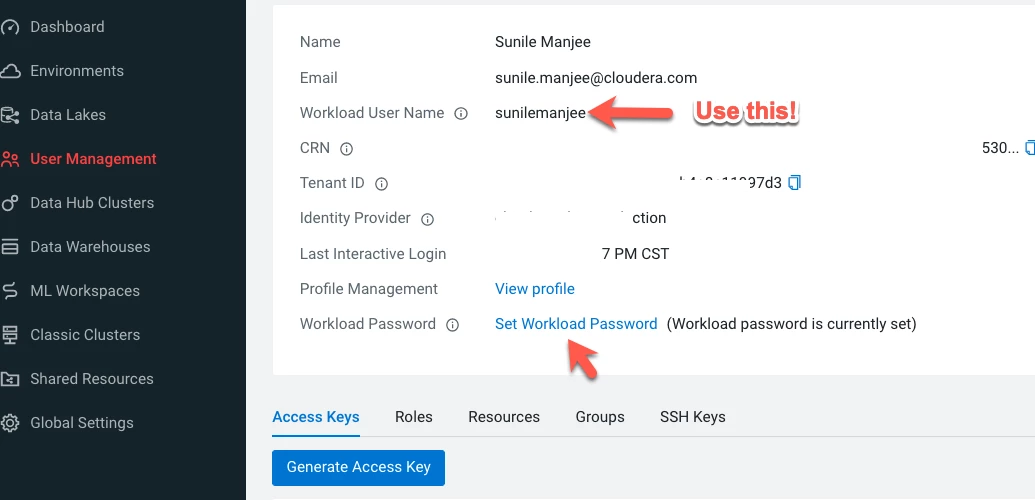
CDP Workload Username/Password

Set and fetch CDP workload username/password
2022-01-25_15-02-34.png

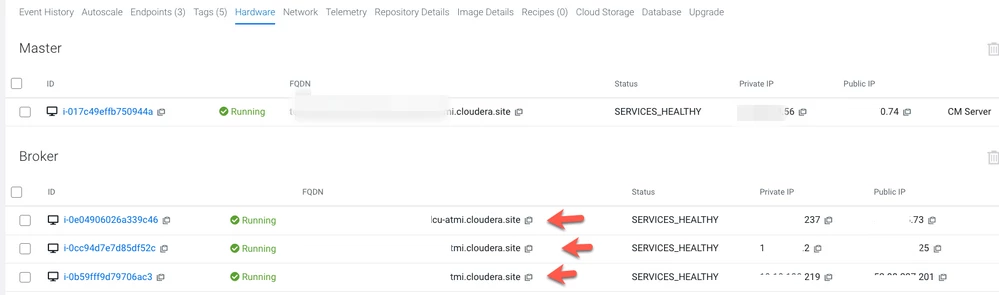
Kafka Broker Names

Fetch broker names from the CDP management console under DataHub, Hardware Tab
2022-01-25_14-57-54.png

JaaS File


KafkaClient {
org.apache.kafka.common.security.plain.PlainLoginModule required
username="cdp-workload-user"
password="cdp-workload-password;
};


That's it. Enjoy

2,013 Views
0 Kudos
Version history
Last update:
‎04-21-2026 01:01 AM
Updated by:
