Our Community is getting an upgrade! To get everything ready for the relaunch, we’ll be placing the site in read-only mode starting September 21st.
We really appreciate your understanding while we get things set up behind the scenes. Catch up on all the exciting details about the move here.
Need help or have questions? Drop us a line at [email protected]

Community Articles

Find and share helpful community-sourced technical articles.
Announcements
Share your experience with Cloudera on G2 and get a $25 Amazon Gift card.
Hi, I'm CLEO! Something exciting is coming to the Community. Stay Tuned!

avatar

In HDP-2.6/Ambari-2.6, it was not mandatory enable HS2 metrics explicitly. Thus, all metrics would be emitted without defining any configs explicitly.


In HDP-3/Ambari-2.7, we will see similar erros in AMS Collector Log:

Error : 2019-06-10 02:42:59,215 INFO timeline timeline.HadoopTimelineMetricsSink: No live collector to send metrics to. Metrics to be sent will be discarded. This message will be skipped for the next 20
Debug Error shows this : 2019-06-14 20:35:29,538 DEBUG main timeline.HadoopTimelineMetricsSink: Trying to find live collector host from : exp5.lab.com,exp4.lab.com
2019-06-14 20:35:29,538 DEBUG main timeline.HadoopTimelineMetricsSink: Requesting live collector nodes : http://exp5.lab.com,exp4.lab.com:6188/ws/v1/timeline/metrics/livenodes
2019-06-14 20:35:29,557 DEBUG main timeline.HadoopTimelineMetricsSink: Unable to connect to collector, http://exp5.lab.com,exp4.lab.com:6188/ws/v1/timeline/metrics/livenodes
2019-06-14 20:35:29,557 DEBUG main timeline.HadoopTimelineMetricsSink: java.net.UnknownHostException: exp5.lab.com,exp4.lab.com
2019-06-14 20:35:29,558 DEBUG main timeline.HadoopTimelineMetricsSink: Collector exp5.lab.com,exp4.lab.com is not longer live. Removing it from list of know live collector hosts : [] 2019-06-14 20:35:29,558 DEBUG main timeline.HadoopTimelineMetricsSink: No live collectors from configuration.


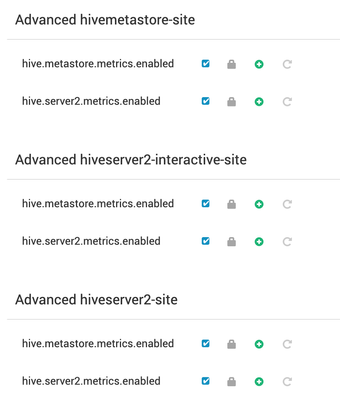
You need to ensure the following properties exist. If not, first add them in the respective custom section via Ambari >Hive> Configs. 

metrics conf.png


Next, if you are using Ambari Metrics with more than one collector, then you need to make one more change due a BUG, which will likely be fixed after Ambari-2.7.4.


Add 

*.sink.timeline.zookeeper.quorum=<ZK_QUORUM_ADDRESS>

Example:
*.sink.timeline.zookeeper.quorum=zk_host1:2181,zk_host2:2181,zk_host3:2181


to all the 4 files under 

/var/lib/ambari-server/resources/stacks/HDP/3.0/services/HIVE/package/templates/

located on Ambari Server host.


Restart Ambari Server & Hive for changes to take effect.

Now the metrics will be emitted and you should be able to see data on your Grafana Dashboard.

1,376 Views
Version history
Last update:
‎08-22-2019 02:19 PM
Updated by:
Contributors