Our Community is getting an upgrade! To get everything ready for the relaunch, we’ll be placing the site in read-only mode starting September 21st.
We really appreciate your understanding while we get things set up behind the scenes. Catch up on all the exciting details about the move here.
Need help or have questions? Drop us a line at [email protected]

Community Articles

Find and share helpful community-sourced technical articles.
Announcements
Share your experience with Cloudera on G2 and get a $25 Amazon Gift card.
Hi, I'm CLEO! Something exciting is coming to the Community. Stay Tuned!

Labels (2)
avatar

This article "Perform Data Analysis using SAP Vora on SAP Hana data - Part 4" is continuation of "Load Demo data in SAP Vora Using Eclipse HANA Modelling tools - Part 3"

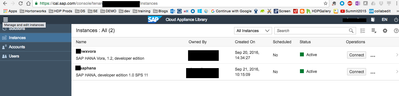
Log back in to SAP Cloud Appliance Library - the free service to manage your SAP solutions in the public cloud. You should have HANA and Vora instances up and running:

8003-screen-shot-2016-09-26-at-104614-am.png

  1. Open Apache Zeppelin web UI click on Connect in your SAP HANA Vora instance in CAL, and then pick Open a link for Application: Zeppelin
  2. In Zeppelin click Create new note, name the notebook as you like ex "interact with hana data"
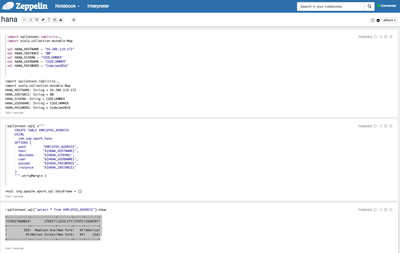
  3. In the first cell lets define our imports and HANA connection information
import sqlContext.implicits._
import scala.collection.mutable.Map


val HANA_HOSTNAME = "xxx.xxx.xx.xxx"
val HANA_INSTANCE = "00"
val HANA_SCHEMA = "CODEJAMMER"
val HANA_USERNAME = "CODEJAMMER"
val HANA_PASSWORD = "CodeJam2016"

4. In the next cell we will use sqlContext that was automatically created by Zeppelin to Connect to HANA using "com.sap.spark.hana"

sqlContext.sql( s"""
    CREATE TABLE EMPLOYEE_ADDRESS 
    USING
      com.sap.spark.hana
    OPTIONS (
      path         "EMPLOYEE_ADDRESS",
      host         "${HANA_HOSTNAME}",
      dbschema     "${HANA_SCHEMA}",
      user         "${HANA_USERNAME}",
      passwd       "${HANA_PASSWORD}",
      instance     "${HANA_INSTANCE}"
    )
    """.stripMargin )

5. Now lets query the HANA database from Zeppelin

sqlContext.sql("select * from EMPLOYEE_ADDRESS").show

You should get the results from the EMPLOYEE_ADDRESS table we created earlier.

+------------+-------------+--------+-----+-------+
|STREETNUMBER|       STREET|LOCALITY|STATE|COUNTRY|
+------------+-------------+--------+-----+-------+
|         555|  Madison Ave|New York|   NY|America|
|          95|Morten Street|New York|   NY|    USA|
+------------+-------------+--------+-----+-------+

8019-screen-shot-2016-09-26-at-53041-pm.png

3,601 Views
Version history
Last update:
‎08-17-2019 09:36 AM
Updated by:
Contributors