Our Community is getting an upgrade! To get everything ready for the relaunch, we’ll be placing the site in read-only mode starting September 21st.
We really appreciate your understanding while we get things set up behind the scenes. Catch up on all the exciting details about the move here.
Need help or have questions? Drop us a line at [email protected]

Community Articles

Find and share helpful community-sourced technical articles.
Announcements
Share your experience with Cloudera on G2 and get a $25 Amazon Gift card.
Hi, I'm CLEO! Something exciting is coming to the Community. Stay Tuned!

avatar

Have you stumbled upon existing articles on only reading from a managed Hive table using R within CML, but you really want to read/write to an external table (not a Hive Managed table)?  Then you've come to the right place!  


There are complexities to reading/writing to a Hive-managed table since ACID is involved, as the HWC piece solves.  In 2023, if you're looking for ACID capabilities then using Iceberg table format instead of Hive-managed tables is recommended anyways. The Iceberg table format is fully supported throughout CDP.  


Let's get on with the steps to easily read/write using R to an external table within CML!  Again, without the need for HWC.  


Step 1: Created two tables (external) and inserted records

*In this case, I used Cloudera Data Warehouse with an Impala Virtual Warehouse


create database cloudera_r;

create external table cloudera_r.people_table (id int, name string) location 's3a://ryancicak/people_table';

insert into cloudera_r.people_table values (0,'ryan'), (1, 'paul'), (2, 'oleksandr'), (3, 'oliver'), (4,'jd');

create external table cloudera_r.people_new_table (id int, name string) location 's3a://ryancicak/people_new_table';

insert into cloudera_r.people_new_table values (5,'danielle'), (6,'nilesh');


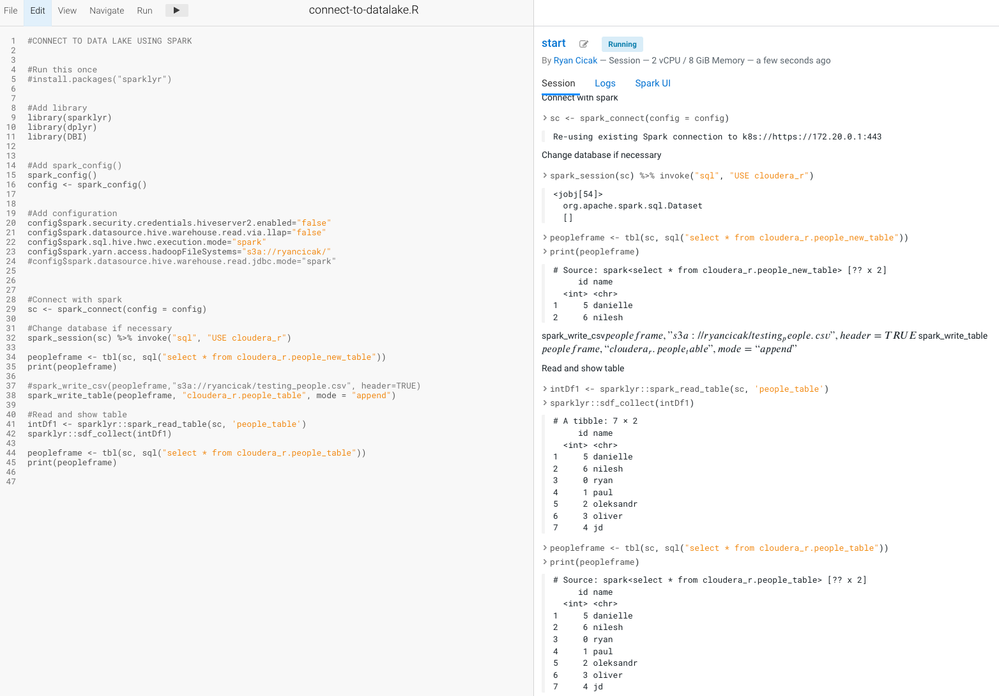
Step 2: Modifying the code in the article above (stripping out HWC) - I'm able to run the code (which I'll include a snippet below so you can copy)

  • Since the Hive Metastore contains the S3 location from Impala in Step 1, we do not need to specify the S3 location for Spark to read/write.
  • We need the spark.yarn.access.hadoopFileSystem to contain the S3 location that our table is - so Spark has access to read/write.  If you make a modification on spark.yarn.access.hadoopFileSystem - it's best to start a new session.
article_step2.png


#CONNECT TO DATA LAKE USING SPARK


#Run this once
#install.packages("sparklyr")


#Add library
library(sparklyr)
library(dplyr)
library(DBI)


#Add spark_config()
spark_config()
config <- spark_config()


#Add configuration
config$spark.security.credentials.hiveserver2.enabled="false"
config$spark.datasource.hive.warehouse.read.via.llap="false"
config$spark.sql.hive.hwc.execution.mode="spark"
config$spark.yarn.access.hadoopFileSystems="s3a://ryancicak/"
#config$spark.datasource.hive.warehouse.read.jdbc.mode="spark"


#Connect with spark
sc <- spark_connect(config = config)

#Change database if necessary
spark_session(sc) %>% invoke("sql", "USE cloudera_r")

peopleframe <- tbl(sc, sql("select * from cloudera_r.people_new_table"))
print(peopleframe)

#spark_write_csv(peopleframe,"s3a://ryancicak/testing_people.csv", header=TRUE)
spark_write_table(peopleframe, "cloudera_r.people_table", mode = "append")

#Read and show table
intDf1 <- sparklyr::spark_read_table(sc, 'people_table')
sparklyr::sdf_collect(intDf1)

peopleframe <- tbl(sc, sql("select * from cloudera_r.people_table"))
print(peopleframe)


Notice that the first print table is showing the two rows, Danielle and Nilesh.  The second table print is showing the table people_table after we wrote the two new rows, where instead of five initial records, we show seven (since we appended).
  • I do print the same table twice - just showing two different ways to read from a table (I prefer the SQL option).
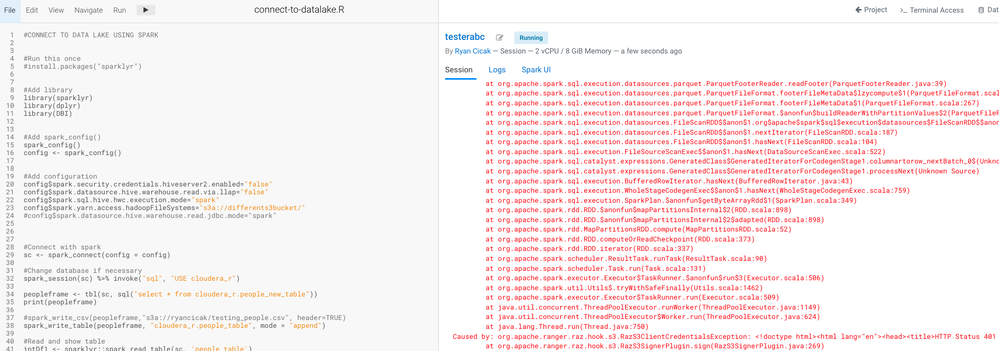
  • If you do not choose the correct bucket name (the S3 bucket where you're reading/writing tables) - you'll receive an error.  In my case, I receive a RAZ 401 error (since I have RAZ enabled).  If I change my bucket after running one in my session, I'll still get the error.  I need to stop and then start a new session to take in the correct bucket. 
  • I can add multiple S3 locations separated with commas.
Notice that I changed my hadoopFileSystems to "differents3bucket" and receive the access error.  Even if I change back to "ryancicak", I still receive an access error until I start a new session.  
article_end.png
 
@pauldefusco added some more examples to his GitHub repo that may be helpful: SparklyR_CML_Example.
 
Shout-out to @pauldefusco, @ozarate, @aakulov, and @jagadeesan for helping with these steps!
2,792 Views
Comments

Cloudera making hard stuff easy again!   Great article Ryan!!

Version history
Last update:
‎04-21-2026 12:08 AM
Updated by: