
Our Community is getting an upgrade! To get everything ready for the relaunch, we’ll be placing the site in read-only mode starting September 21st.
We really appreciate your understanding while we get things set up behind the scenes. Catch up on all the exciting details about the move here.
Need help or have questions? Drop us a line at [email protected]

Community Articles
 Hi, I'm CLEO! Something exciting is coming to the Community. Stay Tuned!
- Cloudera Community
- Support
- Community Articles
- Running SparkR in RStudio using HDP 2.4
- Subscribe to RSS Feed
- Mark as New
- Mark as Read
- Bookmark
- Subscribe
- Printer Friendly Page
- Report Inappropriate Content
- Subscribe to RSS Feed
- Mark as New
- Mark as Read
- Bookmark
- Subscribe
- Printer Friendly Page
- Report Inappropriate Content


Created on
04-01-2016
05:12 PM
- edited on
02-24-2020
02:27 AM
by
 VidyaSargur

HDP Sandbox comes pre-installed with SparkR and R .
First let's setup the R Studio on the HDP Sandbox:
To download and install RStudio Server open a terminal window and execute the commands corresponding to get the 64-bit version
wget https://download2.rstudio.org/rstudio-server-rhel-0.99.893-x86_64.rpm

sudo yum install --nogpgcheck rstudio-server-rhel-0.99.893-x86_64.rpm

sudo rstudio-server verify-installation

sudo rstudio-server stop

sudo rstudio-server start
Now setup a local user on the hdp sandbox, to access the rstudio:
useradd alex

passwd xxxx
Next launch web-browser and point to : http://sandbox.hortonworks.com:8787/
Login using the local account created earlier above.
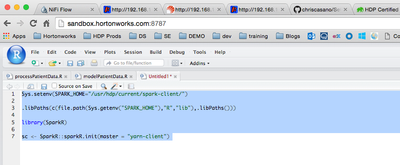
Next lets initialize the sparkr in "yarn-client" mode
Sys.setenv(SPARK_HOME="/usr/hdp/current/spark-client/")


.libPaths(c(file.path(Sys.getenv("SPARK_HOME"),"R","lib"),.libPaths()))


library(SparkR)


sc <- SparkR::sparkR.init(master = "yarn-client")
Run the code in rstudio , you should get the following output:
>
>
> Sys.setenv(SPARK_HOME="/usr/hdp/current/spark-client/")
>
> .libPaths(c(file.path(Sys.getenv("SPARK_HOME"),"R","lib"),.libPaths()))
>
> library(SparkR)

Attaching package: ‘SparkR’

The following objects are masked from ‘package:stats’:

    cov, filter, lag, na.omit, predict, sd, var

The following objects are masked from ‘package:base’:

    colnames, colnames<-, intersect, rank, rbind, sample, subset, summary, table, transform

> sc <- SparkR::sparkR.init(master = "yarn-client")
Launching java with spark-submit command /usr/hdp/current/spark-client//bin/spark-submit   sparkr-shell /tmp/RtmpVvKWS8/backend_port38582cab538c
16/04/01 16:28:00 INFO SparkContext: Running Spark version 1.6.0
16/04/01 16:28:01 WARN NativeCodeLoader: Unable to load native-hadoop library for your platform... using builtin-java classes where applicable
16/04/01 16:28:01 INFO SecurityManager: Changing view acls to: azeltov
16/04/01 16:28:01 INFO SecurityManager: Changing modify acls to: azeltov
16/04/01 16:28:01 INFO SecurityManager: SecurityManager: authentication disabled; ui acls disabled; users with view permissions: Set(azeltov); users with modify permissions: Set(azeltov)
16/04/01 16:28:02 INFO Utils: Successfully started service 'sparkDriver' on port 51539.
16/04/01 16:28:02 INFO Slf4jLogger: Slf4jLogger started
16/04/01 16:28:02 INFO Remoting: Starting remoting
16/04/01 16:28:03 INFO Remoting: Remoting started; listening on addresses :[akka.tcp://[email protected]:54056]
16/04/01 16:28:03 INFO Utils: Successfully started service 'sparkDriverActorSystem' on port 54056.
16/04/01 16:28:03 INFO SparkEnv: Registering MapOutputTracker
16/04/01 16:28:03 INFO SparkEnv: Registering BlockManagerMaster
16/04/01 16:28:03 INFO DiskBlockManager: Created local directory at /tmp/blockmgr-533d709d-f345-4d26-8046-0ae68a009d13
16/04/01 16:28:03 INFO MemoryStore: MemoryStore started with capacity 511.5 MB
16/04/01 16:28:03 INFO SparkEnv: Registering OutputCommitCoordinator
16/04/01 16:28:03 INFO Server: jetty-8.y.z-SNAPSHOT
16/04/01 16:28:03 INFO AbstractConnector: Started [email protected]:4040
16/04/01 16:28:03 INFO Utils: Successfully started service 'SparkUI' on port 4040.
16/04/01 16:28:03 INFO SparkUI: Started SparkUI at http://000.000.000.000:4040
spark.yarn.driver.memoryOverhead is set but does not apply in client mode.
16/04/01 16:28:04 INFO TimelineClientImpl: Timeline service address: http://sandbox.hortonworks.com:8188/ws/v1/timeline/
16/04/01 16:28:04 INFO RMProxy: Connecting to ResourceManager at sandbox.hortonworks.com/1000.000.000.000:8050
16/04/01 16:28:05 WARN DomainSocketFactory: The short-circuit local reads feature cannot be used because libhadoop cannot be loaded.
16/04/01 16:28:05 INFO Client: Requesting a new application from cluster with 1 NodeManagers
16/04/01 16:28:05 INFO Client: Verifying our application has not requested more than the maximum memory capability of the cluster (5120 MB per container)
16/04/01 16:28:05 INFO Client: Will allocate AM container, with 896 MB memory including 384 MB overhead
16/04/01 16:28:05 INFO Client: Setting up container launch context for our AM
16/04/01 16:28:05 INFO Client: Setting up the launch environment for our AM container
16/04/01 16:28:05 INFO Client: Using the spark assembly jar on HDFS because you are using HDP, defaultSparkAssembly:hdfs://sandbox.hortonworks.com:8020/hdp/apps/2.4.0.0-169/spark/spark-hdp-assembly.jar
16/04/01 16:28:05 INFO Client: Preparing resources for our AM container
16/04/01 16:28:05 INFO Client: Using the spark assembly jar on HDFS because you are using HDP, defaultSparkAssembly:hdfs://sandbox.hortonworks.com:8020/hdp/apps/2.4.0.0-169/spark/spark-hdp-assembly.jar
16/04/01 16:28:05 INFO Client: Source and destination file systems are the same. Not copying hdfs://sandbox.hortonworks.com:8020/hdp/apps/2.4.0.0-169/spark/spark-hdp-assembly.jar
16/04/01 16:28:06 INFO Client: Uploading resource file:/tmp/spark-974da35e-9ded-485a-9a13-0fd9a020dbf0/__spark_conf__5714702140855539619.zip -> hdfs://sandbox.hortonworks.com:8020/user/azeltov/.sparkStaging/application_1459455786854_0007/__spark_conf__5714702140855539619.zip
16/04/01 16:28:06 INFO SecurityManager: Changing view acls to: azeltov
16/04/01 16:28:06 INFO SecurityManager: Changing modify acls to: azeltov
16/04/01 16:28:06 INFO SecurityManager: SecurityManager: authentication disabled; ui acls disabled; users with view permissions: Set(azeltov); users with modify permissions: Set(azeltov)
16/04/01 16:28:06 INFO Client: Submitting application 7 to ResourceManager
16/04/01 16:28:06 INFO YarnClientImpl: Submitted application application_1459455786854_0007
16/04/01 16:28:06 INFO SchedulerExtensionServices: Starting Yarn extension services with app application_1459455786854_0007 and attemptId None
16/04/01 16:28:07 INFO Client: Application report for application_1459455786854_0007 (state: ACCEPTED)
16/04/01 16:28:07 INFO Client:
  client token: N/A
  diagnostics: N/A
  ApplicationMaster host: N/A
  ApplicationMaster RPC port: -1
  queue: default
  start time: 1459528086330
  final status: UNDEFINED
  tracking URL: http://sandbox.hortonworks.com:8088/proxy/application_1459455786854_0007/
  user: azeltov
16/04/01 16:28:08 INFO Client: Application report for application_1459455786854_0007 (state: ACCEPTED)
16/04/01 16:28:09 INFO Client: Application report for application_1459455786854_0007 (state: ACCEPTED)
16/04/01 16:28:10 INFO Client: Application report for application_1459455786854_0007 (state: ACCEPTED)
16/04/01 16:28:11 INFO Client: Application report for application_1459455786854_0007 (state: ACCEPTED)
16/04/01 16:28:12 INFO YarnSchedulerBackend$YarnSchedulerEndpoint: ApplicationMaster registered as NettyRpcEndpointRef(null)
16/04/01 16:28:12 INFO YarnClientSchedulerBackend: Add WebUI Filter. org.apache.hadoop.yarn.server.webproxy.amfilter.AmIpFilter, Map(PROXY_HOSTS -> sandbox.hortonworks.com, PROXY_URI_BASES -> http://sandbox.hortonworks.com:8088/proxy/application_1459455786854_0007), /proxy/application_1459455786854_0007
16/04/01 16:28:12 INFO JettyUtils: Adding filter: org.apache.hadoop.yarn.server.webproxy.amfilter.AmIpFilter
16/04/01 16:28:12 INFO Client: Application report for application_1459455786854_0007 (state: RUNNING)
16/04/01 16:28:12 INFO Client:
  client token: N/A
  diagnostics: N/A
  ApplicationMaster host:000.000.000.000
  ApplicationMaster RPC port: 0
  queue: default
  start time: 1459528086330
  final status: UNDEFINED
  tracking URL: http://sandbox.hortonworks.com:8088/proxy/application_1459455786854_0007/
  user: azeltov
16/04/01 16:28:12 INFO YarnClientSchedulerBackend: Application application_1459455786854_0007 has started running.
16/04/01 16:28:12 INFO Utils: Successfully started service 'org.apache.spark.network.netty.NettyBlockTransferService' on port 35844.
16/04/01 16:28:12 INFO NettyBlockTransferService: Server created on 35844
16/04/01 16:28:12 INFO BlockManagerMaster: Trying to register BlockManager
16/04/01 16:28:12 INFO BlockManagerMasterEndpoint: Registering block manager 000.000.000.000:35844 with 511.5 MB RAM, BlockManagerId(driver,000.000.000.000, 35844)
16/04/01 16:28:12 INFO BlockManagerMaster: Registered BlockManager
16/04/01 16:28:12 INFO EventLoggingListener: Logging events to hdfs:///spark-history/application_1459455786854_0007
16/04/01 16:28:18 INFO YarnClientSchedulerBackend: Registered executor NettyRpcEndpointRef(null) (sandbox.hortonworks.com:43282) with ID 1
16/04/01 16:28:18 INFO BlockManagerMasterEndpoint: Registering block manager sandbox.hortonworks.com:58360 with 511.5 MB RAM, BlockManagerId(1, sandbox.hortonworks.com, 58360)
16/04/01 16:28:33 INFO YarnClientSchedulerBackend: SchedulerBackend is ready for scheduling beginning after waiting maxRegisteredResourcesWaitingTime: 30000(ms)
Validate that the sparkUI is started, look for this message in your output like the one above:
16/04/01 16:28:03 INFO Utils: Successfully started service 'SparkUI' on port 4040.
16/04/01 16:28:03 INFO SparkUI: Started SparkUI at http://000.000.000.000:4040
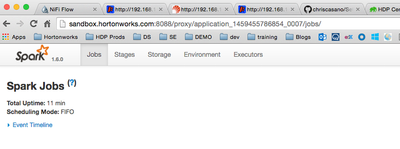
Next lets try running some sparkR code:
sqlContext <-sparkRSQL.init(sc)

path <-file.path("file:///usr/hdp/2.4.0.0-169/spark/examples/src/main/resources/people.json")

peopleDF <-jsonFile(sqlContext, path)

printSchema(peopleDF)
You should get this output:
> printSchema(peopleDF)
root
 |-- age: long (nullable = true)
 |-- name: string (nullable = true)

Now lets try to do some basic dataframe analysis
# Register this DataFrame as a table.
registerTempTable(peopleDF, "people")
teenagers <- sql(sqlContext, "SELECT name FROM people WHERE age >= 13 AND age <= 19")
teenagersLocalDF <- collect(teenagers)
print(teenagersLocalDF)


Created on 05-20-2016 09:15 AM
- Mark as Read
- Mark as New
- Bookmark
- Permalink
- Report Inappropriate Content
Hi @azeltov,
Could you run R-Studio remote, i.e. on your laptop and connect to a cluster?
Cheers,
Christian


Created on 07-20-2016 09:13 PM
- Mark as Read
- Mark as New
- Bookmark
- Permalink
- Report Inappropriate Content
I installed HDP2.4 for Virtual box and it is telling me that R is not found. Are you sure that R is preinstalled? What is the fix for this?

Created on 08-18-2016 10:55 AM
- Mark as Read
- Mark as New
- Bookmark
- Permalink
- Report Inappropriate Content
This did not work. When I verify my installation it gives me: Unable to find an installation of R on the system (which R didn't return valid output); Unable to locate R binary by scanning standard locations.
What to do?
Created on 08-23-2016 04:15 PM
- Mark as Read
- Mark as New
- Bookmark
- Permalink
- Report Inappropriate Content
It seems the new version of Sandbox does not have R pre-installed. Its an easy installation procedure :
sudo yum install -y epel-release
sudo yum update -y
sudo yum install -y RCreated on 08-23-2016 04:16 PM
- Mark as Read
- Mark as New
- Bookmark
- Permalink
- Report Inappropriate Content
It seems the new version of Sandbox does not have R pre-installed. Its an easy installation procedure:
sudo yum install -y epel-release
sudo yum update -y
sudo yum install -y R

Created on 10-31-2016 11:03 PM
- Mark as Read
- Mark as New
- Bookmark
- Permalink
- Report Inappropriate Content
HI @azeltov, I am trying to install R-studio on Hortonworks sandbox 2.5, running through the exception in verify installation step:
initctl: Unable to connect to Upstart: Failed to connect to socket /com/ubuntu/upstart: Connection refused
I have tried starting, stopping rstudio server, it shows the same message.
PS: Since it is a docker container, 8787 port is not opened so I have configured /etc/rstudio/rserver.conf to use port 9000.


| User | Count |
|---|---|
| 4 | |
| 4 | |
| 2 | |
| 2 | |
| 1 |


