
Our Community is getting an upgrade! To get everything ready for the relaunch, we’ll be placing the site in read-only mode starting September 21st.
We really appreciate your understanding while we get things set up behind the scenes. Catch up on all the exciting details about the move here.
Need help or have questions? Drop us a line at [email protected]

Community Articles
 Hi, I'm CLEO! Something exciting is coming to the Community. Stay Tuned!
- Cloudera Community
- Support
- Community Articles
- Sample HDF/NiFi flow to Push Tweets into Solr/Bana...
- Subscribe to RSS Feed
- Mark as New
- Mark as Read
- Bookmark
- Subscribe
- Printer Friendly Page
- Report Inappropriate Content
- Subscribe to RSS Feed
- Mark as New
- Mark as Read
- Bookmark
- Subscribe
- Printer Friendly Page
- Report Inappropriate Content



Created on 10-12-2015 08:41 AM - edited 08-17-2019 02:05 PM
Build flow in HDF/Nifi to push tweets to HDP
In this tutorial, we will learn how to use HDF to create a simple event processing flow by:
- Install HDF/Nifi on sandbox using the Ambari service
- Setup Solr/Banana/Hive table
- Import/Instantiate a prebuilt Nifi template
- Verify tweets got pushed to HDFS, Hive using Ambari views
- Visualize tweets in Solr using Banana dashboard
- Explore provenance features of Nifi
Change log
- 9/30: Automation script to deploy HDP clusters (on any cloud) with this demo already setup, is available here
- 9/15: Updated: Demo Ambari service for Nifi updated to support HDP 2.5 sandbox and Nifi 1.0. Steps to manually install demo artifacts remains unchanged (but below Nifi screenshots need to be updated)
References
For a primer on HDF, you can refer to the materials here to get a basic background
Thanks to @[email protected] for his earlier blog post that helped make this tutorial possible
Pre-Requisites
- The lab is designed for the HDP Sandbox VM. To run on Azure sandbox, Azure specific pre-req steps provided here
- Download the HDP Sandbox here, import into VMWare Fusion and start the VM
- If running on VirtualBox you will need to forward port 9090. See here for detailed steps
- After it boots up, find the IP address of the VM and add an entry into your machines hosts file e.g.
192.168.191.241 sandbox.hortonworks.com sandbox
Connect to the VM via SSH (root/hadoop), correct the /etc/hosts entry
ssh [email protected]
- If using HDP 2.5 sandbox, you will also need to SSH into the docker based sandbox container:
ssh [email protected] -p 2222
- Deploy/update Nifi Ambari service on sandbox by running below
- Note: on HDP 2.5 sandbox, the Nifi service definition is already installed, so you can skip this and proceed to installing Nifi via 'Install Wizard'
VERSION=`hdp-select status hadoop-client | sed 's/hadoop-client - \([0-9]\.[0-9]\).*/\1/'`
rm -rf /var/lib/ambari-server/resources/stacks/HDP/$VERSION/services/NIFI
sudo git clone https://github.com/abajwa-hw/ambari-nifi-service.git   /var/lib/ambari-server/resources/stacks/HDP/$VERSION/services/NIFI
#sandbox
service ambari restart
#non sandbox
service ambari-server restart
- To install Nifi, start the 'Install Wizard': Open Ambari (http://sandbox.hortonworks.com:8080) then:
- On bottom left -> Actions -> Add service -> check NiFi server -> Next -> Next -> Change any config you like (e.g. install dir, port, setup_prebuilt or values in nifi.properties) -> Next -> Deploy. This will kick off the install which will run for 5-10min.
Steps
- Import a simple flow to read Tweets into HDFS/Solr and visualize using Banana dashboard
- HDP sandbox comes LW HDP search. Follow the steps below to use it to setup Banana, start SolrCloud and create a collection
- On HDP 2.5 sandbox, HDPsearch can be installed via Ambari. Just use the same 'Install Wizard' used above and select all defaults
- To install HDP search on non-sandbox, you can either:
- install via Ambari (for this you will need to install its management pack in Ambari)
- OR install HDPsearch manually:
yum install -y lucidworks-hdpsearch
sudo -u hdfs hadoop fs -mkdir /user/solr
sudo -u hdfs hadoop fs -chown solr /user/solr
- Ensure no log files owned by root (current sandbox version has files owned by root in log dir which causes problems when starting solr)
chown -R solr:solr /opt/lucidworks-hdpsearch/solr
- Run solr setup steps as solr user
su solr
- Setup the Banana dashboard by copying default.json to dashboard dir
cd /opt/lucidworks-hdpsearch/solr/server/solr-webapp/webapp/banana/app/dashboards/
mv default.json default.json.orig
wget https://raw.githubusercontent.com/abajwa-hw/ambari-nifi-service/master/demofiles/default.json
- Edit solrconfig.xml by adding
<str>EEE MMM d HH:mm:ss Z yyyy</str>underParseDateFieldUpdateProcessorFactoryso it looks like below. This is done to allow Solr to recognize the timestamp format of tweets.
vi /opt/lucidworks-hdpsearch/solr/server/solr/configsets/data_driven_schema_configs/conf/solrconfig.xml
<processor> <arr name="format"> <str>EEE MMM d HH:mm:ss Z yyyy</str>- Start/Restart Solr in cloud mode
- If you installed Solr via Ambari, just use the 'Service Actions' dropdown to restart it
- Otherwise, if you installed manually, start Solr as below after setting JAVA_HOME to the right location:
export JAVA_HOME=/usr/lib/jvm/java-1.7.0-openjdk.x86_64
/opt/lucidworks-hdpsearch/solr/bin/solr start -c -z localhost:2181
- create a collection called tweets
/opt/lucidworks-hdpsearch/solr/bin/solr create -c tweets -d data_driven_schema_configs -s 1 -rf 1
- Solr setup is complete. Return to root user
exit
- Ensure the time on your sandbox is accurate or you will get errors using the GetTwitter processor. In case the time is not correct, run the below to fix it:
yum install -y ntp
service ntpd stop
ntpdate pool.ntp.org
service ntpd start
- HDP sandbox comes LW HDP search. Follow the steps below to use it to setup Banana, start SolrCloud and create a collection
- Now open Nifi webui (http://sandbox.hortonworks.com:9090/nifi) and run the remaining steps there:
- Download prebuilt Twitter_Dashboard.xml template to your laptop from here
- Import flow template info Nifi:
- Import template by clicking on Templates (third icon from right) which will launch the 'Nifi Flow templates' popup
- Browse and navigate to where ever you downloaded Twitter_Dashboard.xml on your local machine
- Click Import. Now the template should appear:
- Close the popup
- Import template by clicking on Templates (third icon from right) which will launch the 'Nifi Flow templates' popup
- Instantiate the Twitter dashboard template:
- Drag/drop the Template icon (7th icon form left) onto the canvas so that a picklist popup appears
- Select 'Twitter dashboard' and click Add
- This should create a box (i.e processor group) named 'Twitter Dashboard'. Double click it to drill into the actual flow
- Drag/drop the Template icon (7th icon form left) onto the canvas so that a picklist popup appears
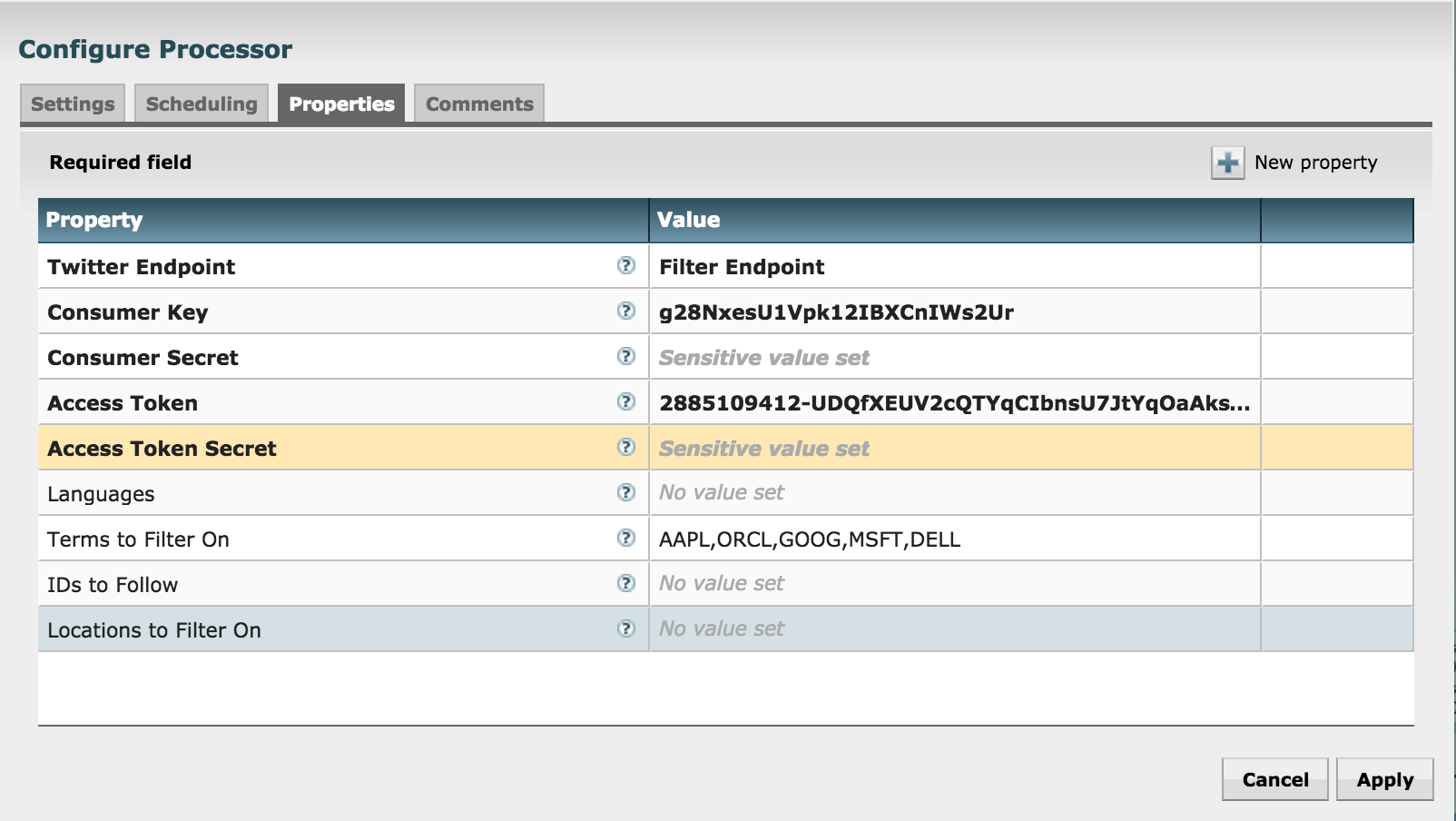
- Configure GetTwitter processor
- Right click on 'GetTwitter' processor (near top) and click Configure
- Under Properties:
- Enter your Twitter key/secrets
- ensure the 'Twitter Endpoint' is set to 'Filter Endpoint'
- enter the search terms (e.g. AAPL,GOOG,MSFT,ORCL) under 'Terms to Filter on'
- Under Properties:
- Right click on 'GetTwitter' processor (near top) and click Configure
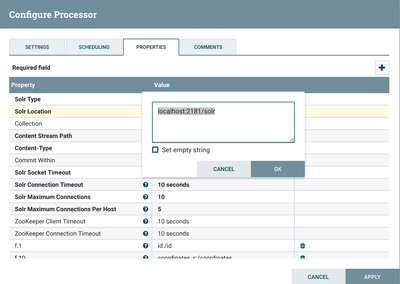
- Configure PutContentSolrStream processor
- Writes the selected attributes to Solr. In this case, assuming Solr is running in cloud mode with a collection 'tweets'
- Confirm the Solr Location property is updated to reflect your Zookeeper configuration (for SolrCloud) or Solr standalone instance
- If you installed Solr via Ambari, you will need to append /solr to the ZK string in the 'Solr Location':
- Review the other processors and modify properties as needed:
- EvaluateJsonPath: Pulls out attributes of tweets
- RouteonAttribute: Ensures only tweets with non-empty messages are processed
- ReplaceText: Formats each tweet as pipe (|) delimited line entry e.g. tweet_id|unixtime|humantime|user_handle|message|full_tweet
- MergeContent: Merges tweets into a single file (either 20 tweets or 120s, whichever comes first) to avoid having a large number of small files in HDFS. These values can be configured.
- PutFile: writes tweets to local disk under /tmp/tweets/
- PutHDFS: writes tweets to HDFS under /tmp/tweets_staging
- If setup correctly, the top left hand of each processor on the canvas will show a red square (indicating the flow is stopped)
- Click the Start button (green triangle near top of screen) to start the flow
- After few seconds you will see tweets flowing
- Create Hive table to be able to run queries on the tweets in HDFS
sudo -u hdfs hadoop fs -chmod -R 777 /tmp/tweets_staging

hive> create table if not exists tweets_text_partition(
  tweet_id bigint,
  created_unixtime bigint,
  created_time string,
  displayname string,
  msg string,
  fulltext string
)
row format delimited fields terminated by "|"
location "/tmp/tweets_staging";



Viewing results
- Verify that:
- tweets appear under /tmp/tweets_staging dir in HDFS. You can see this via Files view in Ambari:
- tweets appear in Solr:
- tweets appear under /tmp/tweets_staging dir in HDFS. You can see this via Files view in Ambari:
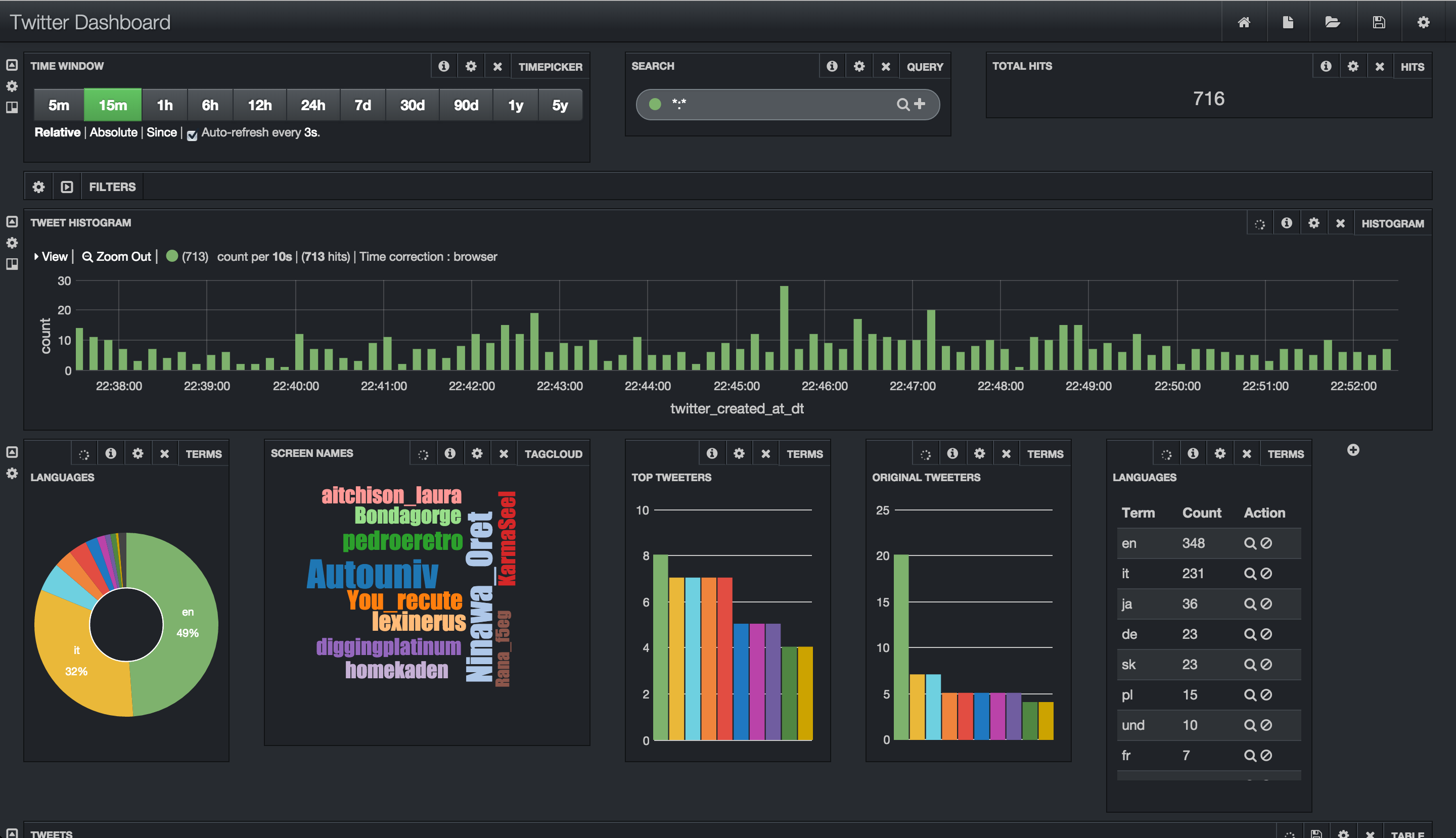
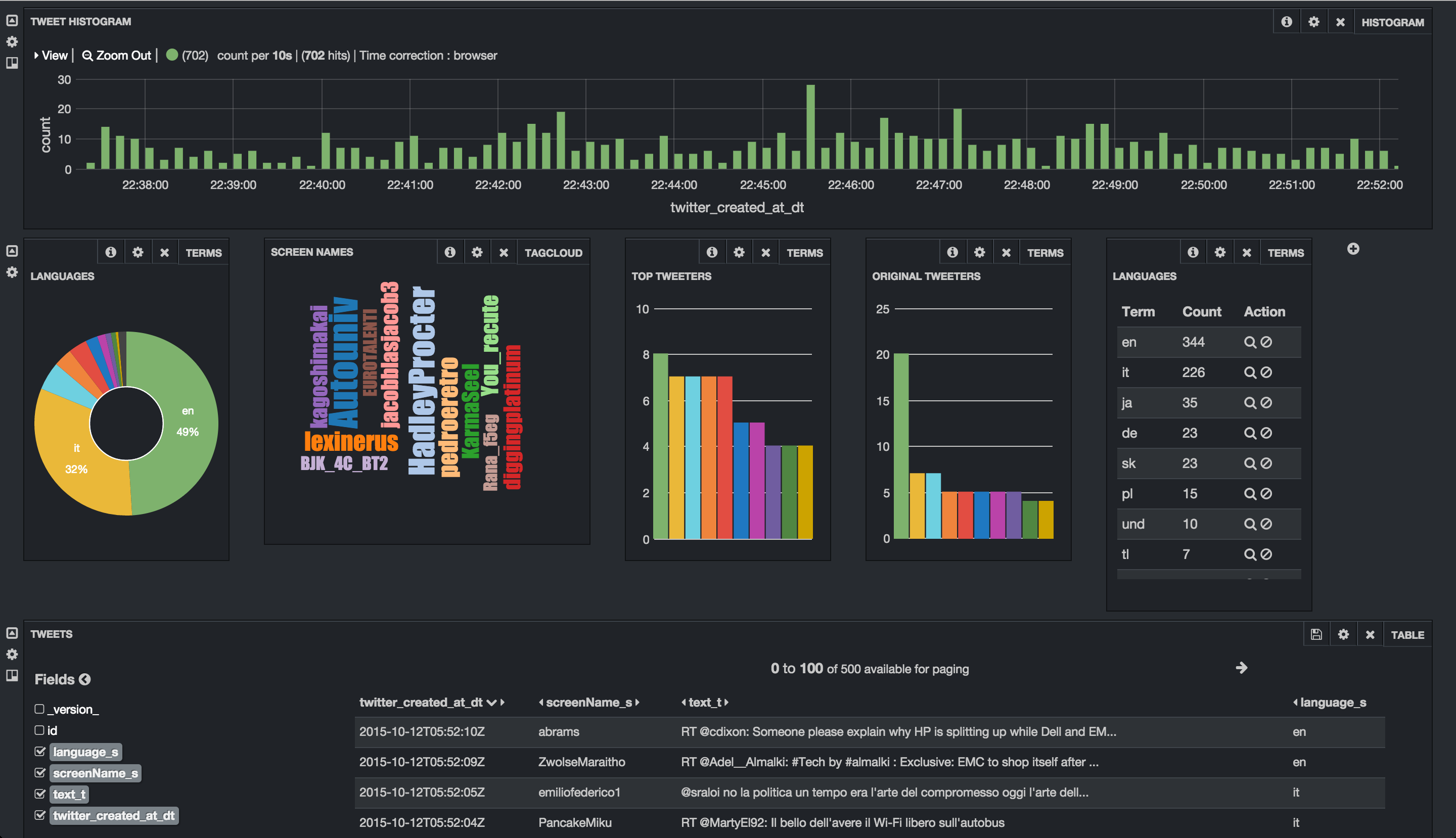
- Tweets appear in Banana:
- http://sandbox.hortonworks.com:8983/solr/banana/index.html#/dashboard
- To search for tweets by language (e.g. Italian) enter the below in the search text box:
- language_s:it
- To search for tweets by a particular user (e.g. warrenbuffett) enter the below in the search text box:
- screenName_s:warrenbuffett
- To search for tweets containing some text (e.g. tax) enter the below in the search text box:
- text_t:tax
- Tweets appear in Hive:



- Flow statistics/graphs:
- Right click on one of the processors (e.g. PutHDFS) and select click 'Stats' to see a number of charts/metrics:
- You should also see Nifi metrics in Ambari (assuming you started Ambari metrics earlier)
- Right click on one of the processors (e.g. PutHDFS) and select click 'Stats' to see a number of charts/metrics:
- Data provenance in Nifi:
- In Nifi home screen, click Provenance icon (5th icon from top right corner) to open Provenance page:
- Click Show lineage icon (2nd icon from right) on any row
- Right click Send > View details > Content
- From here you can view the tweet itself by
- Clicking Content > View > formatted
- Clicking Content > View > formatted
- You can also replay the event by
- Replay > Submit
- Close the provenance window using x icon on the inner window
- Notice the event was replayed
- Re-open the the provenance window on the row you you had originally selected
- Notice that by viewing and replaying the tweet, you changed the provenance graph of this event: Send and replay events were added to the lineage graph
- Also notice the time slider on the bottom left of the page which allows users to 'rewind' time and 'replay' the provenance events as they happened.
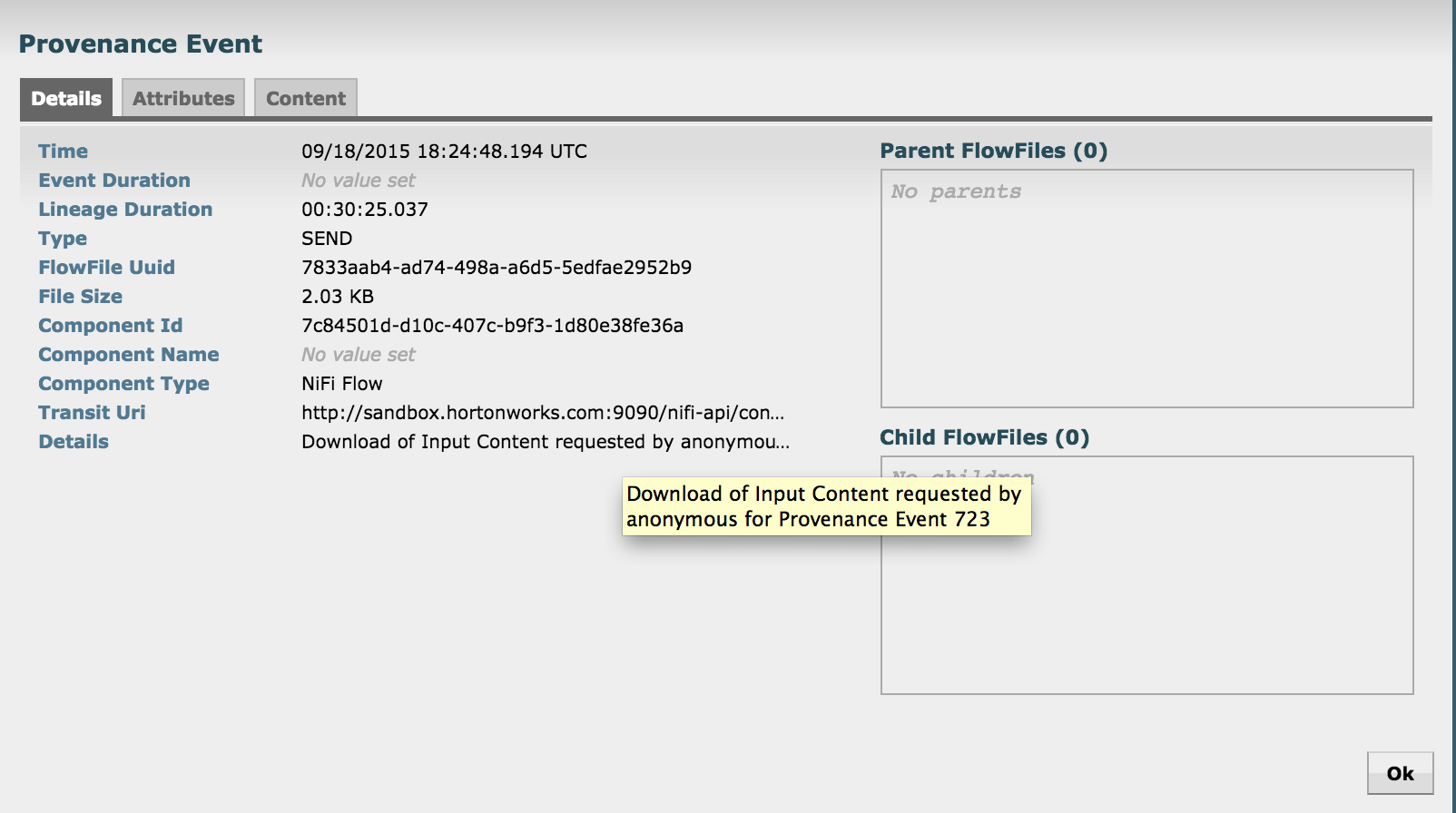
- Right click on the Send event near the bottom of the flow and select Details
- Notice that the details of request to view the tweet are captured here (who requested it, at what time etc)
- Exit the Provenance window but clicking the x icon on the outer window
- In Nifi home screen, click Provenance icon (5th icon from top right corner) to open Provenance page:



Other things to try:
Learn more about Nifi expression language and how to get started building a custom Nifi processor: http://community.hortonworks.com/articles/4356/getting-started-with-nifi-expression-language-and.htm...
Created on 01-19-2016 02:10 AM
- Mark as Read
- Mark as New
- Bookmark
- Permalink
- Report Inappropriate Content
Thanks @Scott Shaw...updated

Created on 03-31-2016 08:24 PM
- Mark as Read
- Mark as New
- Bookmark
- Permalink
- Report Inappropriate Content
One caveat: In case you reboot (reset) your VM/Sandbox, you should enable 'ntpd' daemon to start on bootup. I had trouble with GetTwitter as mentioned in the post above, even after following the steps to add ntpd and enable it. However, in the meantime, I had to reboot, which turned it off. To enable it on system bootup, run this command:
chkconfig ntpd on
To make sure it was effective, you can run this command to make sure 'ntpd' is enabled in the run modes (2,3,4,5):
chkconfig --list | grep ntpd

Created on 07-05-2016 07:26 AM - edited 08-17-2019 02:05 PM
- Mark as Read
- Mark as New
- Bookmark
- Permalink
- Report Inappropriate Content
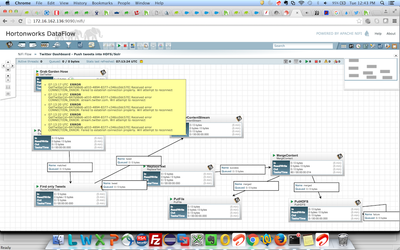
@Ali Bajwa I am getting below error when I tried to replicate same case in my sandbox VM Fusion.
Created on 07-05-2016 12:04 PM
- Mark as Read
- Mark as New
- Bookmark
- Permalink
- Report Inappropriate Content
@Ali Bajwa I have resolved it by adding proxy setting for nifi user.
hadoop.proxyuser.nifi.groups=*
hadoop.proxyuser.nifi.hosts=*

Created on 08-08-2016 11:39 PM
- Mark as Read
- Mark as New
- Bookmark
- Permalink
- Report Inappropriate Content
Anybody seen the following error when trying to create the tweet shard? And is there a known solution?
Unable to create core [tweets_shard1_replica1] Caused by: XML document structures must start and end within the same entity.

Created on 10-21-2016 09:13 PM
- Mark as Read
- Mark as New
- Bookmark
- Permalink
- Report Inappropriate Content
The following tutorial also follows a very similar flow:
ANALYZING SOCIAL MEDIA AND CUSTOMER SENTIMENT WITH APACHE NIFI AND HDP SEARCH


Created on 02-15-2017 11:11 AM
- Mark as Read
- Mark as New
- Bookmark
- Permalink
- Report Inappropriate Content
Thank you @Ali Bajwa for good tutoral.
I am trying this example with a difference, My nifi is local and I try to put tweets in a remote Solr. Solr is in a VM that contains Hortonworks sandbox. Unfortunately I am getting this error on PutSolrContentStream processor:
PutSolrContentStream[id=f6327477-fb7d-4af0-ec32-afcdb184e545] Failed to send StandardFlowFileRecord[uuid=9bc39142-c02c-4fa2-a911-9a9572e885d0,claim=StandardContentClaim [resourceClaim=StandardResourceClaim[id=1487148463852-14, container=default, section=14], offset=696096, length=2589],offset=0,name=103056151325300.json,size=2589] to Solr due to org.apache.solr.client.solrj.SolrServerException: IOException occured when talking to server at: http://172.17.0.2:8983/solr/tweets_shard1_replica1; routing to connection_failure: org.apache.solr.client.solrj.SolrServerException: IOException occured when talking to server at: http://172.17.0.2:8983/solr/tweets_shard1_replica1;
Could you help me?
thanks,
Shanghoosh
- « Previous
-
- 1
- 2
- Next »


| User | Count |
|---|---|
| 4 | |
| 4 | |
| 2 | |
| 2 | |
| 1 |


