Our Community is getting an upgrade! To get everything ready for the relaunch, we’ll be placing the site in read-only mode starting September 21st.
We really appreciate your understanding while we get things set up behind the scenes. Catch up on all the exciting details about the move here.
Need help or have questions? Drop us a line at [email protected]

Community Articles

Find and share helpful community-sourced technical articles.
Announcements
Share your experience with Cloudera on G2 and get a $25 Amazon Gift card.
Hi, I'm CLEO! Something exciting is coming to the Community. Stay Tuned!

Labels (2)
avatar
Master Guru

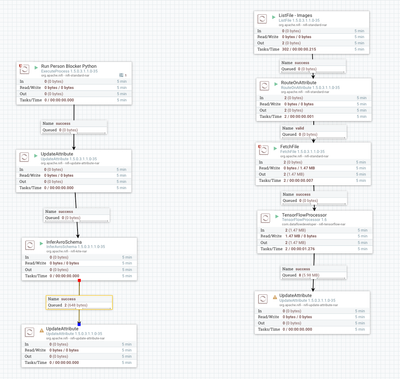
Using a Pre-Trained Neural Network on MS CoCo DataSet using Mask R-CNN in TensorFlow / Keras.

65051-personblockerflow.png

I am always looking for use cases, always. Yesterday I gave a talk at the IoT Fusion Conference in Philadelphia about IoT. I had a Raspberry Pi taking web camera images. I mentioned I wasn't pointing at people because they may not want to be photographed. I am concerned with privacy. It gave me the idea it would be cool to block people or other things from images. Then on queue, a great library shows up in github. Thanks to Minimaxir's Person Blocker, I can now use Apache NiFi to pull remove people from images. I did a couple of minor tweaks to his code to add OpenCV image capture and output some JSON information on what happened. I am running this on an OSX laptop, but at some point I'll move it to a Raspberry Pi, TinkerBoard or NVidia Jetson TX1.

Please support this project: https://github.com/minimaxir/person-blocker

https://www.patreon.com/minimaxir

Using this pretrained neural network, we can block anything in this list of classes https://github.com/minimaxir/person-blocker/blob/master/classes.py.

You will need to download the MS Coco classes which aren't that large. (mask_rcnn_coco.h5)

This works without a GPU!!

To Install the Libraries:

pip install --upgrade pip
pip install keras
pip install tensorflow
pip install opencv-python
pip install uuid
git clone https://github.com/minimaxir/person-blocker.git
pip3 install -r requirements.txt

There are a bunch of requirements such as Python 3, recent TensorFlow (I used TF 1.7), Keras, Numpy, SkiImage, SCIPY, Pillow, Cython, H5PY, Matplotlib and imageio. I added uuid and json libraries. So you install them and get running.

The JSON produced as a record of the run has the following schema:

Schema

 { "type" : "record", "name" : "personblocker", "fields" : [ { "name" : "uuid", "type" : "string", "doc" : "Type inferred from '\"person_uuid_20180406203059f_b7ce1056-9d88-4e7f-b4dd-0e8c8d6e7086\"'" }, { "name" : "runtime", "type" : "string", "doc" : "Type inferred from '\"27\"'" }, { "name" : "host", "type" : "string", "doc" : "Type inferred from '\"server.local\"'" }, { "name" : "ts", "type" : "string", "doc" : "Type inferred from '\"2018-04-06 20:30:59\"'" }, { "name" : "ipaddress", "type" : "string", "doc" : "Type inferred from '\"10.1\"'" }, { "name" : "imagefilename", "type" : "string", "doc" : "Type inferred from '\"person_blocked_20180406203057\"'" }, { "name" : "originalfilename", "type" : "string", "doc" : "Type inferred from '\"images2/tx1_image_b9ebdd52-9a9f-45f0-b71c-a44c54f14b71_20180406203032.jpg\"'" } ] }

Example Output JSON

{"uuid": "person_uuid_20180406201647f_1d2c31bc-c232-4976-a350-747ffabf5afe", "runtime": "76", "host": "mymachine.local", "ts": "2018-04-06 20:16:47", "ipaddress": "10.1.1.12", "imagefilename": "person_blocked_20180406201632", "originalfilename": "images2/tx1_image_0309425f-12ca-4331-a810-21067cbaa8f2_20180406201531.jpg"}

run.sh

 python3 -W ignore pb.py 2>/dev/null

Now You See Me (OpenCV Captured Image)

65049-tx1-image-0309425f-12ca-4331-a810-21067cbaa8f2-201.jpg

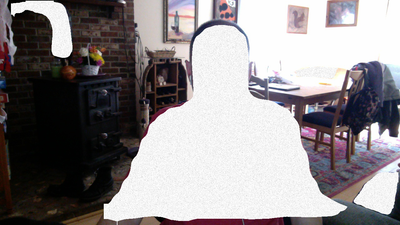
Now You Don't (Person Blocker - it did block a stove pipe)

65050-person-blocked-20180406201632.png

There's also the option to produce a GIF that moves which is cool but takes time and space. I commented that out.

My modified example:

https://github.com/tspannhw/OpenSourceComputerVision

See run.sh and pb.py.

3,842 Views
Comments
avatar
Master Guru
These setup steps may help for your particular machine.
apt-get install curl wget -y
wget https://github.com/bazelbuild/bazel/releases/download/0.11.1/bazel-0.11.1-installer-linux-x86_64.sh
./bazel-0.11.1-installer-linux-x86_64.sh
apt-get install libblas-dev liblapack-dev python-dev libatlas-base-dev gfortran python-setuptools python-h5py -y
pip3 install six numpy wheel
pip3 install --user numpy scipy matplotlib pandas sympy nose
pip3 install --upgrade tensorflow
git clone --recurse-submodules https://github.com/tensorflow/tensorflow
wget http://mirror.jax.hugeserver.com/apache/nifi/minifi/0.4.0/minifi-0.4.0-bin.zip
wget https://storage.googleapis.com/download.tensorflow.org/models/inception5h.zip
wget http://download.tensorflow.org/models/image/imagenet/inception-2015-12-05.tgz
Version history
Last update:
‎08-17-2019 07:55 AM
Updated by:
Contributors