
Our Community is getting an upgrade! To get everything ready for the relaunch, we’ll be placing the site in read-only mode starting September 21st.
We really appreciate your understanding while we get things set up behind the scenes. Catch up on all the exciting details about the move here.
Need help or have questions? Drop us a line at [email protected]

Support Questions
 Hi, I'm CLEO! Something exciting is coming to the Community. Stay Tuned!
- Cloudera Community
- Support
- Support Questions
- Re: Apache Nifi - Not a Validate JSON & Not a Vali...
- Subscribe to RSS Feed
- Mark Question as New
- Mark Question as Read
- Float this Question for Current User
- Bookmark
- Subscribe
- Mute
- Printer Friendly Page
- Subscribe to RSS Feed
- Mark Question as New
- Mark Question as Read
- Float this Question for Current User
- Bookmark
- Subscribe
- Mute
- Printer Friendly Page
Apache Nifi - Not a Validate JSON & Not a Validate XML
- Labels:
-
Apache NiFi


Created on 04-17-2022 06:36 PM - edited 04-17-2022 06:55 PM
- Mark as New
- Bookmark
- Subscribe
- Mute
- Subscribe to RSS Feed
- Permalink
- Report Inappropriate Content
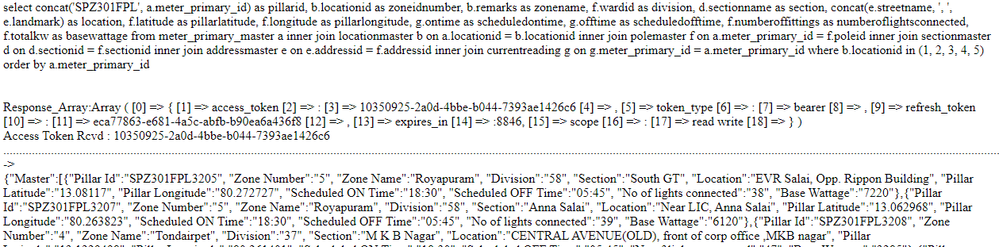
select concat SPZ301FPL , a meter primary id as pillarid, b locationid as zoneidnumber, b remarks as zonename, f wardid as division, d sectionname as section, concat e streetname, , , e landmark as location, f latitude as pillarlatitude, f longitude as pillarlongitude, g ontime as scheduledontime, g offtime as scheduledofftime, f numberoffittings as numberoflightsconnected, f totalkw as basewattage from meter primary master a inner join locationmaster b on a locationid b locationid inner join polemaster f on a meter primary id f poleid inner join sectionmaster d on d sectionid f sectionid inner join addressmaster e on e addressid f addressid inner join currentreading g on g meter primary id a meter primary id where b locationid in 1, 2, 3, 4, 5 order by a meter primary id br br br Response Array:Array 0 { 1 access token 2 : 3 10350925 2a0d 4bbe b044 7393ae1426c6 4 , 5 token type 6 : 7 bearer 8 , 9 refresh token 10 : 11 eca77863 e681 4a5c abfb b90ea6a436f8 12 , 13 expires in 14 :9348, 15 scope 16 : 17 read write 18 } br Access Token Rcvd : 10350925 2a0d 4bbe b044 7393ae1426c6 br Procesing br {"Master": {"Pillar Id":"SPZ301FPL3205", "Zone Number":"5", "Zone Name":"Royapuram", "Division":"58", "Section":"South GT", "Location":"EVR Salai, Opp Rippon Building", "Pillar Latitude":"13 08117", "Pillar Longitude":"80 272727", "Scheduled ON Time":"18:30", "Scheduled OFF Time":"05:45", "No of lights connected":"38", "Base Wattage":"7220"},
I have api that gives the above content want only the Braces value & delete rest
please help
hope Im clear
Tried - EvaluateJSONPath error - not a valid JSON Content
Tried - XML - did not start & end properly
Thanks,
J0Sh



Created 04-21-2022 02:46 PM
- Mark as New
- Bookmark
- Subscribe
- Mute
- Subscribe to RSS Feed
- Permalink
- Report Inappropriate Content
@J0sh ,
If you use a ReplaceText with the following settings it will clean up the garbage in your flowfiles:
Search Value:      (?s)(^|(\})<br>).*?(\n).*?(<br>(\{)|$)
Replacement Value: $2$3$5
This file, though, has not 1 JSON, but 8 different JSON fragments. So the resulting flowfile will still have 8 lines, each with a valid JSON. You must use a SplitText process to separate those into 8 different flowfiles before applying the EvaluateJSONPath.
Cheers,
André
Was your question answered? Please take some time to click on "Accept as Solution" below this post.
If you find a reply useful, say thanks by clicking on the thumbs up button.
Created 04-20-2022 07:00 PM
- Mark as New
- Bookmark
- Subscribe
- Mute
- Subscribe to RSS Feed
- Permalink
- Report Inappropriate Content
any support
Im new
should I use
RouteonContent or Attribute
How do I define Attributes
Created 04-20-2022 11:56 PM
- Mark as New
- Bookmark
- Subscribe
- Mute
- Subscribe to RSS Feed
- Permalink
- Report Inappropriate Content
You can use a ReplaceText processor with the following properties:
Search Value:      (?s)^.*?(\{".*\}).*$
Replacement Value: $1
Cheers,
André
Was your question answered? Please take some time to click on "Accept as Solution" below this post.
If you find a reply useful, say thanks by clicking on the thumbs up button.
Created 04-21-2022 01:24 AM
- Mark as New
- Bookmark
- Subscribe
- Mute
- Subscribe to RSS Feed
- Permalink
- Report Inappropriate Content
Thank you for the Response
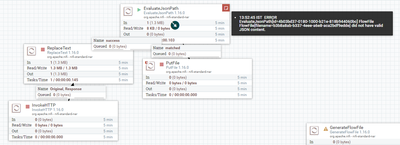
I tried this processor and connected to EvaulateJSONPath & It gave an error msg:
This is not a valid JSON Content
Created 04-21-2022 01:26 AM
- Mark as New
- Bookmark
- Subscribe
- Mute
- Subscribe to RSS Feed
- Permalink
- Report Inappropriate Content
@J0sh ,
Can you provide me with the entire contents of your flow file?
Cheers,
André
Was your question answered? Please take some time to click on "Accept as Solution" below this post.
If you find a reply useful, say thanks by clicking on the thumbs up button.
Created 04-21-2022 01:41 AM
- Mark as New
- Bookmark
- Subscribe
- Mute
- Subscribe to RSS Feed
- Permalink
- Report Inappropriate Content
Im not able to attach the file in this post
help me & I'll attach the file
I'm getting the file from Rest API & want to store in SQL Server
Created 04-21-2022 02:04 AM
- Mark as New
- Bookmark
- Subscribe
- Mute
- Subscribe to RSS Feed
- Permalink
- Report Inappropriate Content
to the post.
Was your question answered? Please take some time to click on "Accept as Solution" below this post.
If you find a reply useful, say thanks by clicking on the thumbs up button.


Created 04-21-2022 02:29 AM
- Mark as New
- Bookmark
- Subscribe
- Mute
- Subscribe to RSS Feed
- Permalink
- Report Inappropriate Content
@araujo, they will be unable to attach a document to this post. @J0sh, please add your file as text (in multiple posts, if necessary) as a reply to this post.
Regards,
Vidya Sargur,Community Manager
Was your question answered? Make sure to mark the answer as the accepted solution.
If you find a reply useful, say thanks by clicking on the thumbs up button.
Learn more about the Cloudera Community:
Created 04-21-2022 02:35 AM
- Mark as New
- Bookmark
- Subscribe
- Mute
- Subscribe to RSS Feed
- Permalink
- Report Inappropriate Content
@araujo As Im not able to attach I'll share the maximum content I can that will make it clear to understand what I have
first few lines
<br> Response_Array:Array
(
[0] => {
[1] => access_token
[2] => :
[3] => 81e77e95-b3c2-4b0d-bf45-150caefa0250
[4] => ,
[5] => token_type
[6] => :
[7] => bearer
[8] => ,
[9] => refresh_token
[10] => :
[11] => a02658dc-2e94-4681-9bee-4ff4a7300519
[12] => ,
[13] => expires_in
[14] => :2349,
[15] => scope
[16] => :
[17] => read write
[18] => }
)
<br>Access Token Rcvd : 81e77e95-b3c2-4b0d-bf45-150caefa0250<br><br><br> <b>ZONE 1 - Loop Completed </b> <br>Procesing -> <br>{"Instant":[{"Pillar Id":"SPZ301FPL5207", "Last communicated time":"2022-04-21 14:04:58", "Volt_R":"208.40", "Volt_Y":"218.00", "Volt_B":"209.90", "Curr_R":"0.00", "Curr_Y":"0.00", "Curr_B":"0.00", "Curr_N":"0.00", "Pwr_R":"0.00", "Pwr_Y":"0.00", "Pwr_B":"0.00", "Total Load":"0", "PF_Avg":"0.999", "Total Energy Consumed (kWh)":"5106.69", "Burning %":"0.00", "Relay_R":"OFF", "Relay_Y":"OFF", "Relay_B":"OFF", "Mode":"Auto", "Load ON Hours":"0000-00-00 00:00:00", "Alerts":"", "Root Cause":""},
Middle
{"Pillar Id":"SPZ301FPL5828", "Last communicated time":"2022-04-21 14:06:52", "Volt_R":"222.70", "Volt_Y":"224.90", "Volt_B":"224.90", "Curr_R":"0.00", "Curr_Y":"0.00", "Curr_B":"0.00", "Curr_N":"0.00", "Pwr_R":"0.00", "Pwr_Y":"0.00", "Pwr_B":"0.00", "Total Load":"0", "PF_Avg":"1.000", "Total Energy Consumed (kWh)":"5534.58", "Burning %":"0.00", "Relay_R":"OFF", "Relay_Y":"OFF", "Relay_B":"OFF", "Mode":"Auto", "Load ON Hours":"0000-00-00 00:00:00", "Alerts":"Low Voltage", "Root Cause":""}]}<br>Array
(
[success] => 1
[message] => Message sent Successfully
)
<br><br><br> <b>ZONE 2 - Loop Completed </b> <br>Procesing -> <br>{"Instant":[{"Pillar Id":"SPZ301FPL3887", "Last communicated time":"2022-04-21 14:06:30", "Volt_R":"0.00", "Volt_Y":"220.50", "Volt_B":"216.10", "Curr_R":"0.00", "Curr_Y":"0.00", "Curr_B":"0.00", "Curr_N":"0.00", "Pwr_R":"0.00", "Pwr_Y":"0.00", "Pwr_B":"0.00", "Total Load":"0", "PF_Avg":"1.000", "Total Energy Consumed (kWh)":"1854.50", "Burning %":"0.00", "Relay_R":"OFF", "Relay_Y":"OFF", "Relay_B":"OFF", "Mode":"Auto", "Load ON Hours":"0000-00-00 00:00:00", "Alerts":"Low Voltage", "Root Cause":""},
{"Pillar Id":"SPZ301FPL6205", "Last communicated time":"2022-04-21 14:06:33", "Volt_R":"213.30", "Volt_Y":"213.20", "Volt_B":"212.90", "Curr_R":"0.00", "Curr_Y":"0.00", "Curr_B":"0.00", "Curr_N":"0.00", "Pwr_R":"0.00", "Pwr_Y":"0.00", "Pwr_B":"0.00", "Total Load":"0", "PF_Avg":"0.999", "Total Energy Consumed (kWh)":"10860.35", "Burning %":"0.00", "Relay_R":"OFF", "Relay_Y":"OFF", "Relay_B":"OFF", "Mode":"Auto", "Load ON Hours":"0000-00-00 00:00:00", "Alerts":"High Voltage", "Root Cause":""}]}<br>Array
(
[success] => 1
[message] => Message sent Successfully
)
<br>Referer - cron
Last Line
This is my content I think my API is mixed with JSON & xml format
sorry Im beginner & Im trying understand and learn my way up on this tool
Created 04-21-2022 03:06 AM
- Mark as New
- Bookmark
- Subscribe
- Mute
- Subscribe to RSS Feed
- Permalink
- Report Inappropriate Content
for clarity
earlier I shared information from Master flowFlile
now I sent from Instant & only the few few lines changes in master & instant API data
select concat('SPZ301FPL', a.meter_primary_id) as pillarid, g.created_date as last_communicated_time, g.vr, g.vy, g.vb, g.ir, g.iy, g.ib, g.ineutral, g.kwr, g.kwy, g.kwb, g.avgpf, g.relay_r, g.relay_y, g.relay_b, g.automanual, g.loadonhour, '' as alerts, '' as rootcause from meter_primary_master a inner join locationmaster b on a.locationid = b.locationid inner join polemaster f on a.meter_primary_id = f.poleid inner join sectionmaster d on d.sectionid = f.sectionid inner join addressmaster e on e.addressid = f.addressid inner join currentreading g on g.meter_primary_id = a.meter_primary_id where b.locationid in (1, 2, 3, 4, 5) order by a.meter_primary_id limit 5
Response_Array:Array ( [0] => { [1] => access_token [2] => : [3] => 5bc16e44-4e4c-4b21-b15c-68c4eda466a2 [4] => , [5] => token_type [6] => : [7] => bearer [8] => , [9] => refresh_token [10] => : [11] => 9654dc77-4457-49ef-ab75-f027e1a8bd22 [12] => , [13] => expires_in [14] => :8200, [15] => scope [16] => : [17] => read write [18] => } )
Access Token Rcvd : 5bc16e44-4e4c-4b21-b15c-68c4eda466a2
.....Procesing ->
{"Master":[{"Pillar Id":"SPZ301FPL3205", "Last communicated time":"2022-04-21 15:24:43", "Volt_R":"223.30", "Volt_Y":"220.20", "Volt_B":"215.20", "Curr_R":"0.00", "Curr_Y":"0.00", "Curr_B":"0.00", "Pwr_R":"0.00", "Pwr_Y":"0.00", "Pwr_B":"0.00", "PF_Avg":"0.999", "Burning %":"0.00", "Relay_R":"OFF", "Relay_Y":"OFF", "Relay_B":"OFF", "automanual":"0", "Load ON Hours":"0000-00-00 00:00:00", "Alerts":"", "Root Cause":""},


