Our Community is getting an upgrade! To get everything ready for the relaunch, we’ll be placing the site in read-only mode starting September 21st.
We really appreciate your understanding while we get things set up behind the scenes. Catch up on all the exciting details about the move here.
Need help or have questions? Drop us a line at [email protected]

Support Questions

Find answers, ask questions, and share your expertise
Announcements
Share your experience with Cloudera on G2 and get a $25 Amazon Gift card.
Hi, I'm CLEO! Something exciting is coming to the Community. Stay Tuned!

Configuring hive.users.in.admin.role

avatar
Expert Contributor

I am following the instruction at links below to add users to Hive admin role.

https://docs.hortonworks.com/HDPDocuments/HDP2/HDP-2.3.2/bk_dataintegration/content/hive-013-feature...

and

https://community.hortonworks.com/articles/4568/sql-based-authorization-in-hive.html


However, I could not find this configuration "hive.users.in.admin.role" via Ambari UI (Hive - Configs - Advanced). I downloaded the hive_site.xml (via Ambria's Download Client Configs button) and found no such configuration in the xml file either. What did I miss?

Below is my current Hive security settings.

  • Authorization: SQL-Standard Based (SQLStdAuth)
  • Authentication: None
  • Run as end user instead of Hive user: False
1 ACCEPTED SOLUTION

avatar
Master Mentor

@Haijin Li

To be able to help, it's a good idea to always share your cluster config and version. I can see you are referencing HDP 2.3 documentation which is obsolete and personally I am wondering why you are running this version?

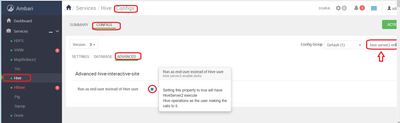
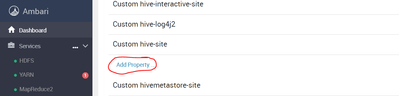
Some parameters like hive.users.in.admin.role are not default values in hive_site.xml , so you will need to add them in Custom hive-site these are considered custom site values see attached screenshot Haijin2.png

110105-haijin1.png

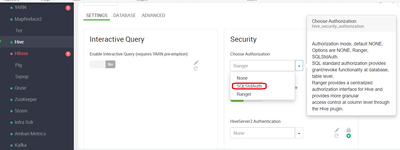
Authorization: SQL-Standard Based (SQLStdAuth)

110132-haijin3.png


Custom values

110087-haijin2.png


The above UI is specific to HDP 3.1.0.0 running Ambari Version 2.7.3.0 but even with earlier versions of Ambari you can filter see the ARROW


HTH

View solution in original post

2 REPLIES 2

avatar
Master Mentor

@Haijin Li

To be able to help, it's a good idea to always share your cluster config and version. I can see you are referencing HDP 2.3 documentation which is obsolete and personally I am wondering why you are running this version?

Some parameters like hive.users.in.admin.role are not default values in hive_site.xml , so you will need to add them in Custom hive-site these are considered custom site values see attached screenshot Haijin2.png

110105-haijin1.png

Authorization: SQL-Standard Based (SQLStdAuth)

110132-haijin3.png


Custom values

110087-haijin2.png


The above UI is specific to HDP 3.1.0.0 running Ambari Version 2.7.3.0 but even with earlier versions of Ambari you can filter see the ARROW


HTH

avatar
Expert Contributor

@Geoffrey Shelton Okot

That is exactly what I missed. Thank you very much for the prompt and right-to-the-point response.