
Our Community is getting an upgrade! To get everything ready for the relaunch, we’ll be placing the site in read-only mode starting September 21st.
We really appreciate your understanding while we get things set up behind the scenes. Catch up on all the exciting details about the move here.
Need help or have questions? Drop us a line at [email protected]

Support Questions
 Hi, I'm CLEO! Something exciting is coming to the Community. Stay Tuned!
- Cloudera Community
- Support
- Support Questions
- Error enabling auto tls on cdp 7.1.8
- Subscribe to RSS Feed
- Mark Question as New
- Mark Question as Read
- Float this Question for Current User
- Bookmark
- Subscribe
- Mute
- Printer Friendly Page
- Subscribe to RSS Feed
- Mark Question as New
- Mark Question as Read
- Float this Question for Current User
- Bookmark
- Subscribe
- Mute
- Printer Friendly Page
Error enabling auto tls on cdp 7.1.8
- Labels:
-
Cloudera on premises


Created on
01-22-2024
06:13 AM
- last edited on
04-20-2026
11:43 PM
by
 GrazittiAPI

- Mark as New
- Bookmark
- Subscribe
- Mute
- Subscribe to RSS Feed
- Permalink
- Report Inappropriate Content
Im on CM 7.10.1, cloudera runtime 7.1.8. I am trying to enable auto tls after creating the cluster, after i input ssh credentials (which are correct), I am getting error "java.lang.IllegalStateException: Failed to run CMCA command, return code: 2"
More info: I have enabled kerberos but have not enabled auto tls yet
Could someone please guide me on how to troubleshoot this issue?
Created 01-22-2024 06:56 AM
- Mark as New
- Bookmark
- Subscribe
- Mute
- Subscribe to RSS Feed
- Permalink
- Report Inappropriate Content
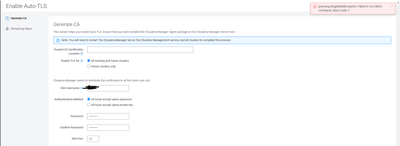
Update: I tried setting up the cluster again and enabling auto TLS at cluster creation, facing same error as per screenshot above


Created 03-07-2024 08:33 PM
- Mark as New
- Bookmark
- Subscribe
- Mute
- Subscribe to RSS Feed
- Permalink
- Report Inappropriate Content
Hello @skylarblu4650
You might need to check /var/log/cloudera-scm-server/cloudera-scm-server.log to get a clue regarding the error that you are facing.
Also just an FYI 7.10.1 is specifically for the CDP private cloud data services cluster https://supportmatrix.cloudera.com/


Created 03-07-2024 10:31 PM
- Mark as New
- Bookmark
- Subscribe
- Mute
- Subscribe to RSS Feed
- Permalink
- Report Inappropriate Content
also, check the certmanager.log under the agent log directory, which should contain an exception for this issue.

Created 10-09-2024 11:17 PM
- Mark as New
- Bookmark
- Subscribe
- Mute
- Subscribe to RSS Feed
- Permalink
- Report Inappropriate Content
This occurs in two scenarios
1. Jdk-11 installed but not provided mod 777
2. jdk-11 not properly extracted and moved
install openjdk11
download the file openjdk-11_linux-x64_bin.tar to /tmp
tar -xf openjdk-11_linux-x64_bin.tar
mv /tmp/jdk-11 /usr/lib/jvm
chmod 777 /usr/lib/jvm/jdk-11
update-alternatives --install "/usr/bin/java" "java" "/usr/lib/jvm/jdk-11/bin/java" 1010
update-alternatives --install "/usr/bin/javac" "javac" "/usr/lib/jvm/jdk-11/bin/javac" 1010
verify > java -version & javac -version
restart cloudera-scm-server


