
Our Community is getting an upgrade! To get everything ready for the relaunch, we’ll be placing the site in read-only mode starting September 21st.
We really appreciate your understanding while we get things set up behind the scenes. Catch up on all the exciting details about the move here.
Need help or have questions? Drop us a line at [email protected]

Support Questions
 Hi, I'm CLEO! Something exciting is coming to the Community. Stay Tuned!
- Cloudera Community
- Support
- Support Questions
- Re: How do I setup internet access to all Web UI f...
- Subscribe to RSS Feed
- Mark Question as New
- Mark Question as Read
- Float this Question for Current User
- Bookmark
- Subscribe
- Mute
- Printer Friendly Page
- Subscribe to RSS Feed
- Mark Question as New
- Mark Question as Read
- Float this Question for Current User
- Bookmark
- Subscribe
- Mute
- Printer Friendly Page
How do I setup internet access to all Web UI for all HDP3.1.0.0 Services installed via Cloudbreak 2.9.1 on Azure?


Created on 11-03-2019 06:41 PM - edited 09-16-2022 07:33 AM
- Mark as New
- Bookmark
- Subscribe
- Mute
- Subscribe to RSS Feed
- Permalink
- Report Inappropriate Content
Background: I have installed an HDP (v3.1.0.0-78) cluster with Ambari 2.7.0.0 on Azure via Cloudbreak 2.9.1 using the deployment template available on this Quickstart link - https://docs.cloudera.com/HDPDocuments/Cloudbreak/Cloudbreak-2.9.1/quickstart-azure/content/cb_launc....
Question- How do I access zeppelin, Knox, spark history server UI, and other UIs over internet. I can access the Ambari Admin UI. Clicking on other UIs takes to the browser but times out. Please suggest.
Thanks,
Ani


Created 11-03-2019 11:15 PM
- Mark as New
- Bookmark
- Subscribe
- Mute
- Subscribe to RSS Feed
- Permalink
- Report Inappropriate Content
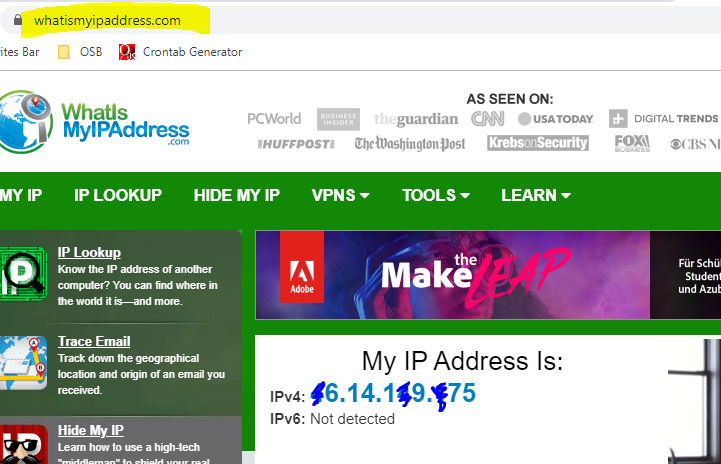
I didn't see you locking the firewall rule to your IP as suggested. and you should open * (all) ports namenode,ranger etc so the best option is a ranger of ports eg 80-9000 or just * all ports which is a better option f you lock it to your IP
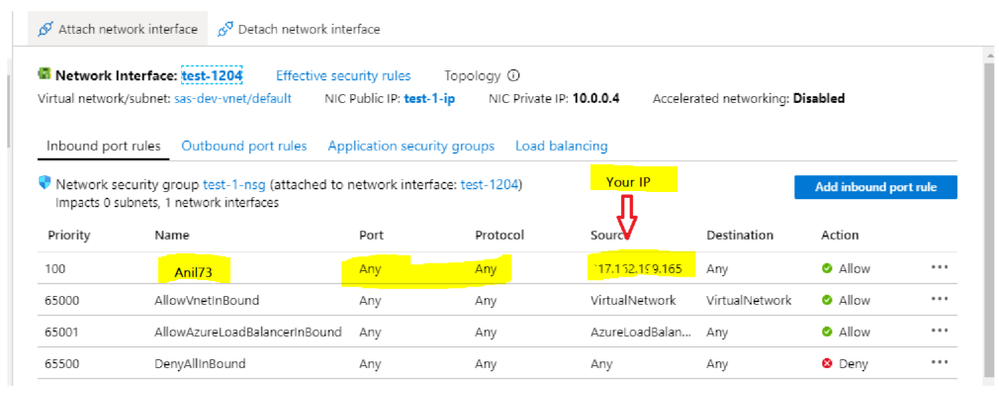
Please do that and revert
Created 11-04-2019 05:51 AM
- Mark as New
- Bookmark
- Subscribe
- Mute
- Subscribe to RSS Feed
- Permalink
- Report Inappropriate Content
Thanks adding my IP works.
Created 11-03-2019 09:15 PM
- Mark as New
- Bookmark
- Subscribe
- Mute
- Subscribe to RSS Feed
- Permalink
- Report Inappropriate Content
Azure controls access to different port through the firewall easily configured from the networking pane. You should locate the VM running Ambari Home --> Resource Group-->filter type and look for the Ambari VM and under settings locate the networking it will open a network interface pane on the right where you set the inbound and outbound rules.
See attached screenshot
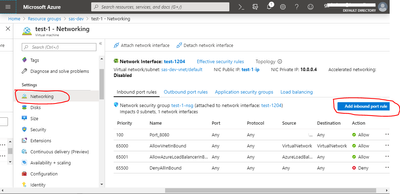
If you are not a network expert the best would be to lock the inbound port rules with source * and Destination * to your IP which you can get from the URL www.whatismyipaddress.com
Created 11-03-2019 10:43 PM
- Mark as New
- Bookmark
- Subscribe
- Mute
- Subscribe to RSS Feed
- Permalink
- Report Inappropriate Content
Hi,
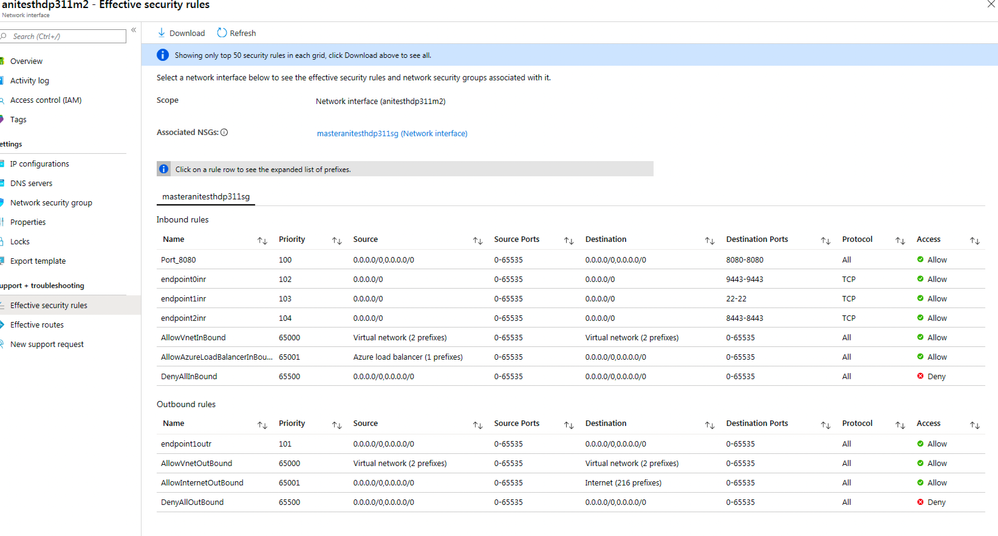
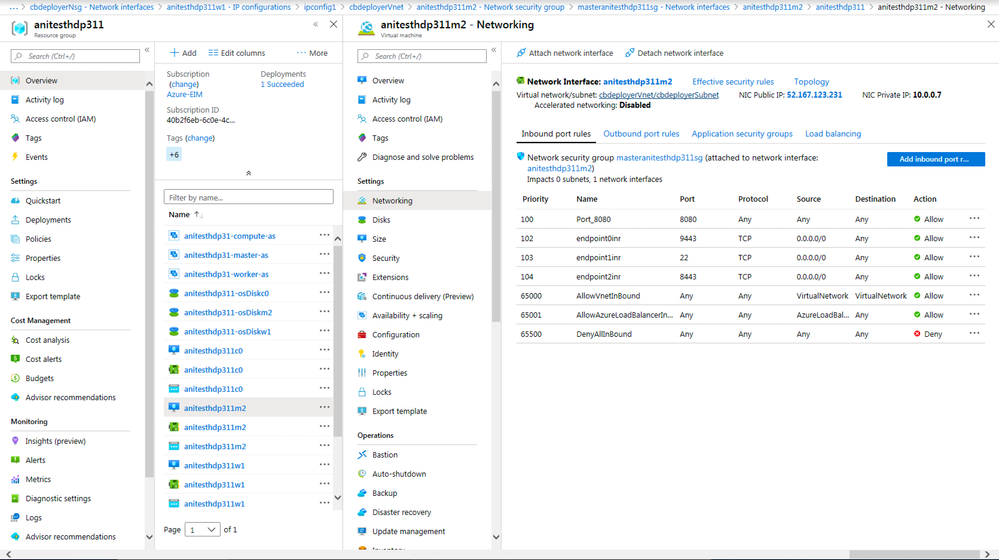
It didn't work, I opened port 8080 on the Ambari VM in Azure as instructed, with restarting services. Screenshots attached.
Thanks,
Ani
Created 11-03-2019 11:15 PM
- Mark as New
- Bookmark
- Subscribe
- Mute
- Subscribe to RSS Feed
- Permalink
- Report Inappropriate Content
I didn't see you locking the firewall rule to your IP as suggested. and you should open * (all) ports namenode,ranger etc so the best option is a ranger of ports eg 80-9000 or just * all ports which is a better option f you lock it to your IP
Please do that and revert
Created 11-04-2019 05:51 AM
- Mark as New
- Bookmark
- Subscribe
- Mute
- Subscribe to RSS Feed
- Permalink
- Report Inappropriate Content
Thanks adding my IP works.


