Our Community is getting an upgrade! To get everything ready for the relaunch, we’ll be placing the site in read-only mode starting September 21st.
We really appreciate your understanding while we get things set up behind the scenes. Catch up on all the exciting details about the move here.
Need help or have questions? Drop us a line at [email protected]
Created on 03-19-2020 01:00 PM - edited 09-16-2022 07:36 AM
Hi all,
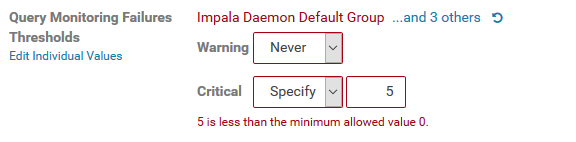
We've recently upgraded our cluster from Cloudera Enterprise 5.13.1 to 5.16.1, and it seems the value of the Impala Query Monitoring Failures Threshold cannot be changed anymore.
By default, the Warning and Critical fields are set to "Never" and "Any" respectively, but when we try to switch them to "Specify" and set a value, we get an error that says "<value> is less than the minimum allowed value 0". We've tried typing in all sorts of values, including zero, and negatives...none are accepted. We know for sure this error didn't exist in the previous version.
To us, it appears to be some sort of logical error in the value check, but maybe there's some other reason for this error we haven't thought of...
Does anyone have the same issue, or can think of a root cause or fix ?
cbfr
Created 03-19-2020 03:18 PM
Hi @cbfr ,
Thanks for reaching out. You are hitting a known bug which is fixed in CM 5.16.2. Can you upgrade to CM5.16.2? If not, you can use CM API to update the configuration in order to workaround this.
Thanks and hope this helps,
Li
Li Wang, Technical Solution Manager
Created 03-19-2020 03:18 PM
Hi @cbfr ,
Thanks for reaching out. You are hitting a known bug which is fixed in CM 5.16.2. Can you upgrade to CM5.16.2? If not, you can use CM API to update the configuration in order to workaround this.
Thanks and hope this helps,
Li
Li Wang, Technical Solution Manager