Our Community is getting an upgrade! To get everything ready for the relaunch, we’ll be placing the site in read-only mode starting September 21st.
We really appreciate your understanding while we get things set up behind the scenes. Catch up on all the exciting details about the move here.
Need help or have questions? Drop us a line at [email protected]

Support Questions

Find answers, ask questions, and share your expertise
Announcements
Share your experience with Cloudera on G2 and get a $25 Amazon Gift card.
Hi, I'm CLEO! Something exciting is coming to the Community. Stay Tuned!

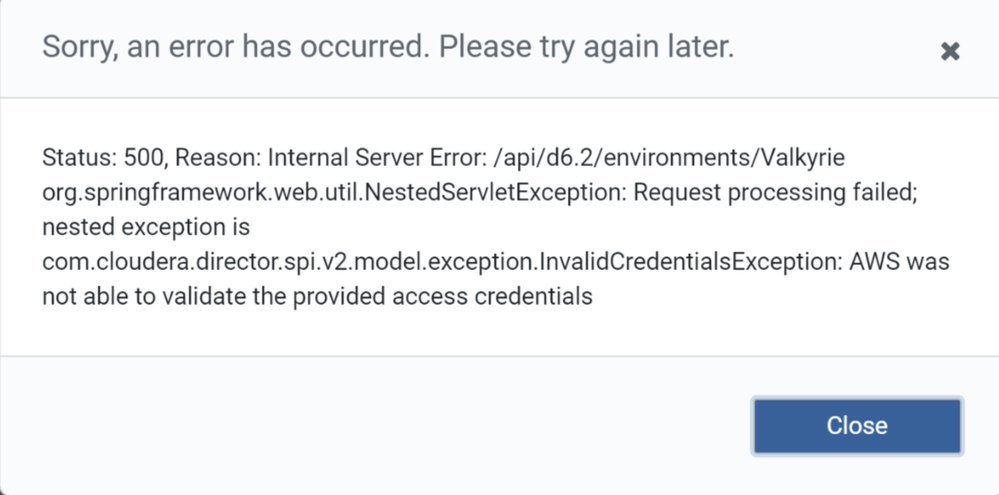
InvalidCredentialsException: AWS was not able to validate the provided access credentials

avatar
New Contributor

Hi,

I am getting this error while accessing one environment in Cloudera director... there is no issue with other environments.

Also,sorry.PNGDEL-ENV.PNG I could not see the option "Update Environment Credentails" when I click choose the environment. I have tried to use the rest api to update the credentials but it didnt work. 

curl -u admin -X POST http://sampleweb.net:7189/api/d6.2/environmen
ts/testenv/provider/credentials -H 'Content-Type: application/json' -d '{"Access key ID":"username","Secret access key":"password"}'
Enter host password for user 'admin':
{
"timestamp" : 1695055508171,
"status" : 405,
"error" : "Method Not Allowed",
"message" : "Request method 'POST' not supported",
"path" : "/api/d6.2/environments/testenv/provider/credentials"

1 REPLY 1

avatar
Super Collaborator

@bvaka it seems like the AWS credentials you have provided are not correct, can you please fetch the correct ones from AWS and pass it in the API