
Our Community is getting an upgrade! To get everything ready for the relaunch, we’ll be placing the site in read-only mode starting September 21st.
We really appreciate your understanding while we get things set up behind the scenes. Catch up on all the exciting details about the move here.
Need help or have questions? Drop us a line at [email protected]

Support Questions
 Hi, I'm CLEO! Something exciting is coming to the Community. Stay Tuned!
- Cloudera Community
- Support
- Support Questions
- JournalNode Default Group
- Subscribe to RSS Feed
- Mark Question as New
- Mark Question as Read
- Float this Question for Current User
- Bookmark
- Subscribe
- Mute
- Printer Friendly Page
- Subscribe to RSS Feed
- Mark Question as New
- Mark Question as Read
- Float this Question for Current User
- Bookmark
- Subscribe
- Mute
- Printer Friendly Page
JournalNode Default Group


Created on
02-28-2021
02:40 PM
- last edited on
04-21-2026
02:06 AM
by
 GrazittiAPI

- Mark as New
- Bookmark
- Subscribe
- Mute
- Subscribe to RSS Feed
- Permalink
- Report Inappropriate Content
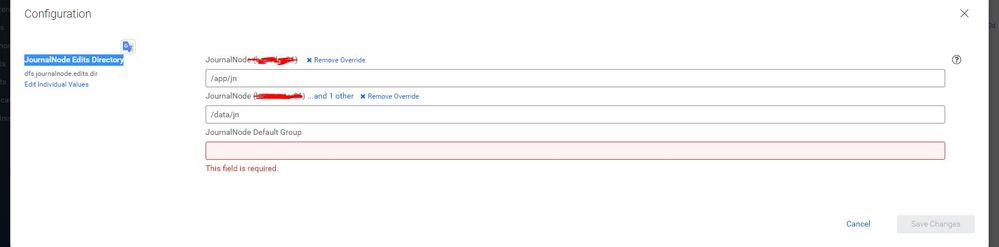
Hi,I've enabled HA successfully. My directory for the three journal node is not the same accross that 3 journal node.
There are alert of required JournalNode Default Group box. Is it safe to I put anything here? as my journal node location is not the same? It is only for managing that 3 journal node loaction right?
Thanks



Created 03-01-2021 09:06 AM
- Mark as New
- Bookmark
- Subscribe
- Mute
- Subscribe to RSS Feed
- Permalink
- Report Inappropriate Content
Hello @muslihuddin , Please note, while enabling HA, CM puts all 3 Journal Nodes into a single group call "Default Group" by default assuming you are going to use the same config value for the 3 JN directories. Since you are using /app/jn for one node and /data/jn for the other 2 JN nodes, it created two separate JN config groups. However, to prevent the CM alert, you can mention /data/jn in the JN default group config so that 2 JNs will be part of the Default config group rather than a separate one, and the 3rd JN will continue to operate in a separate config group till you use /data/jn directory as its edits directory.
Just in case you need to change the JN directory on any JN refer teh steps here - https://docs.cloudera.com/documentation/enterprise/latest/topics/cm_mc_jn.html
Created 03-01-2021 08:28 PM
- Mark as New
- Bookmark
- Subscribe
- Mute
- Subscribe to RSS Feed
- Permalink
- Report Inappropriate Content
Thanks @PabitraDas
Alright, done as your suggestion, the cluster is looking good now without the alert
Thanks for the link too.
Created 03-01-2021 09:06 AM
- Mark as New
- Bookmark
- Subscribe
- Mute
- Subscribe to RSS Feed
- Permalink
- Report Inappropriate Content
Hello @muslihuddin , Please note, while enabling HA, CM puts all 3 Journal Nodes into a single group call "Default Group" by default assuming you are going to use the same config value for the 3 JN directories. Since you are using /app/jn for one node and /data/jn for the other 2 JN nodes, it created two separate JN config groups. However, to prevent the CM alert, you can mention /data/jn in the JN default group config so that 2 JNs will be part of the Default config group rather than a separate one, and the 3rd JN will continue to operate in a separate config group till you use /data/jn directory as its edits directory.
Just in case you need to change the JN directory on any JN refer teh steps here - https://docs.cloudera.com/documentation/enterprise/latest/topics/cm_mc_jn.html
Created 03-01-2021 08:28 PM
- Mark as New
- Bookmark
- Subscribe
- Mute
- Subscribe to RSS Feed
- Permalink
- Report Inappropriate Content
Thanks @PabitraDas
Alright, done as your suggestion, the cluster is looking good now without the alert
Thanks for the link too.


