
Our Community is getting an upgrade! To get everything ready for the relaunch, we’ll be placing the site in read-only mode starting September 21st.
We really appreciate your understanding while we get things set up behind the scenes. Catch up on all the exciting details about the move here.
Need help or have questions? Drop us a line at [email protected]

Support Questions
 Hi, I'm CLEO! Something exciting is coming to the Community. Stay Tuned!
- Cloudera Community
- Support
- Support Questions
- NiFi - JSON seperated date and time - make a times...
- Subscribe to RSS Feed
- Mark Question as New
- Mark Question as Read
- Float this Question for Current User
- Bookmark
- Subscribe
- Mute
- Printer Friendly Page
- Subscribe to RSS Feed
- Mark Question as New
- Mark Question as Read
- Float this Question for Current User
- Bookmark
- Subscribe
- Mute
- Printer Friendly Page
NiFi - JSON seperated date and time - make a timestamp and convert
- Labels:
-
Apache NiFi


Created on 02-13-2020 12:38 AM - edited 02-13-2020 12:53 AM
- Mark as New
- Bookmark
- Subscribe
- Mute
- Subscribe to RSS Feed
- Permalink
- Report Inappropriate Content
Hi all!
What I get:
JSON with an arbitrary number of entries beneath "table".
{
   "head": {
      "dnr": "122"
   },
   "table": [
      {
         "zn": 1,
         "datum": "20200211",					<=== yyyyMMdd CET
         "uhrzvon": "10:40"						<=== HH:mm CET
      },
      {
         "zn": 2,
         "datum": "20200211",
         "uhrzvon": "10:47"
      },
      {
         "zn": 3,
         "datum": "20200212",
         "uhrzvon": "08:11"
      }
   ]
}
What I need:
Each entry contains "datum" and "uhrzvon" (CET) which I need to join and convert to timestamp (UTC). Because of a later JOLT-Transformation, I thought I can change the original entry of "datum" to use this in JOLT.
{
   "head": {
      "dnr": "122"
   },
   "table": [
      {
         "zn": 1,
         "datum": "2020-02-11 09:40:00.000",    <=== yyyy-MM-dd HH:mm:ss.SSS  UTC
         "uhrzvon": "10:40"
      },
      {
         "zn": 2,
         "datum": "2020-02-11 09:47:00.000",
         "uhrzvon": "10:47"
      },
      {
         "zn": 3,
         "datum": "2020-02-12 07:11:00.000",
         "uhrzvon": "08:11"
      }
   ]
}
What I tried:
- RecordProcessing without schema
I can format the date, but not the time (either it stays empty or the value ist wron). And I can't finde a way to bring this two values together.
UpdateRecord
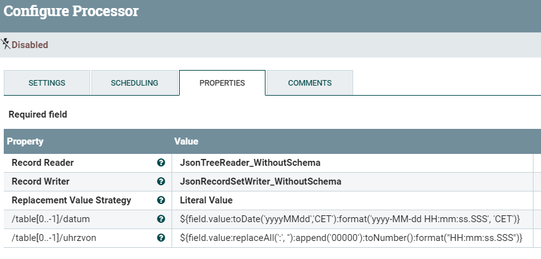
brings this result
{
"head": {
"dnr": "122"
},
"table": [
{
"zn": 1,
"datum" : "2020-02-11 00:00:00.000",
"uhrzvon" : "04:51:40.000", complete wrong
},
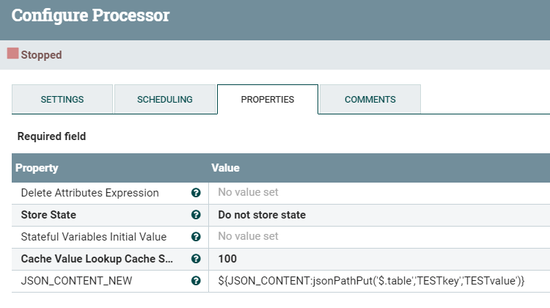
- ExtractText for whole JSON-Content to an attribute and tried to work with new possibilities for JSON of expression language
With jsonPathPut I can't add key/value to the needed path ($.table). It only works on top level.
UpdateAttribute - JOLT
I didn't find a way to join and convert these two information here.
- Groovy-Script
I have no clue of it. I saw some discussion around this but can't find a fitting example.
Any help is very wellcome.
NiFi 1.11.1


Created on 09-19-2020 09:31 AM - edited 09-19-2020 09:32 AM
- Mark as New
- Bookmark
- Subscribe
- Mute
- Subscribe to RSS Feed
- Permalink
- Report Inappropriate Content
Hi @justenji !
Please find the attached groovy code. Use it in ExecuteGroovyScript processor.
import java.nio.charset.StandardCharsets
import groovy.json.JsonSlurper
import groovy.json.JsonOutput

flowFile = session.get()
if (!flowFile) return

try {
 def jsonSlurper = new JsonSlurper();
 def jsonOutput = new JsonOutput();

 def input = flowFile.read().withStream {
  data -> jsonSlurper.parse(data)
 }

 def tables = input.table;

 for(int i=0;i<tables.size();i++){
  def pattern = 'yyyyMMdd';
  def datum = tables[i].datum;

  if(tables[i].containsKey('uhrzvon')){
   pattern = pattern + 'HH:mm';
   datum = datum + tables[i].uhrzvon;
  }
  tables[i].datum = new Date().parse(pattern,datum,TimeZone.getTimeZone('GMT+0200')).format('yyyy-MM-dd HH:mm:ss.SSSZ',TimeZone.getTimeZone('GMT'));
 }

 input.table = tables

 flowFile = session.write(flowFile, {
  outputStream -> outputStream.write(jsonOutput.toJson(input).toString().getBytes(StandardCharsets.UTF_8))
 }as OutputStreamCallback)

 session.transfer(flowFile, REL_SUCCESS);
} catch (e) {
 log.error('Error Occured,{}', e)
 session.transfer(flowFile, REL_FAILURE)
}
Created on 09-19-2020 09:31 AM - edited 09-19-2020 09:32 AM
- Mark as New
- Bookmark
- Subscribe
- Mute
- Subscribe to RSS Feed
- Permalink
- Report Inappropriate Content
Hi @justenji !
Please find the attached groovy code. Use it in ExecuteGroovyScript processor.
import java.nio.charset.StandardCharsets
import groovy.json.JsonSlurper
import groovy.json.JsonOutput

flowFile = session.get()
if (!flowFile) return

try {
 def jsonSlurper = new JsonSlurper();
 def jsonOutput = new JsonOutput();

 def input = flowFile.read().withStream {
  data -> jsonSlurper.parse(data)
 }

 def tables = input.table;

 for(int i=0;i<tables.size();i++){
  def pattern = 'yyyyMMdd';
  def datum = tables[i].datum;

  if(tables[i].containsKey('uhrzvon')){
   pattern = pattern + 'HH:mm';
   datum = datum + tables[i].uhrzvon;
  }
  tables[i].datum = new Date().parse(pattern,datum,TimeZone.getTimeZone('GMT+0200')).format('yyyy-MM-dd HH:mm:ss.SSSZ',TimeZone.getTimeZone('GMT'));
 }

 input.table = tables

 flowFile = session.write(flowFile, {
  outputStream -> outputStream.write(jsonOutput.toJson(input).toString().getBytes(StandardCharsets.UTF_8))
 }as OutputStreamCallback)

 session.transfer(flowFile, REL_SUCCESS);
} catch (e) {
 log.error('Error Occured,{}', e)
 session.transfer(flowFile, REL_FAILURE)
}
Created 09-21-2020 12:15 AM
- Mark as New
- Bookmark
- Subscribe
- Mute
- Subscribe to RSS Feed
- Permalink
- Report Inappropriate Content
@PVVK
In the meantime the problem was solved on an other way.
But thank you for the script I will test it and I can learn a lot of it!
Created 09-21-2020 12:39 AM
- Mark as New
- Bookmark
- Subscribe
- Mute
- Subscribe to RSS Feed
- Permalink
- Report Inappropriate Content
It works perfect! Thank you very much.


