
Our Community is getting an upgrade! To get everything ready for the relaunch, we’ll be placing the site in read-only mode starting September 21st.
We really appreciate your understanding while we get things set up behind the scenes. Catch up on all the exciting details about the move here.
Need help or have questions? Drop us a line at [email protected]

Support Questions
 Hi, I'm CLEO! Something exciting is coming to the Community. Stay Tuned!
- Cloudera Community
- Support
- Support Questions
- Re: NiFi Processor: Save ISO format date into mong...
- Subscribe to RSS Feed
- Mark Question as New
- Mark Question as Read
- Float this Question for Current User
- Bookmark
- Subscribe
- Mute
- Printer Friendly Page
- Subscribe to RSS Feed
- Mark Question as New
- Mark Question as Read
- Float this Question for Current User
- Bookmark
- Subscribe
- Mute
- Printer Friendly Page
NiFi Processor: Save ISO format date into mongoDb using PutMongo Processor


Created on
08-26-2020
04:07 AM
- last edited on
04-21-2026
04:26 AM
by
 GrazittiAPI

- Mark as New
- Bookmark
- Subscribe
- Mute
- Subscribe to RSS Feed
- Permalink
- Report Inappropriate Content
I am trying to insert a flow file into MongoDb which has a createdAt date key record as an attribute.
When I inserted that flow file into MongoDb using PutMongo processor, it saves the "createdAt" attribute as a string. I want this to be saved as an ISO date object in mongoDB.
When I inserted flow file by sending "2020-08-26T04:00:00.000Z" PutMongo Processor inserts as a string.
When I sent like this “ISODate("2020-08-26T04:00:00.000Z”)” it also inserts same string as it is into mongo.
When I tried like this ISODate("2020-08-26T04:00:00.000Z”) without double quotation it throws error invalid object.
I need output as :
{
“createdAt”: ISODate("2020-08-26T04:00:00.000Z”)
}
Kindly help if there is any way to do so.
Created 08-29-2020 10:22 AM
- Mark as New
- Bookmark
- Subscribe
- Mute
- Subscribe to RSS Feed
- Permalink
- Report Inappropriate Content
I have achieved this by using AVRO schema.
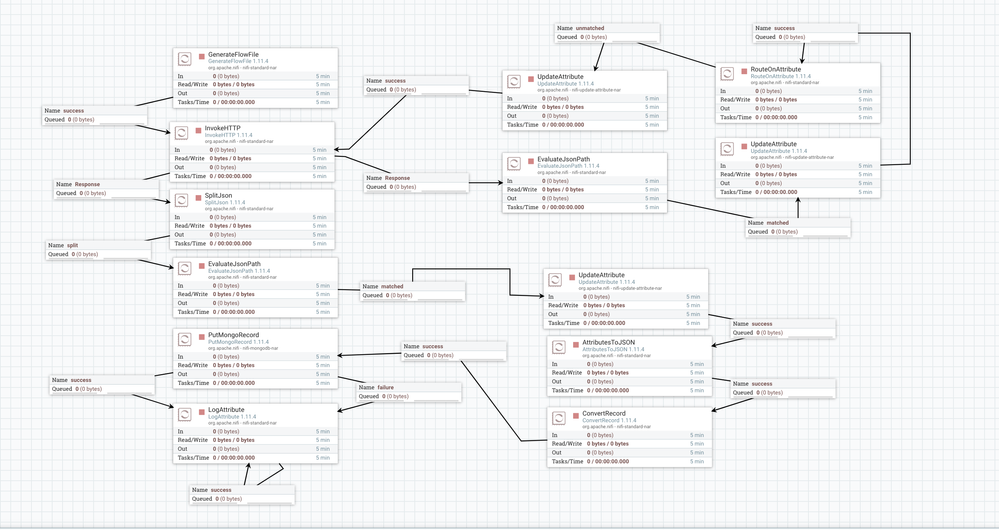
In place of putMongo Now I am using putMongoRecord and convertRecord for converting schema.
Here is an example for AVRO schema :
{
"type": "record",
"namespace": "nifi",
"name": "fredSchema",
"fields": [
 {
    "name": "createdAt",
    "type": {
      "type": "int",
      "logicalType": "date"
    }
 }
]
}
Use the above AVRO schema, and remember the date what you are going to sen should be yyyy-MM-dd format. Thanks.
Created 08-29-2020 10:22 AM
- Mark as New
- Bookmark
- Subscribe
- Mute
- Subscribe to RSS Feed
- Permalink
- Report Inappropriate Content
I have achieved this by using AVRO schema.
In place of putMongo Now I am using putMongoRecord and convertRecord for converting schema.
Here is an example for AVRO schema :
{
"type": "record",
"namespace": "nifi",
"name": "fredSchema",
"fields": [
 {
    "name": "createdAt",
    "type": {
      "type": "int",
      "logicalType": "date"
    }
 }
]
}
Use the above AVRO schema, and remember the date what you are going to sen should be yyyy-MM-dd format. Thanks.


Created 09-03-2020 08:18 AM
- Mark as New
- Bookmark
- Subscribe
- Mute
- Subscribe to RSS Feed
- Permalink
- Report Inappropriate Content
I also tried it with the Avro schema and type 'timestamp-millis' but I had the problem, that the milliseconds everytime got saved as .000 instead of .123, .987, ...
So another solution for you would be to use Jolt and add
"createdAt": { "$date": "${dateAttr}" }to your JSON, that converts the type to date in MongoDB


Created on 04-18-2023 10:27 PM - edited 04-18-2023 11:39 PM
- Mark as New
- Bookmark
- Subscribe
- Mute
- Subscribe to RSS Feed
- Permalink
- Report Inappropriate Content
Put Mongo is throwing an error while using this
***PutMongo[id=e57c5334-b5a8-1c6c-0840-73050fa4acd5] Failed to insert FlowFile[filename=a2268e35-1e97-4f75-b58c-f33396290666] into MongoDB due to Failed to parse string as a date: org.bson.json.JsonParseException: Failed to parse string as a date
Caused by: java.time.format.DateTimeParseException: Text '2023-04-18 13:07:38.000+0000' could not be parsed at index 10****
Is there a way to use jolt and putMongo to store the iso date in mongo db
pls help
thanks
Created 04-26-2023 09:54 PM
- Mark as New
- Bookmark
- Subscribe
- Mute
- Subscribe to RSS Feed
- Permalink
- Report Inappropriate Content
"createdOn": {"$date":"${now():format('YYYY-MM-dd HH:mm:ss'):replace(' ', 'T'):append('.000+00:00')}"}
used this to store ISO date format in mongo db from Jolt and nifi expression language.


