Our Community is getting an upgrade! To get everything ready for the relaunch, we’ll be placing the site in read-only mode starting September 21st.
We really appreciate your understanding while we get things set up behind the scenes. Catch up on all the exciting details about the move here.
Need help or have questions? Drop us a line at [email protected]
Created 01-09-2024 03:15 PM
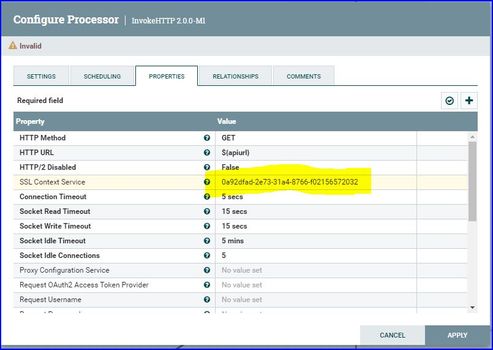
We have upgraded nifi to 2.0M1 recently. It was clean install and process groups were imported from Nifi-registry. All InvokeHttp processors remained invalid and the reason seems to be that the SSL context service attribute was not recognized. Please refer the attached screenshot.
When I manually selected right SSL context controller service from drop down list, InvokeHttp processor becomes valid and and another observation here is: the action of setting right SSL context service is not treated as code change and process group still shows green.
Please advise if there is any work around to fix this problem. Currently we are manually setting controller service after automated deployment pipeline is complete.
To isolate the issue, we have tried to replicate by creating simple process group with InvokeHttp processor. Downloaded definition and re-imported onto Nifi canvas. Issue was reproduced. This might be a bug in Nifi 2.0M1. Please advise.
Created 04-04-2024 08:45 AM
This issue was resolved after upgrading Nifi to 2.0-M2
Created 04-04-2024 08:45 AM
This issue was resolved after upgrading Nifi to 2.0-M2
Created 04-04-2024 10:01 AM
Congratulations on resolving the issue @shiva239. Can you please mark the appropriate reply as the solution to make it easier for others to find the answer in the future?
mark as solution button