Our Community is getting an upgrade! To get everything ready for the relaunch, we’ll be placing the site in read-only mode starting September 21st.
We really appreciate your understanding while we get things set up behind the scenes. Catch up on all the exciting details about the move here.
Need help or have questions? Drop us a line at [email protected]

Support Questions

Find answers, ask questions, and share your expertise
Announcements
Share your experience with Cloudera on G2 and get a $25 Amazon Gift card.
Hi, I'm CLEO! Something exciting is coming to the Community. Stay Tuned!

No Bionic parcels for CDS3.0 (Apache Spark3)

avatar
New Contributor

Hello,

I have a 18.04 bionic cluster using the Cloudera Manager 7.1.3 and CDH 7.1.3 parcels.


I need to install CDS3 (Spark 3.0.0) on my cluster but I can't find any parcels for the bionic version, only xenial, wheezy and trusty.

 

spark3-errBIONIC (3).png


Does it exist? Can you also publish it for bionic?


Thank you !!

1 ACCEPTED SOLUTION

avatar
Master Guru

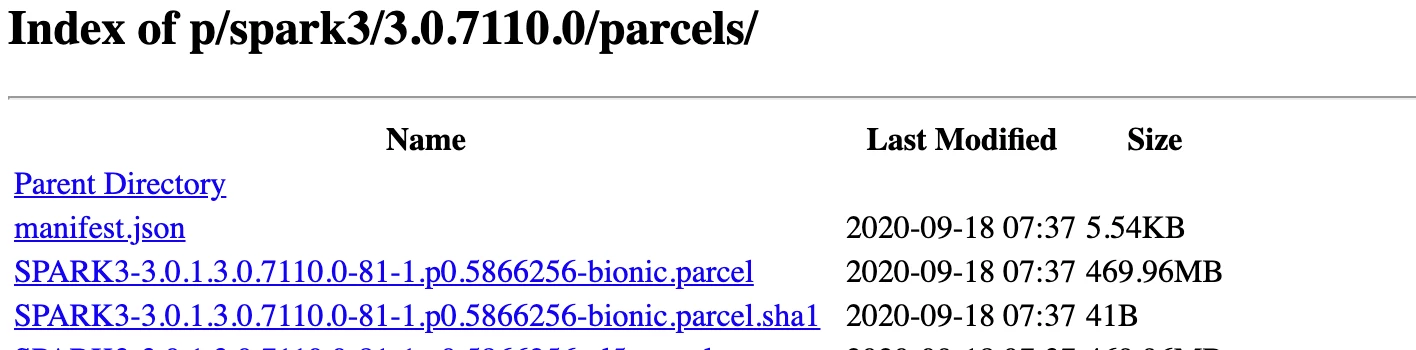
@Cluster-CDP I can see bionic parcels as well. 


Screenshot 2021-03-02 at 5.22.52 PM.png


Please make sure you are using the correct document and method to install the Spark. Follow below doc: 

https://docs.cloudera.com/runtime/7.2.7/cds-3/topics/spark-spark-3-packaging.html

https://docs.cloudera.com/runtime/7.2.7/cds-3/topics/spark-install-spark-3-parcel.html


Cheers!
Was your question answered? Make sure to mark the answer as the accepted solution.
If you find a reply useful, say thanks by clicking on the thumbs up button.

View solution in original post

1 REPLY 1

avatar
Master Guru

@Cluster-CDP I can see bionic parcels as well. 


Screenshot 2021-03-02 at 5.22.52 PM.png


Please make sure you are using the correct document and method to install the Spark. Follow below doc: 

https://docs.cloudera.com/runtime/7.2.7/cds-3/topics/spark-spark-3-packaging.html

https://docs.cloudera.com/runtime/7.2.7/cds-3/topics/spark-install-spark-3-parcel.html


Cheers!
Was your question answered? Make sure to mark the answer as the accepted solution.
If you find a reply useful, say thanks by clicking on the thumbs up button.