
Our Community is getting an upgrade! To get everything ready for the relaunch, we’ll be placing the site in read-only mode starting September 21st.
We really appreciate your understanding while we get things set up behind the scenes. Catch up on all the exciting details about the move here.
Need help or have questions? Drop us a line at [email protected]

Support Questions
 Hi, I'm CLEO! Something exciting is coming to the Community. Stay Tuned!
- Cloudera Community
- Support
- Support Questions
- Re: ls: Operation category READ is not supported i...
- Subscribe to RSS Feed
- Mark Question as New
- Mark Question as Read
- Float this Question for Current User
- Bookmark
- Subscribe
- Mute
- Printer Friendly Page
- Subscribe to RSS Feed
- Mark Question as New
- Mark Question as Read
- Float this Question for Current User
- Bookmark
- Subscribe
- Mute
- Printer Friendly Page
Resolving HDFS NameNode Standby Errors: Enabling Automatic Failover and ZKFC
- Labels:
-
Apache Zookeeper
-
HDFS


- Mark as New
- Bookmark
- Subscribe
- Mute
- Subscribe to RSS Feed
- Permalink
- Report Inappropriate Content
I currently have one namenode in a 'stopped' state due to a node failure. I am unable to access any data or services on the cluster, as this was the main namenode.
However, there is a second namenode that I am hoping can be used to recover. I have been working on the issue in this thread and currently I all hdfs instances started except for the bad namenode. This seems to have improved the situation as far as node health status but I still can't access any data.
Here is the relevant command and error:
ubuntu@ip-10-0-0-154:~/backup/data1$ hdfs dfs -ls hdfs://10.0.0.154:8020/
ls: Operation category READ is not supported in state standby
In the previous thread, I also pointed out that there was the option to enable automatic failure in CM. I am wondering if that is the best course of action right now. Any help is greatly appreciated.
- Mark as New
- Bookmark
- Subscribe
- Mute
- Subscribe to RSS Feed
- Permalink
- Report Inappropriate Content
As noted in the previous reply, I did not have any nodes with the Failover Controller role. Importantly, I also had not enabled Automatic Failover despite running in an HA configuration.
I went ahead and added the Failover Controller role to both namenodes - the good one and the bad one.
After that, I attempted enable the Automatic Failover . To do that, however, I needed to first start Zookeeper.
At that point, If I recall correctly, the other namenode was still not active but I then restarted the entire cluster and the automatic failover kicked in, using the other namenode as the active one and leaving the bad namenode in a stopped state.


Created on 11-07-2017 08:01 PM - edited 11-07-2017 08:03 PM
- Mark as New
- Bookmark
- Subscribe
- Mute
- Subscribe to RSS Feed
- Permalink
- Report Inappropriate Content
The issue might be related to the below jira which is opened a long back still in open status
https://issues.apache.org/jira/browse/HDFS-3447
as an alternate way to connect to hdfs, go to hdfs-site.xml and get dfs.nameservices and try to connect to hdfs using namespace as follows, it may help you
hdfs://<ClusterName>-ns/<hdfs_path>
Note: I didn't get a chance to explore this... also not sure how it will respond in old cdh version

Created on 11-07-2017 08:24 PM - edited 11-07-2017 08:28 PM
- Mark as New
- Bookmark
- Subscribe
- Mute
- Subscribe to RSS Feed
- Permalink
- Report Inappropriate Content
Thank you for your response.
I followed you advice below but I am getting the error below. This is the same error as when I try a plain 'hdfs dfs -ls' command.
root@ip-10-0-0-154:/home/ubuntu/backup/data1# grep -B 1 -A 2 nameservices /var/run/cloudera-scm-agent/process/9908-hdfs-NAMENODE/hdfs-site.xml
  <property>
    <name>dfs.nameservices</name>
    <value>nameservice1</value>
  </property>
ubuntu@ip-10-0-0-154:~/backup/data1$ hdfs dfs -ls hdfs://nameservice1/
17/11/08 04:29:50 WARN retry.RetryInvocationHandler: Exception while invoking getFileInfo of class ClientNamenodeProtocolTranslatorPB after 1 fail over attempts. Trying to fail over after sleeping for 796ms.
Also, I should mention that when I go to CM, it shows that my one good namenode is in 'standby'. Would it help to try a command like this?
./hdfs haadmin -transitionToActive <nodename>
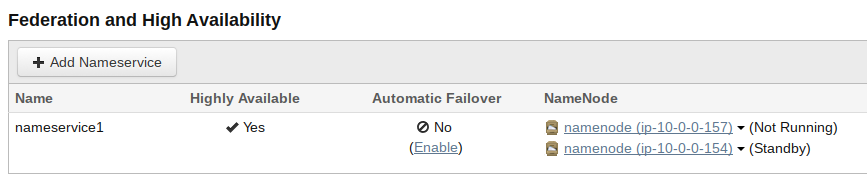
A second thing is that CM shows Automatic Failover is not enabled but there is a link to 'Enable' (see screenshot). Maybe this is another option to help the standby node get promoted to active?



Created 11-07-2017 08:54 PM
- Mark as New
- Bookmark
- Subscribe
- Mute
- Subscribe to RSS Feed
- Permalink
- Report Inappropriate Content
not, start it up so it may elect its local NameNode into the ACTIVE state
Created 11-07-2017 08:56 PM
- Mark as New
- Bookmark
- Subscribe
- Mute
- Subscribe to RSS Feed
- Permalink
- Report Inappropriate Content
I do not know how to check if the "Failover Controller daemon running on the remaining NameNode".
Can you please tell me how to check?
Created 11-07-2017 09:48 PM
- Mark as New
- Bookmark
- Subscribe
- Mute
- Subscribe to RSS Feed
- Permalink
- Report Inappropriate Content
If you're managing CDH without Cloudera Manager, then you can check on the NameNode host(s) with the below command:
$ sudo service hadoop-hdfs-zkfc status
Created 11-07-2017 09:55 PM
- Mark as New
- Bookmark
- Subscribe
- Mute
- Subscribe to RSS Feed
- Permalink
- Report Inappropriate Content
$ hadoop-daemon.sh start zkfc
Or for a more interactive style:
$ hdfs zkfc
Created 11-08-2017 08:51 AM
- Mark as New
- Bookmark
- Subscribe
- Mute
- Subscribe to RSS Feed
- Permalink
- Report Inappropriate Content
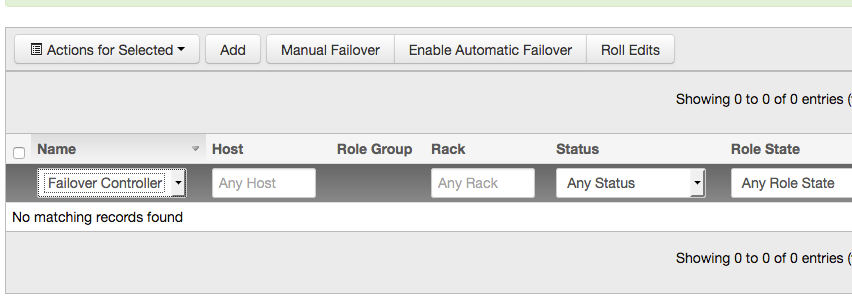
It appears I do not have any nodes with the Failover Controller role. The screenshot below shows the hdfs instances filtered by that role.
- Mark as New
- Bookmark
- Subscribe
- Mute
- Subscribe to RSS Feed
- Permalink
- Report Inappropriate Content
As noted in the previous reply, I did not have any nodes with the Failover Controller role. Importantly, I also had not enabled Automatic Failover despite running in an HA configuration.
I went ahead and added the Failover Controller role to both namenodes - the good one and the bad one.
After that, I attempted enable the Automatic Failover . To do that, however, I needed to first start Zookeeper.
At that point, If I recall correctly, the other namenode was still not active but I then restarted the entire cluster and the automatic failover kicked in, using the other namenode as the active one and leaving the bad namenode in a stopped state.


