Our Community is getting an upgrade! To get everything ready for the relaunch, we’ll be placing the site in read-only mode starting September 21st.
We really appreciate your understanding while we get things set up behind the scenes. Catch up on all the exciting details about the move here.
Need help or have questions? Drop us a line at [email protected]

Support Questions
 Hi, I'm CLEO! Something exciting is coming to the Community. Stay Tuned!
- Cloudera Community
- Support
- Support Questions
- Re: VT-x is not available (VERR_VMX_NO_VMX) Error ...
- Subscribe to RSS Feed
- Mark Question as New
- Mark Question as Read
- Float this Question for Current User
- Bookmark
- Subscribe
- Mute
- Printer Friendly Page
- Subscribe to RSS Feed
- Mark Question as New
- Mark Question as Read
- Float this Question for Current User
- Bookmark
- Subscribe
- Mute
- Printer Friendly Page
VT-x is not available (VERR_VMX_NO_VMX) Error for HDP 3.0.1 on Windows 10
- Labels:
-
Hortonworks Data Platform (HDP)


Created 02-16-2019 11:54 AM
- Mark as New
- Bookmark
- Subscribe
- Mute
- Subscribe to RSS Feed
- Permalink
- Report Inappropriate Content
I have donwloaded HDP 3.0.1, and then installed in Virtualbox(its version greater than 5.1). But I am getting this error. Virtualization is enabled in BIOS. Also, Hyper -v was installed. What I will do?
Note: I run Virtualbox as Adminastor.



Created 02-16-2019 12:01 PM
- Mark as New
- Bookmark
- Subscribe
- Mute
- Subscribe to RSS Feed
- Permalink
- Report Inappropriate Content
VT-x is Intel's technology for virtualization on the x86 platform. VT-x allows multiple operating systems to simultaneously share x86 processor resources in a safe and efficient manner. Make sure Virtualization is enabled in your BIOS.
- To check the status of Hyper-v in Windows 10,<right click start> | Run | OptionalFeatures.exe, and look for the "Hyper-V" option. The box should be empty, not checked or shaded. If you want to be absolutely sure that Hyper-v is gone then open an administrator command console and type "bcdedit /set hypervisorlaunchtype off". Make sure to fully power down and reboot the host after changing the Hyper-v setting.
. - On some Windows hosts with an EFI BIOS, DeviceGuard or CredentialGuard may be active by default, and interferes with OS level virtualization apps in the same way that Hyper-v does. These features need to be disabled. On Pro versions of Windows you can do this using gpedit.msc (setLocal Computer Policy > Computer Configuration > Administrative Templates > System > Device Guard > Turn on Virtualization Based SecuritytoDisabled. CredentialGuard is a subset of DeviceGuard, so disabling the former should be enough. If you cannot use gpedit for some reason then the equivalent registry hack is to find the keyHKLM|SYSTEM|CurrentControlSet|Control|DeviceGuard|EnableVirtualizationBasedSecurity|Enabledand set it to 0.
. - On Win10 hosts, checkWindows Defender > Device Security > Core Isolation Detailsand make sure settings in this panel are turned off, reboot the host from power down if you needed to make changes.
"Core isolation [includes] security features available on your device that use virtualization-based security"
Created 02-16-2019 12:01 PM
- Mark as New
- Bookmark
- Subscribe
- Mute
- Subscribe to RSS Feed
- Permalink
- Report Inappropriate Content
VT-x is Intel's technology for virtualization on the x86 platform. VT-x allows multiple operating systems to simultaneously share x86 processor resources in a safe and efficient manner. Make sure Virtualization is enabled in your BIOS.
- To check the status of Hyper-v in Windows 10,<right click start> | Run | OptionalFeatures.exe, and look for the "Hyper-V" option. The box should be empty, not checked or shaded. If you want to be absolutely sure that Hyper-v is gone then open an administrator command console and type "bcdedit /set hypervisorlaunchtype off". Make sure to fully power down and reboot the host after changing the Hyper-v setting.
. - On some Windows hosts with an EFI BIOS, DeviceGuard or CredentialGuard may be active by default, and interferes with OS level virtualization apps in the same way that Hyper-v does. These features need to be disabled. On Pro versions of Windows you can do this using gpedit.msc (setLocal Computer Policy > Computer Configuration > Administrative Templates > System > Device Guard > Turn on Virtualization Based SecuritytoDisabled. CredentialGuard is a subset of DeviceGuard, so disabling the former should be enough. If you cannot use gpedit for some reason then the equivalent registry hack is to find the keyHKLM|SYSTEM|CurrentControlSet|Control|DeviceGuard|EnableVirtualizationBasedSecurity|Enabledand set it to 0.
. - On Win10 hosts, checkWindows Defender > Device Security > Core Isolation Detailsand make sure settings in this panel are turned off, reboot the host from power down if you needed to make changes.
"Core isolation [includes] security features available on your device that use virtualization-based security"
Created 02-16-2019 12:02 PM
- Mark as New
- Bookmark
- Subscribe
- Mute
- Subscribe to RSS Feed
- Permalink
- Report Inappropriate Content
Created 02-17-2019 08:08 PM
- Mark as New
- Bookmark
- Subscribe
- Mute
- Subscribe to RSS Feed
- Permalink
- Report Inappropriate Content
I have disabled Hyper-V. It worked. Thank you so much.


Created 06-12-2020 11:29 PM
- Mark as New
- Bookmark
- Subscribe
- Mute
- Subscribe to RSS Feed
- Permalink
- Report Inappropriate Content
thanks, @jsensharma
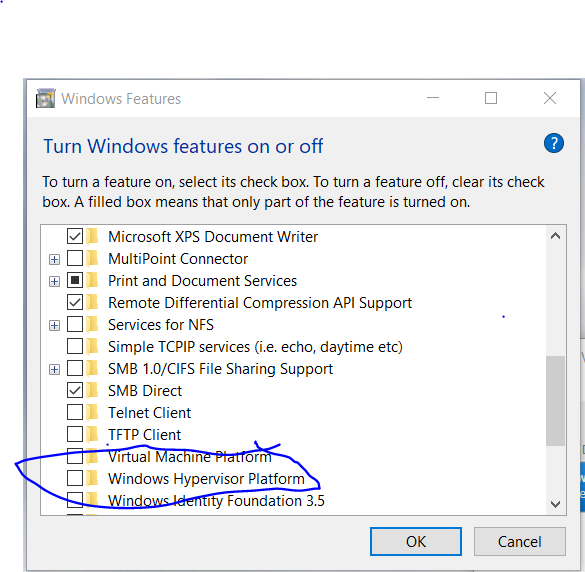
I had to do one more thing (Windows 10 pro, Dell Inspiron):
run OptionalFeatures.exe