
Our Community is getting an upgrade! To get everything ready for the relaunch, we’ll be placing the site in read-only mode starting September 21st.
We really appreciate your understanding while we get things set up behind the scenes. Catch up on all the exciting details about the move here.
Need help or have questions? Drop us a line at [email protected]

Support Questions
 Hi, I'm CLEO! Something exciting is coming to the Community. Stay Tuned!
- Cloudera Community
- Support
- Support Questions
- Re: failed to execute command install yarn mapredu...
- Subscribe to RSS Feed
- Mark Question as New
- Mark Question as Read
- Float this Question for Current User
- Bookmark
- Subscribe
- Mute
- Printer Friendly Page
- Subscribe to RSS Feed
- Mark Question as New
- Mark Question as Read
- Float this Question for Current User
- Bookmark
- Subscribe
- Mute
- Printer Friendly Page
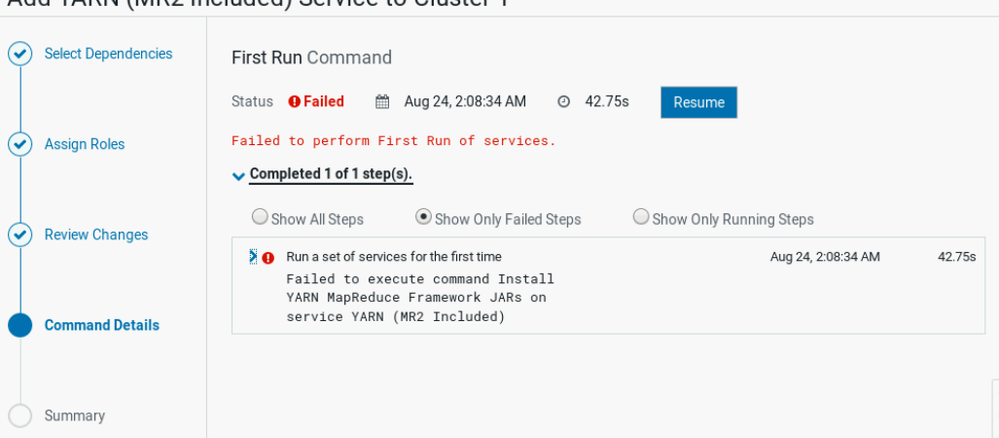
failed to execute command install yarn mapreduce framework jars on service yarn


Created on 08-23-2020 05:41 PM - edited 09-16-2022 07:38 AM
- Mark as New
- Bookmark
- Subscribe
- Mute
- Subscribe to RSS Feed
- Permalink
- Report Inappropriate Content
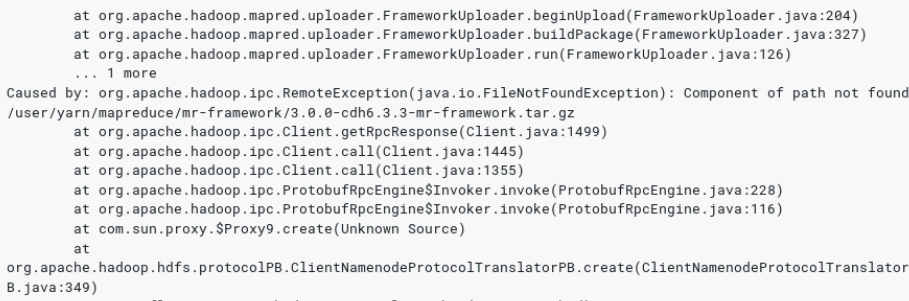
i am installing cloudera cdh 6.3.3 with isilon but when adding yarn i am facing this error
any help i will be grateful


Created 08-25-2020 02:24 PM
- Mark as New
- Bookmark
- Subscribe
- Mute
- Subscribe to RSS Feed
- Permalink
- Report Inappropriate Content
@farouk This seems a known issue and I used to fixed it by adding the required permission : hadoop dfs -chmod -R +x /user/yarn
Can you please try this and see how it goes.
Cheers!
Was your question answered? Make sure to mark the answer as the accepted solution.
If you find a reply useful, say thanks by clicking on the thumbs up button.
Created 08-25-2020 02:24 PM
- Mark as New
- Bookmark
- Subscribe
- Mute
- Subscribe to RSS Feed
- Permalink
- Report Inappropriate Content
@farouk This seems a known issue and I used to fixed it by adding the required permission : hadoop dfs -chmod -R +x /user/yarn
Can you please try this and see how it goes.
Cheers!
Was your question answered? Make sure to mark the answer as the accepted solution.
If you find a reply useful, say thanks by clicking on the thumbs up button.
Created 08-25-2020 02:27 PM
- Mark as New
- Bookmark
- Subscribe
- Mute
- Subscribe to RSS Feed
- Permalink
- Report Inappropriate Content
many thanks


Created 07-09-2025 01:54 PM
- Mark as New
- Bookmark
- Subscribe
- Mute
- Subscribe to RSS Feed
- Permalink
- Report Inappropriate Content
I am having this issue with a brand new cluster install on version 7.13.1 and here is the error I get when I run that command. Who should I be running it as?
chmod: changing permissions of '/user/yarn/mapreduce/mr-framework/3.1.1.7.3.1.0-197-mr-framework.tar.gz': Permission denied. user=root is not the owner of inode=/user/yarn/mapreduce/mr-framework/3.1.1.7.3.1.0-197-mr-framework.tar.gz


Created 07-09-2025 05:45 PM
- Mark as New
- Bookmark
- Subscribe
- Mute
- Subscribe to RSS Feed
- Permalink
- Report Inappropriate Content
@jkoral As this is an older post, you would have a better chance of receiving a resolution by starting a new thread. This will also be an opportunity to provide details specific to your environment that could aid others in assisting you with a more accurate answer to your question. You can link this thread as a reference in your new post. Thanks.
Regards,
Diana Torres,Senior Community Moderator
Was your question answered? Make sure to mark the answer as the accepted solution.
If you find a reply useful, say thanks by clicking on the thumbs up button.
Learn more about the Cloudera Community:
Created 07-09-2025 07:35 PM
- Mark as New
- Bookmark
- Subscribe
- Mute
- Subscribe to RSS Feed
- Permalink
- Report Inappropriate Content
Sorry about that. I'll keep that in mind for the future. I was able to resolve the issue though. Thank you.


